Hi
I have below code . Instead of hardcoding i want data to be read from Database and then displayed
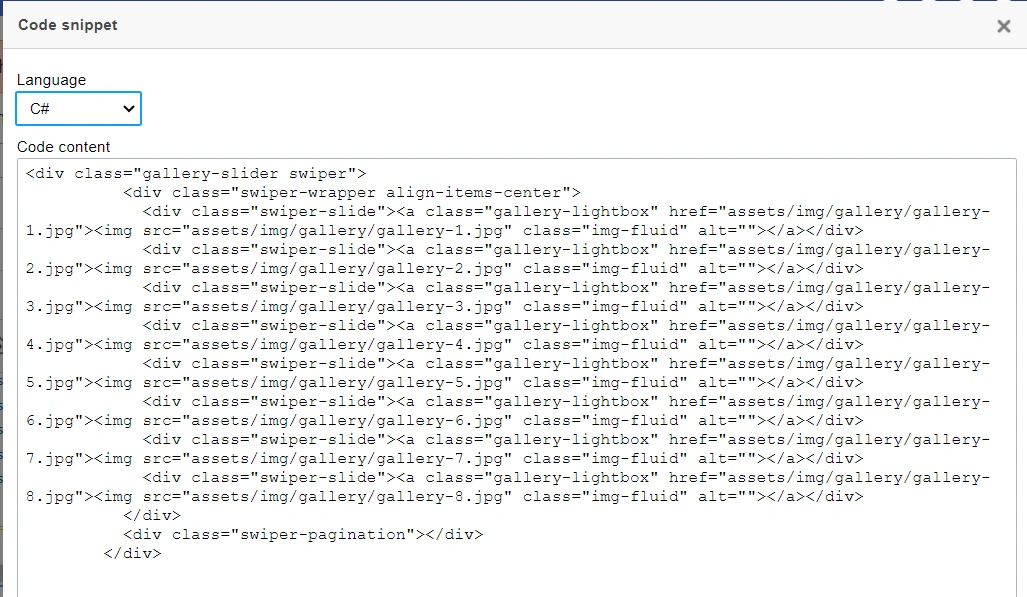
Thanks
Hi
I have below code . Instead of hardcoding i want data to be read from Database and then displayed
Thanks
Know the answer? Post it. Somebody with the same question will find it here.
Answer a question in the forums and earn +20 SHARP for every answer.
See unanswered questions Arun PottiAnswers in the forums20answers02
 Tahir AnsariAnswers in the forums5answers03
 Kamlesh KumarAnswers in the forums5answers04
 Sam HobbsAnswers in the forums4answers05
 Željko PerićAnswers in the forums3answersFull leaderboard →
 DevSocialUpcoming · 3rd editionAI Agents ConferenceDec 1–3, 2026Live onlineFree to attend5days leftRegister

Prasad RaveendranRank #320 · 7.8K reputationPosted Apr 28, 2024, 9:43 AM EDT
Using .NET 6.0 Web API, you can achieve the same functionality by creating a Web API project that connects to your database and serves the image URLs. Here's a basic outline of how you can do this:
Set up your database: Make sure you have a database table with columns for image URLs.
Create a .NET Web API project: You can create a new .NET Web API project using Visual Studio or the .NET CLI.
Set up Entity Framework Core: Use Entity Framework Core to interact with your database from the API project.
Create a Controller: Implement a controller that retrieves the image URLs from the database and returns them as JSON.
sample UI code
Dynamic Gallery // Fetch data from the API endpoint fetch('your api goes here') .then(response => response.json()) .then(data => { const galleryWrapper = document.getElementById('gallery-wrapper'); // Dynamically create HTML for each image data.forEach(imageUrl => { const slide = document.createElement('div'); slide.className = 'swiper-slide'; const link = document.createElement('a'); link.className = 'gallery-lightbox'; link.href = imageUrl; const img = document.createElement('img'); img.src = imageUrl; img.className = 'img-fluid'; img.alt = ''; link.appendChild(img); slide.appendChild(link); galleryWrapper.appendChild(slide); }); }) .catch(error => console.error('Error fetching images:', error));Jaimin ShethiyaRank #177 · 13.7K reputationPosted Apr 29, 2024, 12:19 AM EDT
Hello Ramco,
Prepare the list variable in the javascipt side or if you are using angular/react then prepare the list in the componenet side, and use that object in the html side for render and showing the data.
Thanks
Jaimin ShethiyaRank #177 · 13.7K reputationPosted Apr 29, 2024, 12:37 AM EDT
Hello Ramco,
// database table class
public class Gallery
{
	public int ID { get; set; }

	public string URL { get; set; }
}

//Fetching the data from the database side code.
public class GalleryService
{
	public List ReadGallaryData(string connectionString)
	{
		string queryString =
			"SELECT ID, URL FROM dbo.Gallery;";

		using (SqlConnection connection =
				   new SqlConnection(connectionString))
		{
			SqlCommand command =
				new SqlCommand(queryString, connection);
			connection.Open();

			SqlDataReader reader = command.ExecuteReader();

			var gallaries = new List();

			// Call Read before accessing data.
			while (reader.Read())
			{
				gallaries.Add(new Gallery
				{
					ID = reader[0],
					URL = reader[1]
				});
			}

			// Call Close when done reading.
			reader.Close();

			return gallaries;
		}
	}
}


// API side code
[HttpGet]
public IActionResult> Get()
{
	var response = _gallaryService.ReadGallaryData();
	return Ok(response);
}
Thanks