After obtaining the meeting area and meeting time. but i want to merge all columns from start time to end time into a single cell as shown
handle the code merger column that I don't know how to do. thank you very much
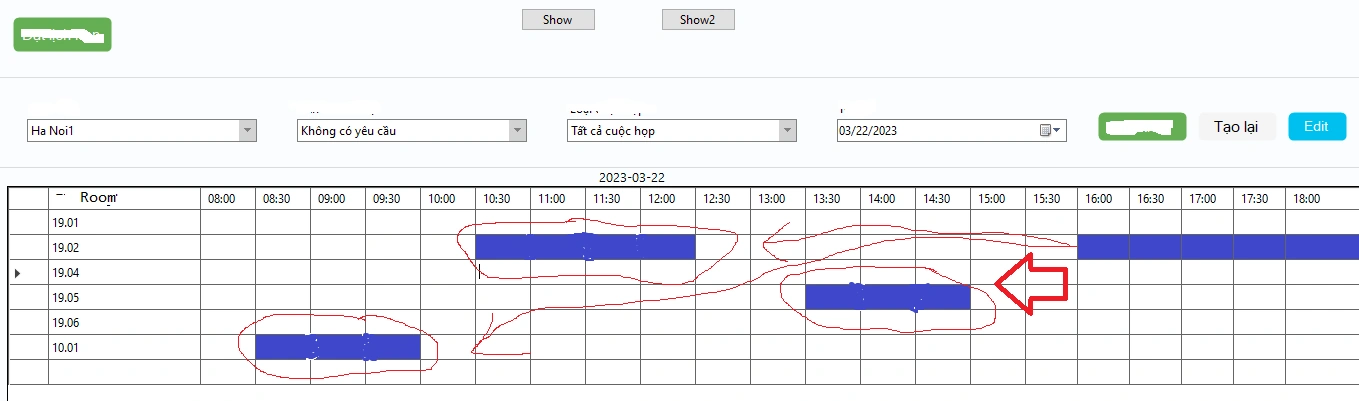
C#
private void selectAreaColor()
{
    string starttime1 = cboStarttime.Text;
    string stoptime1 = cboStoptime.Text;
    // Get the start time and end time inputs and the selected meeting room
    DateTime startTime = DateTime.ParseExact(starttime1, "HH:mm", null);
    DateTime endTime = DateTime.ParseExact(stoptime1, "HH:mm", null);
    string selectedRoom = cboRoom.SelectedItem.ToString();//

    // Loop through the rows in the DataGridView and find the matching row

    foreach (DataGridViewRow row in grdMeeting.Rows)
    {
        if (row.Cells[0].Value.ToString() == selectedRoom)
        {
            int rowIndex = row.Index;
            // Loop through the columns and compare the start and end times with the time slots
            for (int i = 1; i < grdMeeting.Columns.Count; i++)
            {
                DateTime columnTime;
                try
                {
                    columnTime = DateTime.ParseExact(grdMeeting.Columns[i].HeaderText, "HH:mm", CultureInfo.InvariantCulture);
                }
                catch (Exception ex)
                {
                    continue;
                }
                //DateTime columnTime = DateTime.ParseExact(grdMeeting.Columns[i].HeaderText, "HH:mm", null);
                string _HeaderText = grdMeeting.Columns[i].Name.ToString();
                if (startTime == columnTime)//|| endTime == columnTime
                {

                    grdMeeting.Rows[rowIndex].Cells[_HeaderText].Style.BackColor = Color.Blue;

                    if (startTime == endTime)
                        return;
                    else
                        startTime = startTime.AddMinutes(30);

                }
            }
        }
    }
}
/forums/uploadfile/72149a/03282023041855AM/MergeColumn.rar







honag luc106 reputationPosted Mar 28, 2023, 12:38 AM EDT
https://www.mediafire.com/file/kqmpfyeaokbkjw4/MergeColumn.rar/file
don't know how to call the condition after loading the color area showing the meeting time in the dataGridView1_CellPainting event event of the datagridview calls the condition of the function: selectAreaColor() via the dataGridView1_CellPainting event of the datagridview
private void selectAreaColor() { string starttime1 = cboStarttime.Text; string stoptime1 = cboStoptime.Text; // Get the start time and end time inputs and the selected meeting room DateTime startTime = DateTime.ParseExact(starttime1, "HH:mm", null); DateTime endTime = DateTime.ParseExact(stoptime1, "HH:mm", null); string selectedRoom = cboRoom.SelectedItem.ToString();// // Loop through the rows in the DataGridView and find the matching row foreach (DataGridViewRow row in grdMeeting.Rows) { if (row.Cells[0].Value.ToString() == selectedRoom) { int rowIndex = row.Index; // Loop through the columns and compare the start and end times with the time slots for (int i = 1; i < grdMeeting.Columns.Count; i++) { DateTime columnTime; try { columnTime = DateTime.ParseExact(grdMeeting.Columns[i].HeaderText, "HH:mm", CultureInfo.InvariantCulture); } catch (Exception ex) { continue; } //DateTime columnTime = DateTime.ParseExact(grdMeeting.Columns[i].HeaderText, "HH:mm", null); string _HeaderText = grdMeeting.Columns[i].Name.ToString(); if (startTime == columnTime)//|| endTime == columnTime { //how call condition here to event CellPainting grdMeeting.Rows[rowIndex].Cells[_HeaderText].Style.BackColor = Color.Blue;//here condition and get area data color if (startTime == endTime) return; else startTime = startTime.AddMinutes(30); } } } } }Jignesh KumarRank #91 · 22.9K reputationPosted Mar 28, 2023, 1:39 AM EDT
Hello Honag,
You can use dataGridView1_CellPainting event of the datagridview,
private void dataGridView1_CellPainting(object sender, DataGridViewCellPaintingEventArgs e)
{
    if (e.RowIndex >= 0 && e.ColumnIndex >= 0)
    {
        // Check if the current cell and its adjacent cell belong to the columns to be merged
        DataGridViewCell currentCell = dataGridView1[e.ColumnIndex, e.RowIndex];
        DataGridViewCell nextCell = dataGridView1[e.ColumnIndex + 1, e.RowIndex];
        if (currentCell.OwningColumn.HeaderText == "Column1" && nextCell.OwningColumn.HeaderText == "Column2")
        {
            // Merge the two adjacent cells into a single cell
            e.PaintBackground(e.CellBounds, true);
            Rectangle newRect = new Rectangle(e.CellBounds.X, e.CellBounds.Y, e.CellBounds.Width + nextCell.Size.Width, e.CellBounds.Height);
            e.Graphics.FillRectangle(new SolidBrush(e.CellStyle.BackColor), newRect);
            e.Graphics.DrawString(currentCell.Value.ToString() + " " + nextCell.Value.ToString(), e.CellStyle.Font, new SolidBrush(e.CellStyle.ForeColor), newRect);
            e.Handled = true;
        }
    }
}