Hi
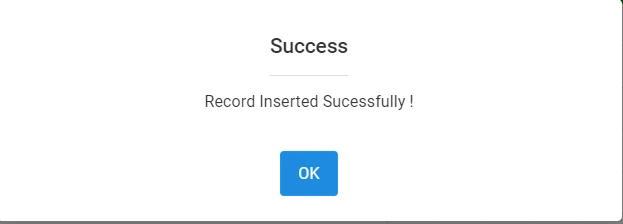
I have below message Popup. I want Title should appear on left with primary background & Horizonal line should be full width.
Image attached.
JavaScript
    var swalInit = swal.mixin({
        buttonsStyling: false,
        confirmButtonClass: 'btn btn-primary',
        cancelButtonClass: 'btn btn-light'
    });


    function ShowPopup(heading, body, type) {
        swalInit.fire({
/*            title: `${heading}
`,*/
            /*title: `${heading}
`,*/
            title: `

                ${heading}

`,
            html: `${body}
`,
            icon: type,
            position: 'center', // Adjust position as needed
            allowOutsideClick: false,
            confirmButtonText: 'OK',
            timer: 6000
        });
    }
Thanks







Naimish MakwanaRank #324 · 7.7K reputationPosted Aug 29, 2024, 1:16 AM EDT
Try below solution,
function ShowPopup(heading, body, type) {
    swalInit.fire({
        title: `

            ${heading}

`,
        html: `${body}
`,
        icon: type,
        position: 'center', // Adjust position as needed
        allowOutsideClick: false,
        confirmButtonText: 'OK',
        timer: 6000
    });
}
Thanks
Sriyans Sharma186 reputationPosted Aug 30, 2024, 5:25 AM EDT
To meet your requirements, you want to style the title of the message popup so that it appears on the left side with a primary background color. Additionally, you want a horizontal line below the title that spans the full width of the popup. Here's how you can adjust your
ShowPopupfunction to achieve this:var swalInit = swal.mixin({ buttonsStyling: false, confirmButtonClass: 'btn btn-primary', cancelButtonClass: 'btn btn-light' }); function ShowPopup(heading, body, type) { swalInit.fire({ title: ` ${heading} `, html: `${body} `, icon: type, position: 'center', // Adjust position as needed allowOutsideClick: false, confirmButtonText: 'OK', timer: 6000 }); }Explanation of Changes:
Title Styling:
divwithbackground-color: #007bff;(Bootstrap's primary color) andcolor: white;to make the text stand out.divto provide spacing around the title text.Horizontal Line:
div.Text Alignment:
divwithtext-align: left;.Result:
Ramco RamcoRank #462 · 5.4K reputationPosted Aug 31, 2024, 6:30 AM EDT
Hi Naimish
It is still not displaying properly . Neither Heading is left aligned & also line is not appearing. Iamge also attached
function ShowPopup(heading, body, type) { swalInit.fire({ title: ` ${heading} `, html: `${body} `, icon: type, position: 'center', // Adjust position as needed allowOutsideClick: false, confirmButtonText: 'OK', timer: 6000 }); }public void ShowMessage(String Title, String Text, String Type) { Text = Text.Replace("'", "").Replace("/", " ").Replace(";", " ").Replace(":", " ").Replace(",", " "); Text = System.Text.RegularExpressions.Regex.Replace(Text, @"\t|\n|\r", " "); if (Common.CommonFunction.IE(Request.Browser.Browser)) { Common.MessageBox.Show(Text); } else { ClientScript.RegisterStartupScript(this.GetType(), "Popup", "ShowPopup('" + Title + "', '" + Text + "','" + Type + "');", true); } }Thanks