
I am calling the two web API calls one after the other using the MSAL authentication token. While running the application, the first call is successful but the token value is lost on the second API call. The code that I am using is as shown below:
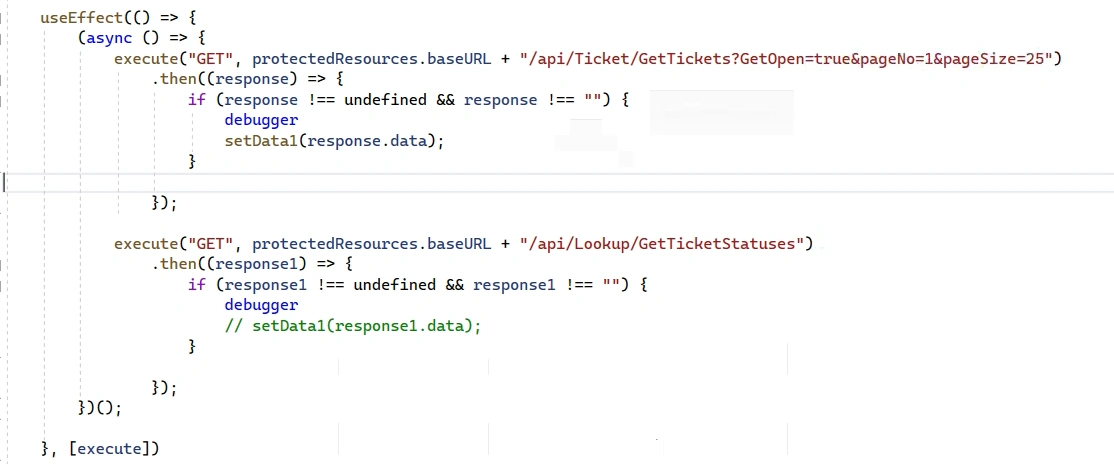
The main purpose of the code is to call the two simultaneous API calls using the MSAL token authentication.







Prasad RaveendranRank #320 · 7.8K reputationPosted Dec 28, 2023, 11:18 PM EST
Here's a basic example of how you might structure the calls to ensure sequential execution:
import { useState, useEffect } from 'react';
import { msalInstance } from './msalConfig'; // Your MSAL configuration

const YourComponent = () => {
  const [token, setToken] = useState(null);

  useEffect(() => {
    const fetchData = async () => {
      try {
        // First API call
        const firstResponse = await fetch('first-api-endpoint', {
          headers: {
            Authorization: `Bearer ${token}`
          }
        });
        // Process firstResponse if needed

        // Ensure token is present or refreshed before the second API call
        const accessToken = await getToken();
        if (accessToken) {
          // Second API call
          const secondResponse = await fetch('second-api-endpoint', {
            headers: {
              Authorization: `Bearer ${accessToken}`
            }
          });
          // Process secondResponse if needed
        }
      } catch (error) {
        console.error('Error:', error);
        // Handle errors appropriately
      }
    };

    fetchData();
  }, [token]);

  // Function to get or refresh the token
  const getToken = async () => {
    try {
      const accounts = msalInstance.getAllAccounts();
      if (accounts.length > 0) {
        const silentRequest = {
          scopes: ['your-api-scope']
        };
        const response = await msalInstance.acquireTokenSilent(silentRequest);
        if (response.accessToken) {
          setToken(response.accessToken); // Update token in state
          return response.accessToken;
        }
      }
    } catch (error) {
      console.error('Token Error:', error);
    }
    return null;
  };

  return (
    // Your component JSX
  );
};

export default YourComponent;
Replace
'first-api-endpoint','second-api-endpoint','your-api-scope', andmsalInstancewith your actual API endpoints, required scopes, and MSAL instance accordingly.Ensure that you've properly initialized your MSAL instance and configured it to request the necessary scopes. Also, handle token retrieval and refresh logic appropriately based on your application's requirements.
By following these steps and ensuring proper token handling and API call sequencing, you should be able to resolve the issue of losing the token value during the second API call in your React app.