
Hi All ,
we require Nested Gridview without expand (+) ( -) Button . Which means we need it automatically to load the data .
Header Grid ( Header row data which) and details Grid
Barcode Qty InventoryName -> Header Grid
A01 4 Abcd
Brachid Qty -> Details Grid
B001 2
B002 2
If anyone know , suggest with sample code .
Thanks in advance ,
Karthik.K







Pankajkumar PatelRank #181 · 13.4K reputationPosted Mar 19, 2025, 8:28 AM EDT
Hi Karthik K,
.aspx
        body
        {
            font-family: Arial;
            font-size: 10pt;
        }
        .Grid td
        {
            background-color: #A1DCF2;
            color: black;
            font-size: 10pt;
            line-height:200%
        }
        .Grid th
        {
            background-color: #3AC0F2;
            color: White;
            font-size: 10pt;
            line-height:200%
        }
        .ChildGrid td
        {
            background-color: #eee !important;
            color: black;
            font-size: 10pt;
            line-height:200%
        }
        .ChildGrid th
        {
            background-color: #6C6C6C !important;
            color: White;
            font-size: 10pt;
            line-height:200%
        }


    $("[src*=plus]").live("click", function () {
        $(this).closest("tr").after("" + $(this).next().html() + "")
        $(this).attr("src", "images/minus.png");
    });
    $("[src*=minus]").live("click", function () {
        $(this).attr("src", "images/plus.png");
        $(this).closest("tr").next().remove();
    });
C#
using System;
using System.Collections.Generic;
using System.Linq;
using System.Web;
using System.Web.UI;
using System.Web.UI.WebControls;
using System.Data;
using System.Data.SqlClient;
using System.Configuration;

public partial class CS : System.Web.UI.Page
{
    protected void Page_Load(object sender, EventArgs e)
    {
        if (!IsPostBack)
        {
            gvCustomers.DataSource = GetData("select top 10 * from Customers");
            gvCustomers.DataBind();
        }
    }

    private static DataTable GetData(string query)
    {
        string strConnString = ConfigurationManager.ConnectionStrings["constr"].ConnectionString;
        using (SqlConnection con = new SqlConnection(strConnString))
        {
            using (SqlCommand cmd = new SqlCommand())
            {
                cmd.CommandText = query;
                using (SqlDataAdapter sda = new SqlDataAdapter())
                {
                    cmd.Connection = con;
                    sda.SelectCommand = cmd;
                    using (DataSet ds = new DataSet())
                    {
                        DataTable dt = new DataTable();
                        sda.Fill(dt);
                        return dt;
                    }
                }
            }
        }
    }

    protected void OnRowDataBound(object sender, GridViewRowEventArgs e)
    {
        if (e.Row.RowType == DataControlRowType.DataRow)
        {
            string customerId = gvCustomers.DataKeys[e.Row.RowIndex].Value.ToString();
            GridView gvOrders = e.Row.FindControl("gvOrders") as GridView;
            gvOrders.DataSource = GetData(string.Format("select top 3 * from Orders where CustomerId='{0}'", customerId));
            gvOrders.DataBind();
        }
    }
}
Output
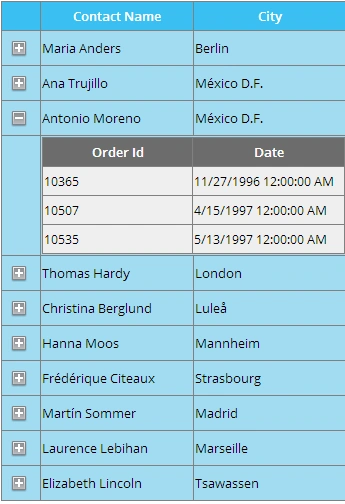
Fore more details:
Hope this will help you!
Eliana BlakeRank #1,595 · 993 reputationPosted Mar 13, 2025, 3:05 AM EDT
Nested Grid view in ASP.NET refers to a scenario where one Grid view control is nested within another, allowing for a hierarchical representation of data. In your case, you are looking to implement a Nested Grid view without the traditional expand/collapse buttons, with data automatically loaded.
To achieve this in ASP.NET, you can use nested Grid views within a parent-child relationship. Here is a brief example to guide you:
1. Define your parent Grid view with the header details (Barcode, Qty, InventoryName):
2. Define your child Grid view for displaying details (Brachid, Qty):
3. In your code-behind (C#), you can populate these Grid views with data. Here is a simplified example:
protected void Page_Load(object sender, EventArgs e)
{
    if (!IsPostBack)
    {
        // Populate the parent Grid view with header details
        DataTable dtParent = GetParentData();
        gvParent.DataSource = dtParent;
        gvParent.DataBind();
    }
}

// Method to get parent data
private DataTable GetParentData()
{
    // Dummy data for illustration
    DataTable dtParent = new DataTable();
    dtParent.Columns.Add("Barcode");
    dtParent.Columns.Add("Qty");
    dtParent.Columns.Add("InventoryName");

    // Add rows to the DataTable
    // DataRow row = dtParent.NewRow();
    // row["Barcode"] = "A01";
    // row["Qty"] = 4;
    // row["InventoryName"] = "Abcd";
    // dtParent.Rows.Add(row);

    // Add more rows as needed

    return dtParent;
}
4. You can similarly populate the child Grid view (`gvChild`) with relevant details when a row in the parent Grid view is selected by handling events like `SelectedIndexChanged`.
This is a basic outline to get you started on implementing a nested Grid view in ASP.NET without expand/collapse buttons. You can further enhance this with styling, data binding, and additional functionalities based on your requirements.
Let me know if you need further assistance or details on a specific aspect!
Prasad RaveendranRank #320 · 7.8K reputationPosted Mar 16, 2025, 2:01 AM EDT
Steps:
gvHeader) to display the header data.gvDetails) inside aRowDataBoundto bind the detail grid based on the parent row's data.Code Implementation
ASPX Page
Code-Behind (C#)
protected void Page_Load(object sender, EventArgs e)
{
    if (!IsPostBack)
    {
        BindHeaderGrid();
    }
}

private void BindHeaderGrid()
{
    // Sample data for the Header Grid
    DataTable dtHeader = new DataTable();
    dtHeader.Columns.Add("Barcode");
    dtHeader.Columns.Add("Qty", typeof(int));
    dtHeader.Columns.Add("InventoryName");

    dtHeader.Rows.Add("A01", 4, "Abcd");

    gvHeader.DataSource = dtHeader;
    gvHeader.DataBind();
}

protected void gvHeader_RowDataBound(object sender, GridViewRowEventArgs e)
{
    if (e.Row.RowType == DataControlRowType.DataRow)
    {
        string barcode = DataBinder.Eval(e.Row.DataItem, "Barcode").ToString();
        GridView gvDetails = (GridView)e.Row.FindControl("gvDetails");

        if (gvDetails != null)
        {
            gvDetails.DataSource = GetDetailData(barcode);
            gvDetails.DataBind();
        }
    }
}

private DataTable GetDetailData(string barcode)
{
    // Sample data for Details Grid
    DataTable dtDetails = new DataTable();
    dtDetails.Columns.Add("BranchId");
    dtDetails.Columns.Add("Qty", typeof(int));

    if (barcode == "A01")
    {
        dtDetails.Rows.Add("B001", 2);
        dtDetails.Rows.Add("B002", 2);
    }

    return dtDetails;
}
Explanation
gvHeaderGridView displays the parent data (Barcode, Qty, InventoryName).gvHeader, there's a nestedgvDetailsGridView inside aTemplateField.gvHeader_RowDataBoundevent fetches the details data (GetDetailData) and binds it automatically for each row.This will result in a nested GridView that loads automatically with details displayed for each row.