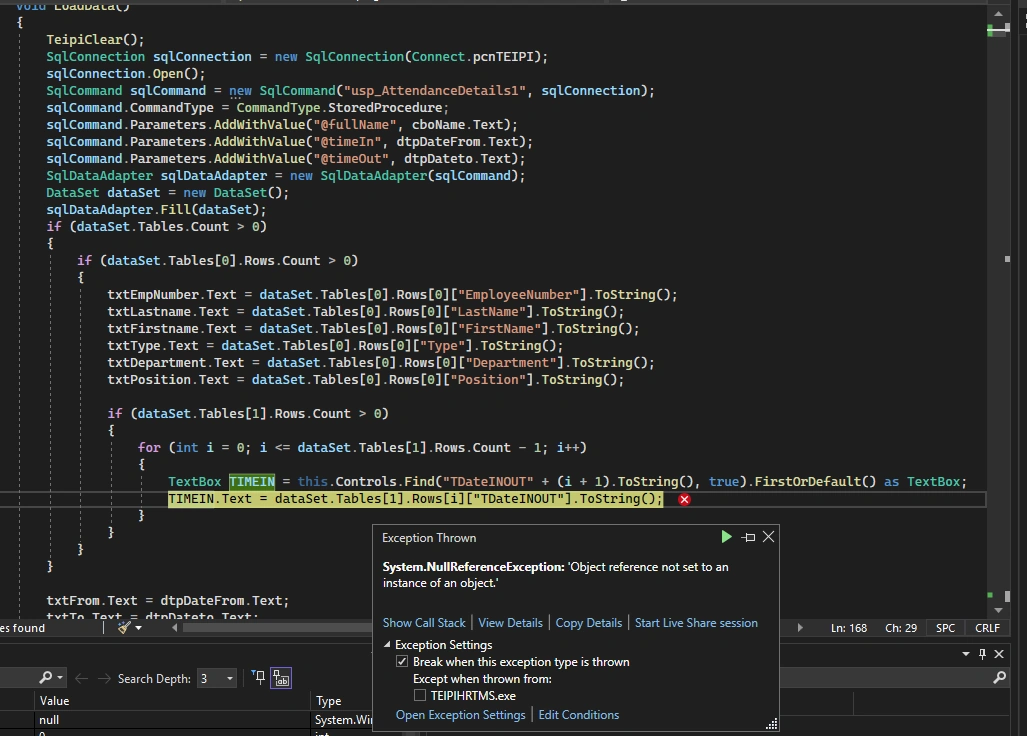
Good day guys can you help me, I have this error called Object reference not set to an instance of an object in my code. here is the code.
Also this is the winforms
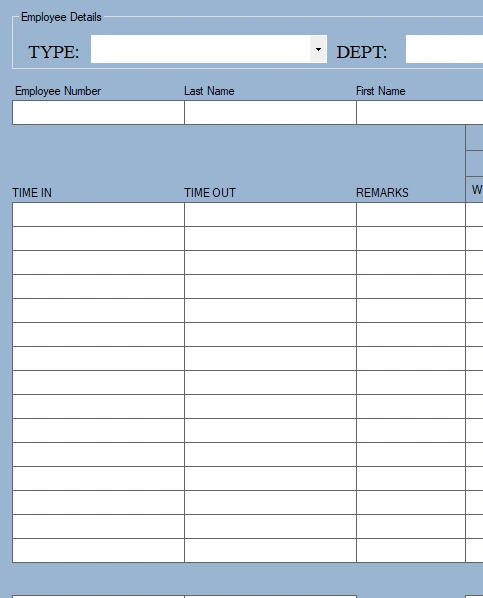
I want the data to fill in the textboxes.
This is the data

and this is my procedure
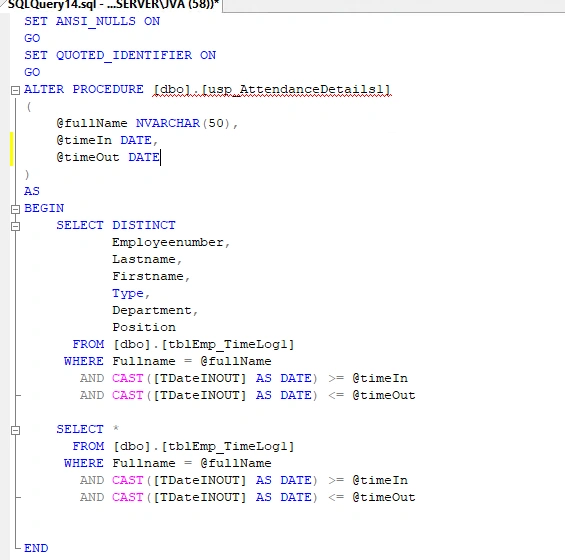
this code is actually from my previous questions I have to change because of some circumstances.
It actually work once but the other day when I want to try it, it is not working I'm sorry.







Tuhin PaulRank #7 · 71.9K reputationPosted Apr 18, 2023, 3:13 AM EDT
There seems to be a typo in the code. In the if block, DBNull.Value is being compared with the value variable using the equality operator (==), which will always return false. Instead, it should be checked for inequality with the value variable.
object value = dataSet.Tables[1].Rows[i]["TdateInOut"];
if (value != null && value != DBNull.Value)
{
   TimeIn.Text = dataSet.Tables[1].Rows[i]["TdateInOut"].ToString();
}
else
{
   // handle the case where the value is null or DBNull.Value
}
TdateInOut column name is misspelled in the code snippet. It should match the correct column name in the dataset.
Jignesh KumarRank #91 · 22.9K reputationPosted Apr 17, 2023, 3:09 AM EDT
Hi JC,
I am able to see the column "TDateINOut" in your data set, Can you please put debugger in you code and check Table[1]. you are getting this column or not ?
object value = dataSet.Tabels[1].Rows[i]["TdateInOut"]; if (value != null && value != DBNull.Value) { TimeIn.Text = dataSet.Tabels[1].Rows[i]["TdateInOut].Tostring(); } else {}Jignesh KumarRank #91 · 22.9K reputationPosted Apr 16, 2023, 11:45 PM EDT
Hello,
You are trying to cast null value due to that you are getting this error. Please do null check before convert to tostring(),
TimeIn.Text = dataSet.Tabels[1].Rows[i]["TdateInOut"] != null ? dataSet.Tabels[1].Rows[i]["TdateInOut].Tostring() : "";or
TimeIn.Text = dataSet.Tabels[1].Rows[i]["TdateInOut]?.Tostring();JC Ballo42 reputationPosted Apr 17, 2023, 1:56 AM EDT
Hello Sir. Jignesh Kumar I tried using your codes but still not working.
JC Ballo42 reputationPosted Apr 17, 2023, 5:09 AM EDT
Hello Sir. Jignesh Kumar the codes work but there is no data in the textboxes
JC Ballo42 reputationPosted Apr 18, 2023, 7:48 PM EDT
Hello Sir. Tuhin Paul
I tried your codes and still the error persist and when I look at the TIME.text the output is still null.
PS: I changed the text only because I changed all the textboxes into TIME1.text to TIME30.
JC Ballo42 reputationPosted Apr 18, 2023, 10:42 PM EDT
Tuhin Paul it works but I also have to change some but all in all it works