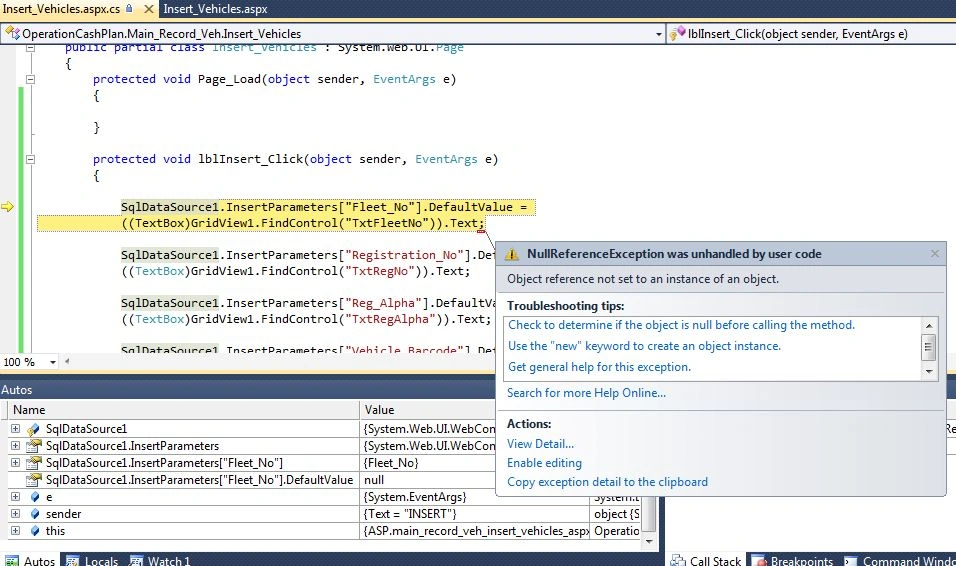
Object reference not set to an instance of an object.Abdalla Elawad9yAsked Apr 12, 2017, 12:35 AM EDTSolvedShareLinkedInXCopy linkSaveHi GuysPlease Help Me . see to this error display this message when i Insert new record using Sqldatasource in gridview
Object reference not set to an instance of an object.Abdalla Elawad9yAsked Apr 12, 2017, 12:35 AM EDTSolvedShareLinkedInXCopy linkSaveHi GuysPlease Help Me . see to this error display this message when i Insert new record using Sqldatasource in gridview
Midhun TpRank #388 · 6.5K reputation9y agoPosted Apr 12, 2017, 1:40 AM EDT✓ Accepted answer0Hi, You can't just call Findcontrol method to get textbox value from gridview. You have to specify the row index for which you need the textbox value, like below - ((TextBox)grdviewnew.Rows[0].FindControl("TxtFleetNo")).Text; 0
Ramesh PalanivelRank #372 · 6.8K reputation9y agoPosted Apr 12, 2017, 12:37 AM EDT+1Hi Abdalla, Your TxtFleetNo values is empty .. Behind the reason you are getting error.. Check the field value whether it has value or not..+1
Abdalla ElawadRank #1,443 · 1.1K reputation9y agoPosted Apr 12, 2017, 1:41 AM EDT+1Thanks to all Programmer This is solution : I forget the Footer Raw of Gridview before Find Control like below code SqlDataSource1.InsertParameters["Fleet_No"].DefaultValue = ((TextBox)GridView1.FooterRow.FindControl("TxtFleetNo")).Text; SqlDataSource1.InsertParameters["Registration_No"].DefaultValue = ((TextBox)GridView1.FooterRow.FindControl("TxtRegNo")).Text; SqlDataSource1.InsertParameters["Reg_Alpha"].DefaultValue = ((TextBox)GridView1.FooterRow.FindControl("TxtRegAlpha")).Text;+1Abdalla ElawadRank #1,443 · 1.1K reputation9y agoPosted Apr 12, 2017, 12:49 AM EDT0Hi Ramesh Sure not empty , please see below 0Ramesh PalanivelRank #372 · 6.8K reputation9y agoPosted Apr 12, 2017, 12:55 AM EDT0Hi Abdalla, Try the below code and create the break point in that and check whether the string is null or not if(string.IsNullOrEmpty(value)) // set break point in this line, { //set some flag here } else { // set some flag here } 0Abdalla ElawadRank #1,443 · 1.1K reputation9y agoPosted Apr 12, 2017, 1:04 AM EDT0i try your code same problem .0Ranjeet PatraRank #1,436 · 1.1K reputation9y agoPosted Apr 12, 2017, 1:12 AM EDT0Hi Abdalla, Check once the "TxtFleetNo" control's spelling and its existance inside Gridview.0Abdalla ElawadRank #1,443 · 1.1K reputation9y agoPosted Apr 12, 2017, 1:28 AM EDT0Check any thing is good , but display same error0Avinash AherRank #5,790 · 286 reputation9y agoPosted Apr 12, 2017, 3:55 AM EDT0Use FooterRow.findControl('ControlName').Text0Join to answer this questionEvery answer you publish earns 20 SHARP.Create free accountSign inKnow the answer?Answer a question in the forums and earn +20 SHARP for every answer.See unanswered questionsForumsTop experts01Arun PottiAnswers in the forums20answers02Tahir AnsariAnswers in the forums5answers03Kamlesh KumarAnswers in the forums5answers04Sam HobbsAnswers in the forums4answers05Željko PerićAnswers in the forums3answers?YouYour name goes here.Every answer: 20 SHARP.JoinFull leaderboard →2026DevSocialUpcoming · 3rd editionAI Agents ConferenceDec 1–3, 2026Live onlineFree to attend5days leftRegister
Abdalla ElawadRank #1,443 · 1.1K reputation9y agoPosted Apr 12, 2017, 12:49 AM EDT0Hi Ramesh Sure not empty , please see below 0
Ramesh PalanivelRank #372 · 6.8K reputation9y agoPosted Apr 12, 2017, 12:55 AM EDT0Hi Abdalla, Try the below code and create the break point in that and check whether the string is null or not if(string.IsNullOrEmpty(value)) // set break point in this line, { //set some flag here } else { // set some flag here } 0
Abdalla ElawadRank #1,443 · 1.1K reputation9y agoPosted Apr 12, 2017, 1:04 AM EDT0i try your code same problem .0
Ranjeet PatraRank #1,436 · 1.1K reputation9y agoPosted Apr 12, 2017, 1:12 AM EDT0Hi Abdalla, Check once the "TxtFleetNo" control's spelling and its existance inside Gridview.0
Abdalla ElawadRank #1,443 · 1.1K reputation9y agoPosted Apr 12, 2017, 1:28 AM EDT0Check any thing is good , but display same error0
Avinash AherRank #5,790 · 286 reputation9y agoPosted Apr 12, 2017, 3:55 AM EDT0Use FooterRow.findControl('ControlName').Text0

Midhun TpRank #388 · 6.5K reputationPosted Apr 12, 2017, 1:40 AM EDT
Ramesh PalanivelRank #372 · 6.8K reputationPosted Apr 12, 2017, 12:37 AM EDT
Abdalla ElawadRank #1,443 · 1.1K reputationPosted Apr 12, 2017, 1:41 AM EDT
Abdalla ElawadRank #1,443 · 1.1K reputationPosted Apr 12, 2017, 12:49 AM EDT
Ramesh PalanivelRank #372 · 6.8K reputationPosted Apr 12, 2017, 12:55 AM EDT
Abdalla ElawadRank #1,443 · 1.1K reputationPosted Apr 12, 2017, 1:04 AM EDT
Ranjeet PatraRank #1,436 · 1.1K reputationPosted Apr 12, 2017, 1:12 AM EDT
Abdalla ElawadRank #1,443 · 1.1K reputationPosted Apr 12, 2017, 1:28 AM EDT
Avinash AherRank #5,790 · 286 reputationPosted Apr 12, 2017, 3:55 AM EDT
Answer a question in the forums and earn +20 SHARP for every answer.
See unanswered questionsTop experts