I
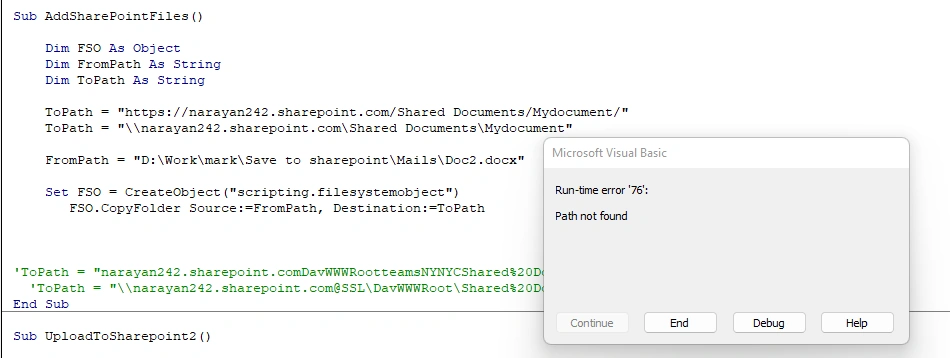
I am trying to upload documnet on sharepoint but getting error "Path not found".
Please help
I
I am trying to upload documnet on sharepoint but getting error "Path not found".
Please help
Know the answer? Post it. Somebody with the same question will find it here.
Answer a question in the forums and earn +20 SHARP for every answer.
See unanswered questions Arun PottiAnswers in the forums20answers02
 Tahir AnsariAnswers in the forums5answers03
 Kamlesh KumarAnswers in the forums5answers04
 Sam HobbsAnswers in the forums4answers05
 Željko PerićAnswers in the forums3answersFull leaderboard →
 DevSocialUpcoming · 3rd editionAI Agents ConferenceDec 1–3, 2026Live onlineFree to attend5days leftRegister

Muhammad Imran AnsariRank #326 · 7.6K reputationPosted Mar 26, 2023, 11:03 PM EDT
The "Path not found" error message typically indicates that the specified file or folder path is incorrect or does not exist in the SharePoint library. To fix this error, you can check Verify the file path, Check the SharePoint library URL is correct, Ensure that the folder exists which you are accessing and Check for special characters (If the file path contains any special characters, such as spaces or punctuation marks, make sure that they are properly encoded in the code).
Here is an example code to upload a document to SharePoint:
Dim siteUrl As String = "https:///"
Dim username As String = ""
Dim password As String = ""
Dim filePath As String = ""
Dim libraryName As String = ""

Dim securePassword As New SecureString()
For Each c As Char In password
    securePassword.AppendChar(c)
Next

Using context As New ClientContext(siteUrl)
    context.Credentials = New SharePointOnlineCredentials(username, securePassword)

    Dim fileName As String = Path.GetFileName(filePath)
    Dim docList As List = context.Web.Lists.GetByTitle(libraryName)
    context.Load(docList.RootFolder)
    context.ExecuteQuery()

    Using fileStream As New FileStream(filePath, FileMode.Open)
        Microsoft.SharePoint.Client.File.SaveBinaryDirect(context, docList.RootFolder.ServerRelativeUrl + "/" + fileName, fileStream, True)
    End Using
End Using
Replace the, , , , and placeholders with the appropriate values for your SharePoint environment.