
I am working on MVC 5, there is have
- @Html.DropDownListFor(model => model.ShowAdConfigIDs, ViewData["Services"] as List<SelectListItem>, "Select", new { @id = "DDLServiceCate", @class = "form-control " })
- $(function () {
- $('[id*=DDLServiceCate]').multiselect({
- includeSelectAllOption: true
- });
- });
-
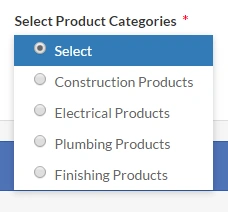
But actually I want look like below image showing.
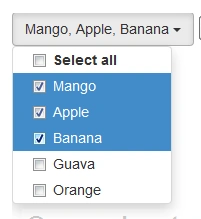
How can I do this ?
Please help me...







Rajeev PunhaniRank #551 · 4.4K reputationPosted Mar 24, 2017, 1:58 AM EDT
Hi Abhilash,
Please add the width to multiselect button.
Asma KhalidRank #160 · 14.7K reputationPosted Mar 24, 2017, 2:00 AM EDT
@Abhilash
I have already posted your answer in my previous comment. You need to add following attribute i.e.
Asma KhalidRank #160 · 14.7K reputationPosted Mar 24, 2017, 12:44 AM EDT
use below code in javascript for bootstrap dropdown multi-select i.e.
Rajeev PunhaniRank #551 · 4.4K reputationPosted Mar 24, 2017, 12:57 AM EDT
Hi Abhilash,
You are missing multiple attribute when select is being generated .Add html attribute in the DropDownListFor constructor. Add Multiple attribute to your code.
Ramesh PalanivelRank #372 · 6.8K reputationPosted Mar 24, 2017, 1:26 AM EDT
Ramesh PalanivelRank #372 · 6.8K reputationPosted Mar 24, 2017, 1:32 AM EDT
Abhilash J ARank #1,243 · 1.4K reputationPosted Mar 24, 2017, 1:37 AM EDT
Abhilash J ARank #1,243 · 1.4K reputationPosted Mar 24, 2017, 2:19 AM EDT
Alexis3 reputationPosted Mar 10, 2018, 10:59 AM EST
Bhaskar BanerjeeRank #8,316 · 224 reputationPosted Jan 8, 2019, 11:29 PM EST