I am using Visual Studio 2015 Community to develop a Windows application..
I have two buttons at the bottom, right of the form and their anchors are set to Bottom, Right.
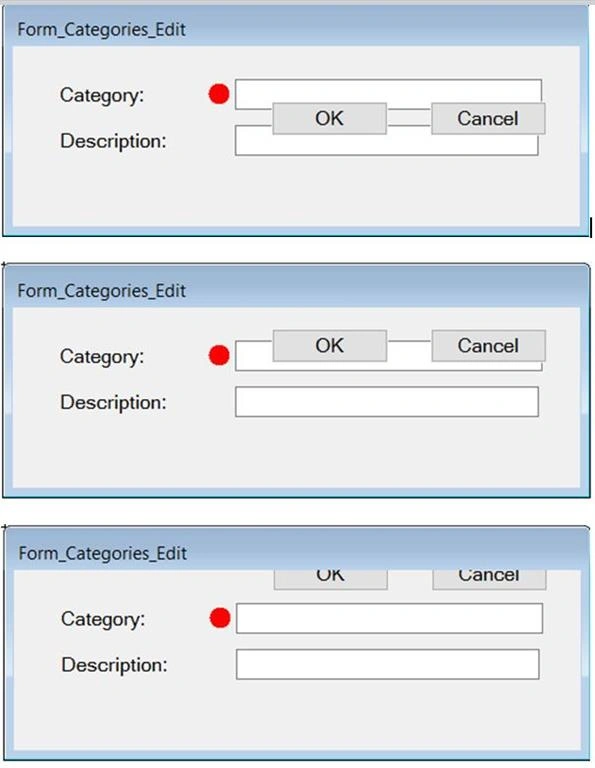
However when I save the solution and close Visual Studio and reopen the solution the buttons have moved up on the form. Every time I open the solution the buttons have moved up (Please see the picture). I have even tried locking the controls on the form.
Can anyone assist me with this?







Asad AliRank #1,139 · 1.6K reputationPosted Jun 14, 2016, 12:07 AM EDT
Kobus Botha10 reputationPosted Jun 14, 2016, 12:11 AM EDT
Kobus Botha10 reputationPosted Jun 14, 2016, 3:14 AM EDT
On further investigation it happens when I set a Minimum Size for the form. I created a new application and left everything at the default settings then it seems fine. The moment I set a Minimum size for the form the button position move up every time I close and open the solution in Visual Studio.
Why would that be?
Vinay SinghRank #604 · 4K reputationPosted Jun 14, 2016, 3:18 AM EDT
Kobus Botha10 reputationPosted Jun 14, 2016, 3:52 AM EDT
Kobus Botha10 reputationPosted Jun 14, 2016, 9:44 PM EDT
I can reproduce the problem as follows:
When I open the project again, the button has moved up. Location f the Button is now (280; 81).
If I save and close the project with the new location of the button and open the project again, the Button has again moved up and new location is (280; 52).
This was all just done in the Editor and I have not added any code of my own.
Regards.