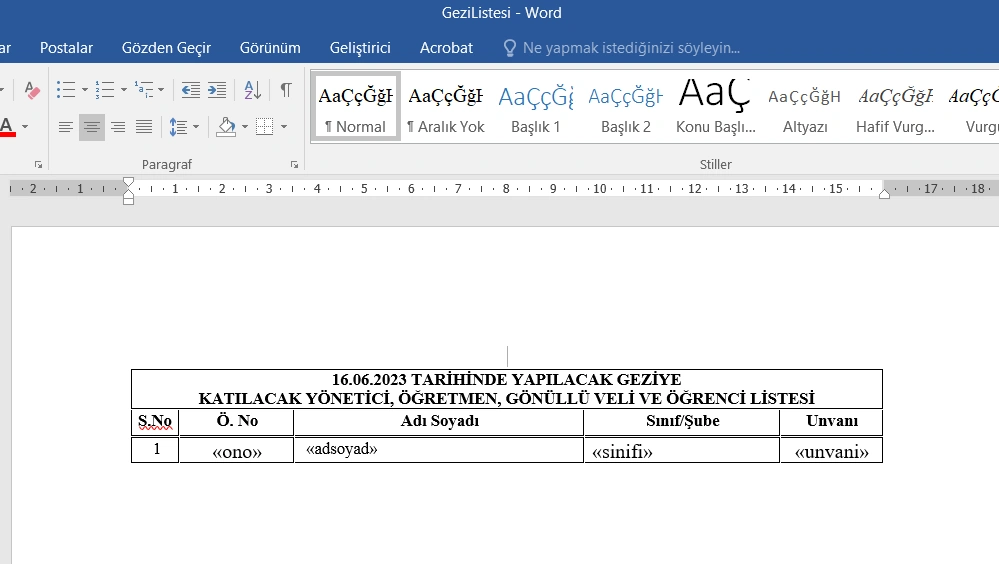
I want to extract all the records in the database in this first picture directly to the word as in the second picture. Which method would you recommend?
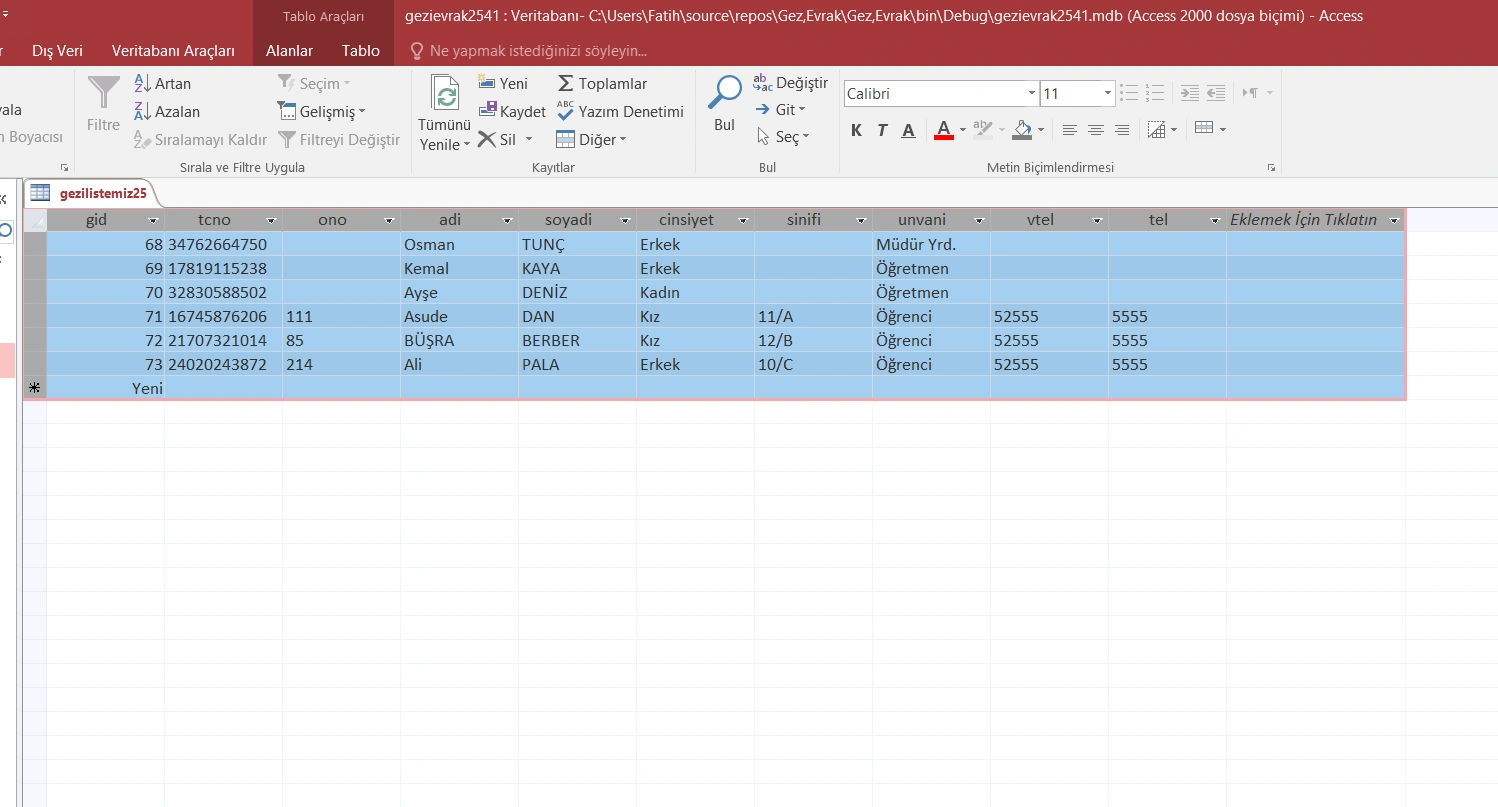
I want to extract all the records in the database in this first picture directly to the word as in the second picture. Which method would you recommend?
Know the answer? Post it. Somebody with the same question will find it here.
Answer a question in the forums and earn +20 SHARP for every answer.
See unanswered questions Arun PottiAnswers in the forums20answers02
 Tahir AnsariAnswers in the forums5answers03
 Kamlesh KumarAnswers in the forums5answers04
 Sam HobbsAnswers in the forums4answers05
 Željko PerićAnswers in the forums3answersFull leaderboard →
 DevSocialUpcoming · 3rd editionAI Agents ConferenceDec 1–3, 2026Live onlineFree to attend5days leftRegister

Deepak RawatRank #646 · 3.7K reputationPosted Jun 20, 2023, 1:18 AM EDT
o pull data from a database and populate it into a Word document in a .NET application, you can use the Microsoft Office Interop libraries. Here's a step-by-step guide on how to achieve this:
Install the "Microsoft.Office.Interop.Word" NuGet package in your project.
Import the necessary namespaces in your code file:
using Microsoft.Office.Interop.Word; using System.Data;public DataTable FetchDataFromDatabase() { string connectionString = "YourConnectionString"; string query = "SELECT * FROM YourTable"; using (SqlConnection connection = new SqlConnection(connectionString)) { connection.Open(); using (SqlCommand command = new SqlCommand(query, connection)) { DataTable dataTable = new DataTable(); using (SqlDataAdapter adapter = new SqlDataAdapter(command)) { adapter.Fill(dataTable); } return dataTable; } } }Replace
"YourConnectionString"with the actual connection string for your database, and"YourTable"with the table name or query to retrieve the desired data.public void GenerateWordDocument(DataTable dataTable, string filePath) { // Create a new instance of the Word application var wordApp = new Application(); // Create a new document var document = wordApp.Documents.Add(); // Add a table to the document var table = document.Tables.Add(document.Range(), dataTable.Rows.Count + 1, dataTable.Columns.Count); // Populate the table header row with column names for (int i = 0; i < dataTable.Columns.Count; i++) { table.Cell(1, i + 1).Range.Text = dataTable.Columns[i].ColumnName; } // Populate the table with data from the DataTable for (int row = 0; row < dataTable.Rows.Count; row++) { for (int col = 0; col < dataTable.Columns.Count; col++) { table.Cell(row + 2, col + 1).Range.Text = dataTable.Rows[row][col].ToString(); } } // Save the document document.SaveAs(filePath); // Close the document and the Word application document.Close(); wordApp.Quit(); }The
GenerateWordDocumentmethod takes the DataTable retrieved from the database and a file path where the Word document should be saved. It uses the Word interop objects to create a new document, add a table to it, populate the table with the data from the DataTable, and save the document to the specified file path.Make sure to adjust the file path and other formatting options as needed.
DataTable data = FetchDataFromDatabase();
GenerateWordDocument(data, "C:\\Path\\To\\Your\\Document.docx");
Replace
"C:\\Path\\To\\Your\\Document.docx"with the desired file path for the Word document.By following these steps, you should be able to pull data from a database and populate it into a Word document in your .NET application.
Leon DRank #851 · 2.6K reputationPosted Jun 19, 2023, 10:49 PM EDT
You can use Spire.Doc library to achieve your requirement:
https://www.e-iceblue.com/Tutorials/Spire.Doc/Spire.Doc-Program-Guide/How-to-Use-Mail-Merge-to-Create-Report.html
Mudzakkir TohaRank #3,303 · 435 reputationPosted Jun 19, 2023, 11:06 PM EDT
You can use NPOI
The sample, is here
https://stackoverflow.com/questions/69621671/c-sharp-npoi-lib-how-to-generate-word-doc-with-2-tables-in-the-same-row
var newFile2 = @"newbook.core.docx"; using (var fs = new FileStream(newFile2, FileMode.Create, FileAccess.Write)) { XWPFDocument doc = new XWPFDocument(); var p0 = doc.CreateParagraph(); p0.Alignment = ParagraphAlignment.CENTER; XWPFRun r0 = p0.CreateRun(); r0.FontFamily = "microsoft yahei"; r0.FontSize = 18; r0.IsBold = true; r0.SetText("Report List"); var p1 = doc.CreateParagraph(); p1.Alignment = ParagraphAlignment.LEFT; p1.IndentationFirstLine = 500; XWPFRun r1 = p1.CreateRun(); r1.FontFamily = "·ÂËÎ"; r1.FontSize = 12; r1.IsBold = true; r1.SetText("This is content, content content content content content content content content content"); var table = doc.CreateTable(3, 4); table.GetRow(0).GetCell(0).SetText("ID"); table.GetRow(0).GetCell(1).SetText("Name"); table.GetRow(0).GetCell(2).SetText("Email"); table.GetRow(0).GetCell(3).SetText("Address"); table.GetRow(1).GetCell(0).SetText("1"); table.GetRow(1).GetCell(1).SetText("MToha"); table.GetRow(1).GetCell(2).SetText("[email protected]"); table.GetRow(1).GetCell(3).SetText("Vila Nusa Indah 2"); table.GetRow(2).GetCell(0).SetText("2"); table.GetRow(2).GetCell(1).SetText("Lia Koko"); table.GetRow(2).GetCell(2).SetText("[email protected]"); table.GetRow(2).GetCell(3).SetText("Pasar Sobang"); doc.Write(fs); }Mehmet FatihRank #1,474 · 1.1K reputationPosted Jun 21, 2023, 3:23 AM EDT
Thanks Depaak Rewat a lot. It works fine. How can we get it in the format in the picture?