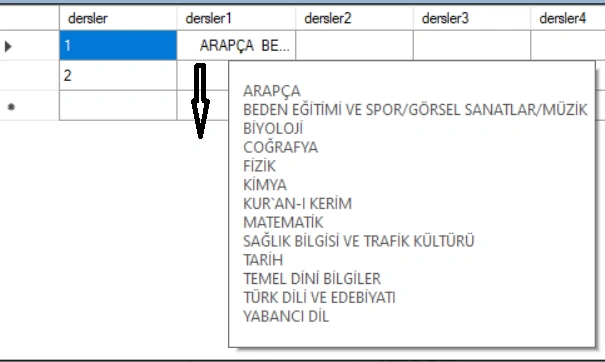
I am pulling the dropdown elements into the datagridview with Selenium, but all the drawn elements are displayed in a single cell. How can I pull all the elements one by one in the rows of the same column?
IList
foreach (IWebElement option in options)
{
for (int i = 0; i < options.Count; i++)
{
dataGridView1.Rows[0].Cells[1].Value = option.Text.ToString();
}
}







Naimish MakwanaRank #324 · 7.7K reputationPosted Jan 17, 2024, 4:47 AM EST
To pull all the dropdown elements into separate rows of a DataGridView, you can follow these steps:
Select dropdown = new Select(driver.FindElement(By.Id("id"))); // replace "id" with the id of your dropdown List dd = dropdown.getOptions();foreach (WebElement option in dd) { int rowIndex = dataGridView1.Rows.Add(); // Add a new row dataGridView1.Rows[rowIndex].Cells["YourColumnName"].Value = option.getText(); // replace "YourColumnName" with the name of your column }This will create a new row for each dropdown element and set the value of a cell in that row to the text of the dropdown element12.
Please replace
"id"and"YourColumnName"with the actual id of your dropdown and the actual name of your column respectively. Also, please make sure that the DataGridView allows adding new rows. You can setdataGridView1.AllowUserToAddRows = true;to allow this.Remember, this is a basic example. Depending on your exact requirements and the structure of your DataGridView, you might need to adjust this code. For example, if you have multiple columns and you want to add values to them, you would need to set the values for those cells too. If you have any specific requirements.
Thanks
Mehmet FatihRank #1,474 · 1.1K reputationPosted Jan 17, 2024, 5:16 AM EST
I am getting errors in these circled places. Do I need to upload anything to nuGet?
Naimish MakwanaRank #324 · 7.7K reputationPosted Jan 17, 2024, 5:29 AM EST
It seems like you’re using Selenium with C#, and you’re trying to use
SelectandgetText(). In C#, the equivalent methods are a bit different:SelectElementclass from theOpenQA.Selenium.Support.UInamespace1. Here’s an example:IWebElement dropdown = driver.FindElement(By.Id("id")); // replace "id" with the id of your dropdown SelectElement selectElement = new SelectElement(dropdown); selectElement.SelectByText("Option"); // replace "Option" with the option you want to selectgetText()isTextproperty1. Here’s an example:IWebElement element = driver.FindElement(By.Id("id")); // replace "id" with the id of your element string text = element.Text;If you’re still facing issues, you might need to check if you have the necessary Selenium WebDriver bindings for .NET installed. You can do this by going to the NuGet package manager in Visual Studio and checking if
Selenium.WebDriverandSelenium.Supportpackages are installed2.If they’re not installed, you can install them by running the following commands in the Package Manager Console:
Please replace
"id"and"Option"with the actual id of your dropdown and the actual option you want to select respectively. If you have any specific requirements.Thanks
Mehmet FatihRank #1,474 · 1.1K reputationPosted Jan 17, 2024, 6:12 AM EST
Both Package Selenium.WebDriver and Package Selenium.Support are intalled. I hve tried the second alternative but nothing seems. I modifed the first alternative like that
IList options = drv.FindElements(By.Id("dersler")); // tüm dropdown listesini veriri
for (int i = 0; i < options.Count; i++)
{
IWebElement element = drv.FindElement(By.Id("ddlDersler")); // replace "id" with the id of your element
//string text = element.Text;
int rowIndex = dataGridView1.Rows.Add(); // Add a new row
dataGridView1.Rows[rowIndex].Cells[1].Value = element.Text.ToString();
}
}
But in this case I am getting the following error.
Naimish MakwanaRank #324 · 7.7K reputationPosted Jan 17, 2024, 6:15 AM EST
Can you paste you error in english ?
Mehmet FatihRank #1,474 · 1.1K reputationPosted Jan 17, 2024, 9:52 AM EST
I have changed my codes as in the following. But I still have a problem. I want to list a lesson in each line. All courses are listed in a single line. How can I correct this situation.?The second problem is how can I print these in the 3rd column?
IList selectElements = drv.FindElements(By.Id("dersler")); lst = new List();
foreach (IWebElement select in selectElements)
{
var selectElement = new SelectElement(select);
List
lst.Add(select.Text);
DataTable dt = new DataTable();
DataColumn dtcol = new DataColumn(select.Text);
dt.Columns.Add(dtcol);
for (int i = 0; i < lst.Count; i++)
{
dataGridView1.DataSource = dt;
}
}
Mehmet FatihRank #1,474 · 1.1K reputationPosted Jan 17, 2024, 3:48 PM EST
Naimish, the error code English is like that "Rows cannot be programmatically added to the datagridview's rows collection when the control is data bound."