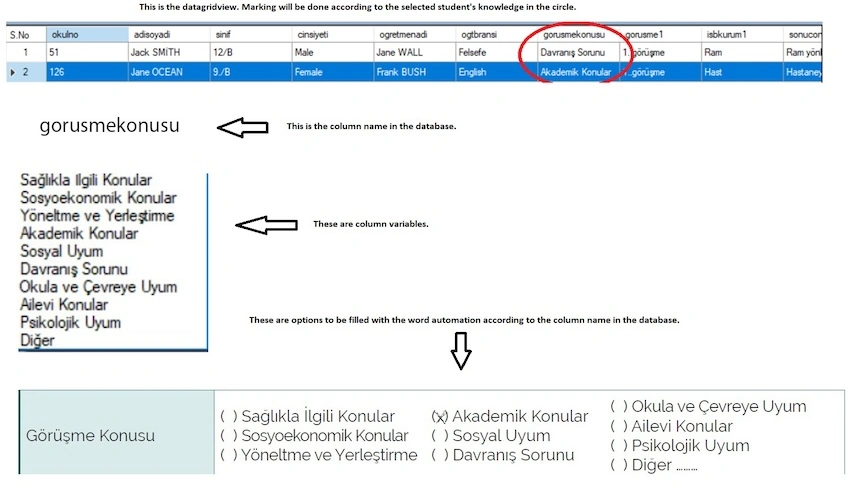
In the database, there are different options for each student in the same column shown in the picture. I want to mark the data I have taken according to the student number in the word document according to the information in this column. How should I do this using word automation?







Mehmet FatihRank #1,474 · 1.1K reputationPosted Feb 12, 2024, 11:35 AM EST
Thank you but it is not the thing I want.
Mehmet FatihRank #1,474 · 1.1K reputationPosted Feb 15, 2024, 4:50 AM EST
I have solved the problem by
if (dr["cinsiyeti"].ToString().Trim() == "Kiz")
{
    if (fieldName == "K")
    {
        myMergeField.Select();
        oWord.Selection.TypeText("X");
    }
}
if (dr["cinsiyeti"].ToString().Trim() == "Erkek")
{
    if (fieldName == "E")
    {
        myMergeField.Select();
        oWord.Selection.TypeText("X");
    }
}
myself like that.
Mounnad MohamedRank #1,633 · 945 reputationPosted Feb 12, 2024, 5:03 AM EST
The clean way for realizing your task is to create a reference table and put all your options in that table, and in the student table you put only the id chosen based by option table, finally to show and mark the chosen option you have join the 2 tables and take the chosen one and in the same time show all the table with marked one.