Hi
I have below data. I want when clicked on Group 2A, it should redirect ro Group 2A. If clicked on Group 2A(i) it should redirect to Group 2A(i).
C#
htmlTable.Append("");
htmlTable.Append("" + GroupCollection + "");
htmlTable.Append("" + Mentor + "");
htmlTable.Append("");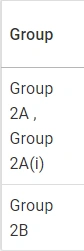
Thanks







Vishal JoshiRank #377 · 6.7K reputationPosted Jun 16, 2023, 2:55 AM EDT
Hello,
You can use an anchor tag to redirect to the destination page, and you can pass the group as a query string parameter to pass on the destination page. Please check the below code.
htmlTable.Append("");
htmlTable.Append("" + GroupCollection + "");
htmlTable.Append("" + Mentor + "");
htmlTable.Append("");
Thanks
Deepak RawatRank #646 · 3.7K reputationPosted Jun 18, 2023, 5:40 AM EDT
To add a click event to a specific cell in the HTML table so that it redirects to the corresponding group, you can modify your code as follows:
// Assuming GroupCollection and Mentor are the variables holding the values
string groupCollection = "Group 2A";
string mentor = "Group 2A(i)";

htmlTable.Append("");
htmlTable.Append("" + groupCollection + "");
htmlTable.Append("" + mentor + "");
htmlTable.Append("");
In the code above, the
onclickattribute is added to thetag. TheredirectToGroupJavaScript function is called when the link is clicked, passing the corresponding group as a parameter. You can define theredirectToGroupfunction elsewhere in your HTML or JavaScript code.Here's an example of how you can define the
redirectToGroupfunction:function redirectToGroup(group) { // Perform the redirection based on the group value // You can replace the alert with the actual redirection logic alert("Redirecting to " + group); }In the above code, the
redirectToGroupfunction is defined to handle the redirection logic. You can replace thealertstatement with the actual code to redirect the user to the desired group.By using this approach, when a user clicks on a specific cell in the HTML table, it will trigger the
redirectToGroupfunction, which can perform the necessary redirection based on the group value.Tuhin PaulRank #7 · 71.9K reputationPosted Jun 18, 2023, 11:35 AM EDT
@Vishal Joshi
When passing data through query string parameters, it's important to validate and sanitize the input on the server-side to prevent security vulnerabilities such as SQL injection or cross-site scripting (XSS) attacks.
Tuhin PaulRank #7 · 71.9K reputationPosted Jun 18, 2023, 11:35 AM EDT
@Vishal Joshi
Depending on the server and browser settings, there might be limitations on the maximum length of URLs that can be handled. If the "GroupCollection" value is too long or contains special characters, it may exceed these limitations and cause issues.
Tuhin PaulRank #7 · 71.9K reputationPosted Jun 18, 2023, 11:37 AM EDT
@Vishal Joshi
Query string parameters are visible in the URL, which means that sensitive information (such as user IDs, passwords, or other confidential data) should not be passed as query string parameters.
Vishal JoshiRank #377 · 6.7K reputationPosted Jun 20, 2023, 1:15 AM EDT
@Tuhin Paul
Yes, you are right. we can not pass sensitive information like passwords or UserIds in query string parameters. but there is nothing mentioned in the question like the need to pass sensitive information. so answered like that.
To protect against SQL injection or cross-site scripting (XSS) attacks we can add authentication checks or Antiforgery tokens to check requests and responses. Also, we can encrypt the query string parameter to make it more secure.
if you have any other solution please share so we can improve.
Thanks