if I click on Save these all fields should disappear only grid will be display when i edit the grid should be disappear
how to do it pls help me
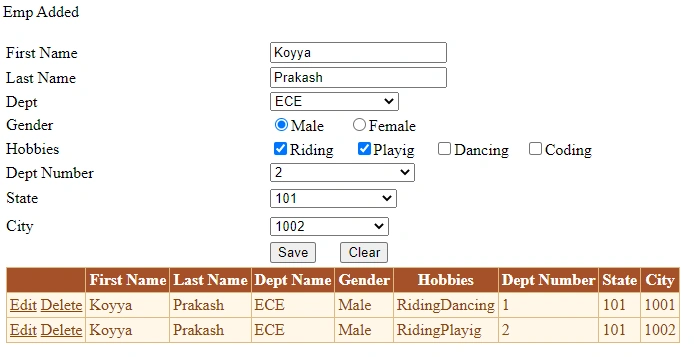
if I click on Save these all fields should disappear only grid will be display when i edit the grid should be disappear
how to do it pls help me
Know the answer? Post it. Somebody with the same question will find it here.
Answer a question in the forums and earn +20 SHARP for every answer.
See unanswered questions Arun PottiAnswers in the forums20answers02
 Tahir AnsariAnswers in the forums5answers03
 Kamlesh KumarAnswers in the forums5answers04
 Sam HobbsAnswers in the forums4answers05
 Željko PerićAnswers in the forums3answersFull leaderboard →
 DevSocialUpcoming · 3rd editionAI Agents ConferenceDec 1–3, 2026Live onlineFree to attend5days leftRegister

Tuhin PaulRank #7 · 71.9K reputationPosted Feb 16, 2023, 2:10 PM EST
Hi Jaya,
As far as I can understand from the image that you have shared and what you have written. To achieve this, you can add two panels to your page -
1. for the registration form and
2. for the grid view.
Initially, the registration form panel will be visible and the grid view panel will be hidden. When the user clicks the "Save" button, you can hide the registration form panel and show the grid view panel.
Similarly, when the user clicks the "Edit" button in the grid view, you can hide the grid view panel and show the registration form panel.
Here is the modified code for the Button1_Click event handler:
protected void Button1_Click(object sender, EventArgs e)
{
    // Save the data to the database

    // Hide the registration form panel and show the grid view panel
    Panel1.Visible = false;
    Panel2.Visible = true;

    // Bind the grid view
    this.BindGrid();
}
And here is the modified code for the GridView1_RowEditing event handler:..
protected void GridView1_RowEditing(object sender, GridViewEditEventArgs e)
{
    // Hide the grid view panel and show the registration form panel
    Panel1.Visible = true;
    Panel2.Visible = false;

    // Set the values of the registration form fields to the values in the selected row of the grid view
    GridViewRow row = GridView1.Rows[e.NewEditIndex];
    TextBox1.Text = row.Cells[1].Text;
    TextBox2.Text = row.Cells[2].Text;
    TextBox3.Text = row.Cells[3].Text;
    TextBox4.Text = row.Cells[4].Text;
    TextBox5.Text = row.Cells[5].Text;
    TextBox6.Text = row.Cells[6].Text;
}
In the modified code, I have used Panel1 for the registration form panel and Panel2 for the grid view panel. The Visible property of each panel is set to true or false to show or hide the panel, respectively.
Bro let me know if that worked for you.
Naimish MakwanaRank #324 · 7.7K reputationPosted Feb 16, 2023, 10:57 PM EST
Hello Jaya,
you can also do as below.
1. For Regstration form - Take on panel like: panelRegistrationForm
2. For gridview you can use its Visible property.
Then on click of buttons you can show and hide the panels. Example:
protected void Save_Click(object sender, EventArgs e)
{
    //Perform all the opration here. EX: Form validation , Database Save etc.
	panelRegistrationForm.Visible = false;
	GridView.Visible = true; //use gridview id here
}
For Grid Click
protected void GridView_RowEditing(object sender, EventArgs e)
{
    //Fetch all the fields value in form
	panelRegistrationForm.Visible = true;
	GridView.Visible = false;
}
Thanks
Naimish Makwana
Diptiranjan SutarRank #1,236 · 1.4K reputationPosted Feb 17, 2023, 12:54 AM EST
Hi Jaya,
You can show hide registration form panel and grid panel based on Save and Edit.
Keep Registration Form into a single panel and grid into a single panel.
Thanks
Diptiranjan
Manikandan R128 reputationPosted Feb 17, 2023, 7:07 AM EST
Hello,
You can also Use
Panel to Change the Visible property to Hide an Unhide The Set of Controls ,
MultiView Control,
Tab - Add 2 Tabs inthe form and One For Registration Form and another one for grid