Hi masters,
I have some Doubts on C# rename activity
Please advise me and resolve this issue with simple c# code
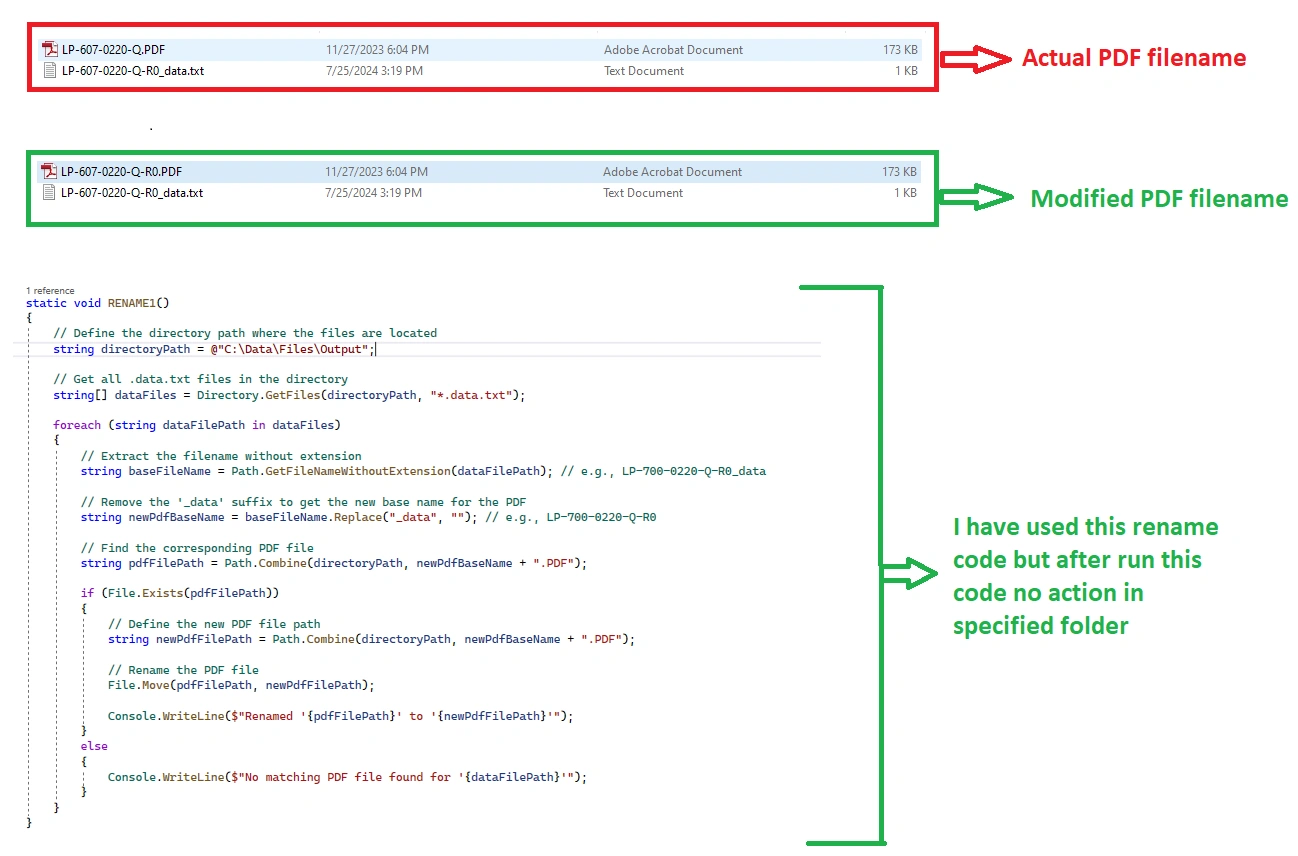
Hi masters,
I have some Doubts on C# rename activity
Please advise me and resolve this issue with simple c# code
Know the answer? Post it. Somebody with the same question will find it here.
Answer a question in the forums and earn +20 SHARP for every answer.
See unanswered questions Arun PottiAnswers in the forums20answers02
 Tahir AnsariAnswers in the forums5answers03
 Kamlesh KumarAnswers in the forums5answers04
 Sam HobbsAnswers in the forums4answers05
 Željko PerićAnswers in the forums3answersFull leaderboard →
 DevSocialUpcoming · 3rd editionAI Agents ConferenceDec 1–3, 2026Live onlineFree to attend5days leftRegister

Amit MohantyRank #112 · 20K reputationPosted Jul 29, 2024, 6:36 AM EDT
Try this latest one:
static void RENAME1() { // Define the directory path where the files are located string directoryPath = @"D:\Data"; // Get all data.txt files in the directory string[] dataFiles = Directory.GetFiles(directoryPath, "*_data.txt"); foreach (string dataFilePath in dataFiles) { // Extract the filename without extension string baseFileName = System.IO.Path.GetFileNameWithoutExtension(dataFilePath); // e.g., LP-607-0220-Q-RO_data // Remove the '_data' suffix to get the new base name for the PDF string newPdfBaseName = baseFileName.Replace("_data", ""); // e.g., LP-607-0220-Q-RO string checkPdfFileName = baseFileName.Replace("-RO_data", ""); // e.g., LP-607-0220-Q // Find the corresponding PDF file string pdfFilePath = System.IO.Path.Combine(directoryPath, checkPdfFileName + ".pdf"); // Ensure correct casing for extension if (File.Exists(pdfFilePath)) { // Define the new PDF file path string newPdfFilePath = System.IO.Path.Combine(directoryPath, newPdfBaseName + ".pdf"); // Ensure correct casing for extension // Rename the PDF file File.Move(pdfFilePath, newPdfFilePath); Console.WriteLine($"Renamed '{pdfFilePath}' to '{newPdfFilePath}'"); } else { Console.WriteLine($"No matching PDF file found for '{pdfFilePath}'"); } } }Amit MohantyRank #112 · 20K reputationPosted Jul 29, 2024, 5:48 AM EDT
I think the file search pattern "*.data.txt" is incorrect. It should be "*_data.txt" to match files ending with _data.txt.
using System; using System.IO; static void RENAME1() { // Define the directory path where the files are located string directoryPath = @"C:\Data\Files\Output"; // Get all data.txt files in the directory string[] dataFiles = Directory.GetFiles(directoryPath, "*_data.txt"); foreach (string dataFilePath in dataFiles) { // Extract the filename without extension string baseFileName = Path.GetFileNameWithoutExtension(dataFilePath); // e.g., LP-607-0220-Q-RO_data // Remove the '_data' suffix to get the new base name for the PDF string newPdfBaseName = baseFileName.Replace("_data", ""); // e.g., LP-607-0220-Q-RO // Find the corresponding PDF file string pdfFilePath = Path.Combine(directoryPath, newPdfBaseName + ".pdf"); // Ensure correct casing for extension if (File.Exists(pdfFilePath)) { // Define the new PDF file path string newPdfFilePath = Path.Combine(directoryPath, newPdfBaseName + ".pdf"); // Ensure correct casing for extension // Rename the PDF file File.Move(pdfFilePath, newPdfFilePath); Console.WriteLine($"Renamed '{pdfFilePath}' to '{newPdfFilePath}'"); } else { Console.WriteLine($"No matching PDF file found for '{dataFilePath}'"); } } }Rajadurai127 reputationPosted Jul 29, 2024, 6:14 AM EDT
Dear Jithu & Amit
i tried both methods not working
Rajadurai127 reputationPosted Jul 30, 2024, 12:13 AM EDT
Dear Jithu,
There is no action while run the code and without error
Rajadurai127 reputationPosted Jul 30, 2024, 12:37 AM EDT
Hi jithu,
Please find the output
Rajadurai127 reputationPosted Jul 30, 2024, 12:46 AM EDT
Dear amit,
The latest one also not working, it showing No matching PDF file
Abhishek YadavRank #217 · 11.3K reputationPosted Jul 30, 2024, 12:53 AM EDT
cannot make file name as ""
Rajadurai127 reputationPosted Jul 30, 2024, 1:28 AM EDT
Dear amit,
After Manipulating Code, Reaname activity working Fine.
Thank you
Jithu ThomasRank #437 · 5.7K reputationPosted Jul 29, 2024, 5:43 AM EDT
using System;
using System.IO;

class Program
{
    static void Main()
    {
        RENAME1();
    }

    static void RENAME1()
    {
        // Define the directory path where the files are located
        string directoryPath = @"C:\DataFiles\Output\";

        if (!Directory.Exists(directoryPath))
        {
            Console.WriteLine($"The directory '{directoryPath}' does not exist.");
            return;
        }

        // Get all .data.txt files in the directory
        string[] dataFiles = Directory.GetFiles(directoryPath, "*.data.txt");

        if (dataFiles.Length == 0)
        {
            Console.WriteLine("No .data.txt files found in the directory.");
            return;
        }

        foreach (string dataFilePath in dataFiles)
        {
            Console.WriteLine($"Processing file: {dataFilePath}");

            // Extract the filename without extension
            string baseFileName = Path.GetFileNameWithoutExtension(dataFilePath); // e.g., LP-700-0220-Q-RQ_data

            // Remove the '.data' suffix to get the new base name for the PDF
            string newPdfBaseName = baseFileName.Replace(".data", ""); // e.g., LP-700-0220-Q-RQ

            // Find the corresponding PDF file
            string pdfFilePath = Path.Combine(directoryPath, newPdfBaseName + ".PDF");

            if (File.Exists(pdfFilePath))
            {
                // Define the new PDF file path
                string newPdfFilePath = Path.Combine(directoryPath, newPdfBaseName + "-modified.PDF");

                // Rename the PDF file
                File.Move(pdfFilePath, newPdfFilePath);

                Console.WriteLine($"Renamed '{pdfFilePath}' to '{newPdfFilePath}'");
            }
            else
            {
                Console.WriteLine($"No matching PDF file found for '{dataFilePath}'");
            }
        }
    }
}
Please try this.
Jithu ThomasRank #437 · 5.7K reputationPosted Jul 29, 2024, 6:33 AM EDT
can you please share me the output.
Tuhin PaulRank #7 · 71.9K reputationPosted Jul 31, 2024, 12:57 PM EDT
using System;
using System.IO;
using System.Threading.Tasks;
using Serilog;

class Program
{
    private const string DIRECTORY_PATH = @"C:\DataFiles\Output\";
    private const string DATA_FILE_EXTENSION = ".data.txt";
    private const string PDF_FILE_EXTENSION = ".PDF";

    static async Task Main()
    {
        // Set up Serilog
        Log.Logger = new LoggerConfiguration()
            .WriteTo.Console()
            .WriteTo.File("log-.txt", rollingInterval: RollingInterval.Day)
            .CreateLogger();

        try
        {
            await RenameDataFilesAsync();
        }
        catch (Exception ex)
        {
            Log.Error(ex, "An unexpected error occurred.");
        }
        finally
        {
            Log.CloseAndFlush();
        }
    }

    static async Task RenameDataFilesAsync()
    {
        if (!Directory.Exists(DIRECTORY_PATH))
        {
            Log.Error($"Directory '{DIRECTORY_PATH}' does not exist.");
            return;
        }

        string[] dataFilePaths = GetDataFiles(DIRECTORY_PATH);

        foreach (string dataFilePath in dataFilePaths)
        {
            await ProcessDataFileAsync(dataFilePath);
        }
    }

    static string[] GetDataFiles(string directoryPath)
    {
        return Directory.GetFiles(directoryPath, "*" + DATA_FILE_EXTENSION);
    }

    static async Task ProcessDataFileAsync(string dataFilePath)
    {
        Log.Information($"Processing file: {dataFilePath}");

        string baseFileName = Path.GetFileNameWithoutExtension(dataFilePath);
        string pdfBaseNameWithoutSuffix = baseFileName.Replace(".data", "");

        string pdfFilePath = Path.Combine(DIRECTORY_PATH, pdfBaseNameWithoutSuffix + PDF_FILE_EXTENSION);

        if (File.Exists(pdfFilePath))
        {
            await RenamePdfFileAsync(pdfFilePath, pdfBaseNameWithoutSuffix);
        }
        else
        {
            Log.Error($"No matching PDF file found for '{dataFilePath}'");
        }
    }

    static async Task RenamePdfFileAsync(string pdfFilePath, string pdfBaseNameWithoutSuffix)
    {
        string newPdfFilePath = Path.Combine(DIRECTORY_PATH, pdfBaseNameWithoutSuffix + "-modified" + PDF_FILE_EXTENSION);

        try
        {
            // File.Move is a synchronous method, but for async, we can use Task.Run to offload it
            await Task.Run(() => File.Move(pdfFilePath, newPdfFilePath));
            Log.Information($"Renamed '{pdfFilePath}' to '{newPdfFilePath}'");
        }
        catch (Exception ex)
        {
            Log.Error(ex, $"Error renaming PDF file: {pdfFilePath}");
        }
    }
}
In this code I have configured Serilog to log to the console and a file. The log file name will have a date suffix and will roll daily. Also
File.Moveis executed inside aTask.Runto make it asynchronous. AlthoughFile.Moveitself is synchronous, usingTask.Runhelps to offload the work to a background thread and fits within an async pattern.