Skip to content
Loading
  • +2

    Arnab Mukherjee Thank You Bro You Save My Life

    +2
  • Vinay Singh
    +1
    Hi 
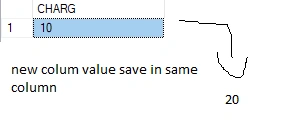
    Check for the column value and the apply update query.  In your code you have written the update query code to update the value
    +1
  • +1
    1 textbox 1 save button
     
    Can U edit in my Query  
     
    i will provide my code can u edit this please  
    iam new here  i am try learn this software  
     
    if you can help me thankfull to you 
     
     
    private void btnmonthlysinkingfund_Click(object sender, EventArgs e)
    {
    if (msf.Text != "")
    {
    cmd = new SqlCommand("insert into tbl_sinking(CHARG) values(@charg)", sqlcon);
    sqlcon.Open();
    cmd.Parameters.AddWithValue("@charg", msf.Text);
    cmd.ExecuteNonQuery();
    sqlcon.Close();
    MessageBox.Show("Record Inserted Successfully");
    DisplayData();
    ClearData();
    }
    else
    {
    MessageBox.Show("Please Provide Details!");
    }
     
    +1
  • Arnab Mukherjee
    +1
    Just replace your insert statement with below query in your code.
    1. IF (SELECT COUNT(CHARG) FROM [DBO].[TBL_SINKING]) >0    
    2. BEGIN                
    3.  UPDATE TBL_SINKING SET CHARG = @charg    
    4. END                        
    5. ELSE                
    6. BEGIN      
    7.     INSERT INTO TBL_SINKING(CHARG) VALUES (@charg)     
    8. END     
     
    +1
  • +1
    i want code form USe C# Visual Studio
    +1
  • +1
    C#
    private void btnmonthlysinkingfund_Click(object sender, EventArgs e)
    {
    if (msf.Text != "")
    {
    cmd = new SqlCommand("insert into tbl_sinking(CHARG) values(@charg)", sqlcon);
    sqlcon.Open();
    cmd.Parameters.AddWithValue("@charg", msf.Text);
    cmd.ExecuteNonQuery();
    sqlcon.Close();
    MessageBox.Show("Record Inserted Successfully");
    DisplayData();
    ClearData();
    }
    else
    {
    MessageBox.Show("Please Provide Details!");
    }

     Use query in this Code

    SQL
    IF (SELECT COUNT(CHARG) FROM [DBO].[TBL_SINKING]) >0
    BEGIN
    UPDATE TBL_SINKING SET CHARG = @charg
    END
    ELSE
    BEGIN
    INSERT INTO TBL_SINKING(C
    +1
  • Arnab Mukherjee
    +1
    No problem.
    +1