Hello Team,
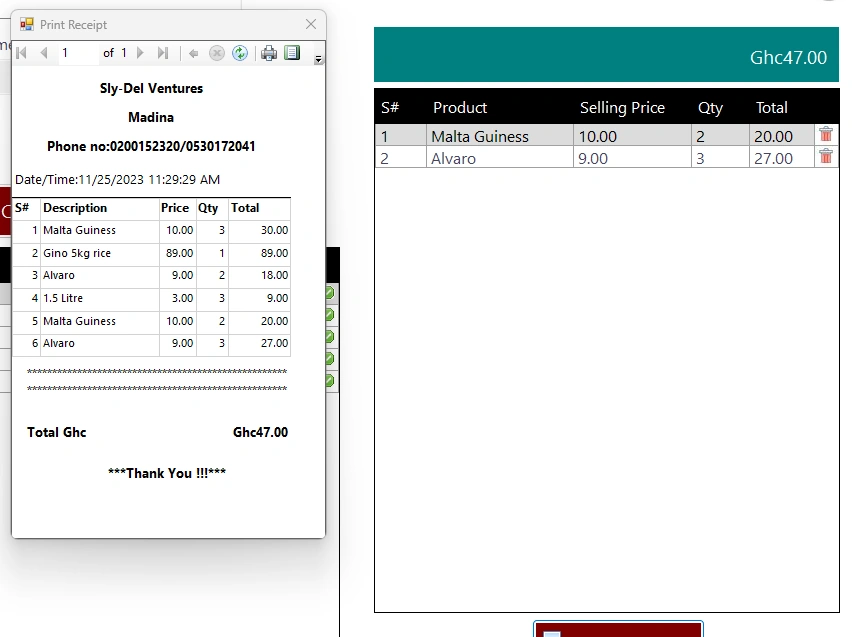
I am trying to print current sales but the sytem ended up printing both the current and the previous sales from database, am using the report printview
private void SaveBill()
{
try
{
if (DGVClientBill.Rows.Count > 0)
{
// update product qty
if (MessageBox.Show("Please confirm if you want to save this record?", stitle, MessageBoxButtons.YesNo, MessageBoxIcon.Question) == DialogResult.Yes)
{
for (int i = 0; i < DGVClientBill.Rows.Count; i++)
{
con.Open();
SqlCommand cmd = new SqlCommand("insert into tblSales(SDate,SProductName,SPrice,SQty, SAmount,SCustomer)values(@sDate,@sProductName,@sPrice,@sQty, @sAmount,@sCustomer)", con);
cmd.Parameters.AddWithValue("@sDate", dtBillindDate.Value.ToString("dd-MM-yyyy"));
cmd.Parameters.AddWithValue("@sProductName", DGVClientBill.Rows[i].Cells["dgvProduct"].Value.ToString());
cmd.Parameters.AddWithValue("@sPrice", DGVClientBill.Rows[i].Cells["dgvSellingPrice2"].Value.ToString());
cmd.Parameters.AddWithValue("@sQty", DGVClientBill.Rows[i].Cells["dgvQunatity"].Value.ToString());
cmd.Parameters.AddWithValue("@sAmount", Convert.ToDecimal(DGVClientBill.Rows[i].Cells["dgvTotal"].Value.ToString()));
cmd.Parameters.AddWithValue("@sCustomer", txtCustomer.Text);
cmd.ExecuteNonQuery();
con.Close();
}
MessageBox.Show("Bill successfully saved !", "POS", MessageBoxButtons.OK, MessageBoxIcon.Information);
}
}
}
catch (Exception Ex)
{
con.Close();
MessageBox.Show(Ex.Message);
}
}
Print Button
private void button2_Click(object sender, EventArgs e)
{
SaveBill();
frmPrintReceipt frm = new frmPrintReceipt(this);
frm.LoadReport();
frm.ShowDialog();
DGVClientBill.Rows.Clear();
}







Amit MohantyRank #112 · 20K reputationPosted Dec 7, 2023, 2:55 AM EST
If you have predefined dtReceipt with you provided structure in frmPrintReceipt form then try this:
public void LoadReport() { ReportDataSource rptReportDataSource; try { this.reportViewer1.LocalReport.ReportPath = Application.StartupPath + @"\rptReceipt.rdlc"; this.reportViewer1.LocalReport.DataSources.Clear(); foreach (DataGridViewRow dgvRow in DVBClientBill.Rows) { DataRow dataRow = dtReceipt.NewRow(); // Assuming column indexes or names match the DataGridView columns dataRow["SName"] = dgvRow.Cells["SName"].Value?.ToString(); // Change the SName with actual DVBClientBill colunm name dataRow["SDate"] = Convert.ToDateTime(dgvRow.Cells["SDate"].Value); dataRow["SProductName"] = dgvRow.Cells["SProductName"].Value?.ToString(); dataRow["SPrice"] = Convert.ToDecimal(dgvRow.Cells["SPrice"].Value); dataRow["SQty"] = Convert.ToInt32(dgvRow.Cells["SQty"].Value); dataRow["SAmount"] = Convert.ToDecimal(dgvRow.Cells["SAmount"].Value); dtReceipt.Rows.Add(dataRow); } ReportParameter pTotal = new ReportParameter("pTotal", fm.lblGrandTotal.Text); ReportParameter pStore = new ReportParameter("pStore", store); ReportParameter pAddress = new ReportParameter("pAddress", address); ReportParameter pPhone = new ReportParameter("pPhone", phone); reportViewer1.LocalReport.SetParameters(pTotal); reportViewer1.LocalReport.SetParameters(pStore); reportViewer1.LocalReport.SetParameters(pAddress); reportViewer1.LocalReport.SetParameters(pPhone); rptReportDataSource = new ReportDataSource("DataSet1", dataTable); reportViewer1.LocalReport.DataSources.Add(rptReportDataSource); reportViewer1.SetDisplayMode(Microsoft.Reporting.WinForms.DisplayMode.PrintLayout); reportViewer1.ZoomMode = ZoomMode.Percent; reportViewer1.ZoomPercent = 100; } catch (Exception ex) { MessageBox.Show(ex.Message); } }Satyaprakash SamantarayRank #101 · 21.1K reputationPosted Nov 27, 2023, 11:46 AM EST
The Report Viewer provides print report option in the toolbar to print a copy of the report. The page setup dialog allows you to set the paper size or other page setup properties. To see print margins, click Print Layout on the toolbar.
Refer link and modify your code as per requirement
Click here >> https://tinyurl.com/3xdm6kfx
Emmmanuel FIADUFERank #947 · 2.2K reputationPosted Nov 27, 2023, 12:45 PM EST
Hello Satyaprakash,
I am trying to print current sales but the sytem ended up printing both the current and the previous sales from database.
I just want to print the sales order not the one already saved in the database
Satyaprakash SamantarayRank #101 · 21.1K reputationPosted Nov 27, 2023, 5:49 PM EST
Check your button click event that savebill method for inserting records but as per requirement u need to generate the report only.
To print the sales order, u need to check loadreport() and showdialog() method.
Check your code in button2_Click() event. Because that performs both save records as well as print records. That's why it is printing both the current and the previous sales from database.
You need to use one button for savebill() method and other for loadreport().
For better findings u need to use breakpoint in each methods under button2 click event. In loadreport() method u need to use filter to generate reports for current sales.
Amit MohantyRank #112 · 20K reputationPosted Nov 28, 2023, 12:38 AM EST
Please provide the code for LoadReport() method.
Emmmanuel FIADUFERank #947 · 2.2K reputationPosted Nov 28, 2023, 5:20 AM EST
public void LoadReport()
{
ReportDataSource rptReportDataSource;
try
{
this.reportViewer1.LocalReport.ReportPath = Application.StartupPath + @"\rptReceipt.rdlc";
this.reportViewer1.LocalReport.DataSources.Clear();
DataSet ds = new DataSet();
SqlDataAdapter da = new SqlDataAdapter();
con.Open();
da.SelectCommand = new SqlCommand("select SNum, SDate,SProductName,SPrice,SQty,SAmount, SCustomer from tblSales", con);
da.Fill(ds.Tables["dtReceipt"]);
con.Close();
ReportParameter pTotal = new ReportParameter("pTotal", fm.lblGrandTotal.Text);
ReportParameter pStore = new ReportParameter("pStore", store);
ReportParameter pAddress = new ReportParameter("pAddress", address);
ReportParameter pPhone = new ReportParameter("pPhone", phone);
reportViewer1.LocalReport.SetParameters(pTotal);
reportViewer1.LocalReport.SetParameters(pStore);
reportViewer1.LocalReport.SetParameters(pAddress);
reportViewer1.LocalReport.SetParameters(pPhone);
rptReportDataSource = new ReportDataSource("DataSet1", ds.Tables["dtReceipt"]);
reportViewer1.LocalReport.DataSources.Add(rptReportDataSource);
reportViewer1.SetDisplayMode(Microsoft.Reporting.WinForms.DisplayMode.PrintLayout);
reportViewer1.ZoomMode = ZoomMode.Percent;
reportViewer1.ZoomPercent = 100;
}
catch (Exception ex)
{
MessageBox.Show(ex.Message);
}
}
}
}
Amit MohantyRank #112 · 20K reputationPosted Nov 28, 2023, 5:45 AM EST
The issue is the query(select SNum,SDate,SProductName,SPrice,SQty,SAmount,SCustomer from tblSales), which is fetching all data present in the tblSales table. You have to fetch selected data by using some condition.
Emmmanuel FIADUFERank #947 · 2.2K reputationPosted Nov 28, 2023, 9:34 AM EST
How do I go about please
Satyaprakash SamantarayRank #101 · 21.1K reputationPosted Nov 28, 2023, 11:11 AM EST
Hi Emmanuel,
As I said earlier, put a filter in the below query of code
da.SelectCommand = new SqlCommand("select SNum, SDate,SProductName,SPrice,SQty,SAmount, SCustomer from tblSales", con);
Here u can filter based on date. So, it will show current sales on report viewer instead of all records.
Emmmanuel FIADUFERank #947 · 2.2K reputationPosted Nov 28, 2023, 12:55 PM EST
Ohk Samantaray I will check and revert
Emmmanuel FIADUFERank #947 · 2.2K reputationPosted Nov 29, 2023, 11:05 AM EST
Hello Samantaray,
I tried to seperate the print button from SaveBill button but it didn't work,
How do i filter current sales with the data, I will happy if you can give me example here
Emmmanuel FIADUFERank #947 · 2.2K reputationPosted Nov 30, 2023, 6:47 AM EST
Hi Samantaray, thank you for help, the receipt came but didn't show any data,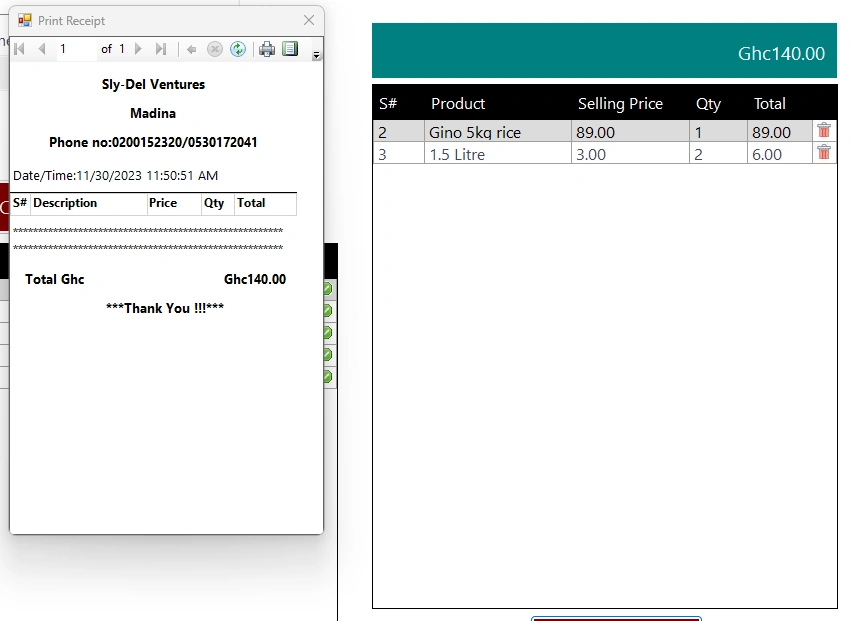
Satyaprakash SamantarayRank #101 · 21.1K reputationPosted Nov 30, 2023, 7:40 AM EST
Hi Emmanuel,
Based on which condition u want records in report viewer
Check ur right side image where the 2 records are loading. You need to check what condition that 2 records are loading. The same condition u need to put in below code in loadreport ()
da.SelectCommand = new SqlCommand("select SNum,SDate,SProductName,SPrice,SQty,SAmount, SCustomer from tblSales where "put ur condition"
Emmmanuel FIADUFERank #947 · 2.2K reputationPosted Nov 30, 2023, 10:34 AM EST
Hello Hello Samantaray,
It is the same condition please
Emmmanuel FIADUFERank #947 · 2.2K reputationPosted Nov 30, 2023, 10:39 AM EST
Could it be like there is an issue with where convert(varchar(10), SDate, 102) = convert(varchar(10), getdate(), 102)
Because when I remove it, it load all the sales data as stated earlier
Amit MohantyRank #112 · 20K reputationPosted Dec 4, 2023, 5:20 AM EST
If you want to use DVBClientBill to print the sales receipt, then store the DVBClientBill data to a datatable and use that datable in your LoadReport().
public void LoadReport() { ReportDataSource rptReportDataSource; try { this.reportViewer1.LocalReport.ReportPath = Application.StartupPath + @"\rptReceipt.rdlc"; this.reportViewer1.LocalReport.DataSources.Clear(); DataTable dataTable = new DataTable(); foreach (DataGridViewColumn dgvColumn in DVBClientBill.Columns) { dataTable.Columns.Add(dgvColumn.HeaderText); } foreach (DataGridViewRow dgvRow in DVBClientBill.Rows) { DataRow dataRow = dataTable.NewRow(); foreach (DataGridViewCell dgvCell in dgvRow.Cells) { // Use DBNull.Value for empty cells dataRow[dgvCell.ColumnIndex] = dgvCell.Value ?? DBNull.Value; } dataTable.Rows.Add(dataRow); } ReportParameter pTotal = new ReportParameter("pTotal", fm.lblGrandTotal.Text); ReportParameter pStore = new ReportParameter("pStore", store); ReportParameter pAddress = new ReportParameter("pAddress", address); ReportParameter pPhone = new ReportParameter("pPhone", phone); reportViewer1.LocalReport.SetParameters(pTotal); reportViewer1.LocalReport.SetParameters(pStore); reportViewer1.LocalReport.SetParameters(pAddress); reportViewer1.LocalReport.SetParameters(pPhone); rptReportDataSource = new ReportDataSource("DataSet1", dataTable); reportViewer1.LocalReport.DataSources.Add(rptReportDataSource); reportViewer1.SetDisplayMode(Microsoft.Reporting.WinForms.DisplayMode.PrintLayout); reportViewer1.ZoomMode = ZoomMode.Percent; reportViewer1.ZoomPercent = 100; } catch (Exception ex) { MessageBox.Show(ex.Message); } }Emmmanuel FIADUFERank #947 · 2.2K reputationPosted Dec 6, 2023, 11:07 AM EST
Thank you Amity,
Please do I need to use my DataTable content here, because after applying your code, this what came
dataRow[dgvCell.ColumnIndex] = dgvCell.Value ?? DBNull.Value;
when I modify it like this, I get an error like the name SProductName does not exist in the current context, dataRow[dgvCell.ColumnIndex] = dgvCell.Value ?? SProductName;
and this is my DataTable
Emmmanuel FIADUFERank #947 · 2.2K reputationPosted Dec 6, 2023, 11:56 AM EST
I bind DGVClientBill DataGridView to frmPrintReceipt as indicated in the code, but my question is how do I include my dataTable content and as well the DGVClientBill DataGridView content here please, thank you
frmBilling fm;
public frmPrintReceipt(frmBilling fmliist)
{
InitializeComponent();
this.fm = fmliist;
}
foreach (DataGridViewColumn dgvColumn in fm.DGVClientBill.Columns)
{
dataTable.Columns.Add(dgvColumn.HeaderText);
}
foreach (DataGridViewRow dgvRow in fm.DGVClientBill.Rows)
{
DataRow dataRow = dataTable.NewRow();
foreach (DataGridViewCell dgvCell in dgvRow.Cells)
{
// Use DBNull.Value for empty cells
dataRow[dgvCell.ColumnIndex] = dgvCell.Value ?? DBNull.Value;
}
dataTable.Rows.Add(dataRow);
}
And this is my DGVClientBill DataGridView
dgvIDD
dgvProduct
dgvSellingPrice2
dgvQunatity
dgvTotal
Satyaprakash SamantarayRank #101 · 21.1K reputationPosted Nov 29, 2023, 12:17 PM EST
Hi Emmanuel,
Modify the select statement using filter in ur loadreport() code as below. Here filter is based on current date like this u can filter records as per requirement. The below code as reference.
da.SelectCommand = new SqlCommand("select SNum,SDate,SProductName,SPrice,SQty,SAmount, SCustomer from tblSales where convert(varchar(10), SDate, 102) = convert(varchar(10), getdate(), 102", con);Emmmanuel FIADUFERank #947 · 2.2K reputationPosted Dec 3, 2023, 9:11 AM EST
May be the another option to get order sales receipt printed is to use DVBClientBill as data source but can someone here assist me how to go about it please
Anandu G NathRank #681 · 3.5K reputationPosted Dec 20, 2023, 1:22 AM EST
public void LoadReport()
{
    ReportDataSource rptReportDataSource;
    try
    {
        this.reportViewer1.LocalReport.ReportPath = Application.StartupPath + @"\rptReceipt.rdlc";
        this.reportViewer1.LocalReport.DataSources.Clear();

        foreach (DataGridViewRow dgvRow in DVBClientBill.Rows)
        {
            DataRow dataRow = dtReceipt.NewRow();

            // Assuming column indexes or names match the DataGridView columns
            dataRow["SName"] = dgvRow.Cells["SName"].Value?.ToString(); // Change the SName with actual DVBClientBill colunm name
            dataRow["SDate"] = Convert.ToDateTime(dgvRow.Cells["SDate"].Value);
            dataRow["SProductName"] = dgvRow.Cells["SProductName"].Value?.ToString();
            dataRow["SPrice"] = Convert.ToDecimal(dgvRow.Cells["SPrice"].Value);
            dataRow["SQty"] = Convert.ToInt32(dgvRow.Cells["SQty"].Value);
            dataRow["SAmount"] = Convert.ToDecimal(dgvRow.Cells["SAmount"].Value);

            dtReceipt.Rows.Add(dataRow);
        }

        ReportParameter pTotal = new ReportParameter("pTotal", fm.lblGrandTotal.Text);
        ReportParameter pStore = new ReportParameter("pStore", store);
        ReportParameter pAddress = new ReportParameter("pAddress", address);
        ReportParameter pPhone = new ReportParameter("pPhone", phone);

        reportViewer1.LocalReport.SetParameters(pTotal);
        reportViewer1.LocalReport.SetParameters(pStore);
        reportViewer1.LocalReport.SetParameters(pAddress);
        reportViewer1.LocalReport.SetParameters(pPhone);
        rptReportDataSource = new ReportDataSource("DataSet1", dataTable);
        reportViewer1.LocalReport.DataSources.Add(rptReportDataSource);
        reportViewer1.SetDisplayMode(Microsoft.Reporting.WinForms.DisplayMode.PrintLayout);

    }
    catch (Exception ex)
    {
        MessageBox.Show(ex.Message);
    }
}
After the data saved into the database then only you can able to print the data .
if there concern please comment