I want to search for student numbers in the datagridview on the web page with Selenium and click on the image link at the beginning of the number line found. But I couldn't understand the logic. Would you mind helping me, plaese?
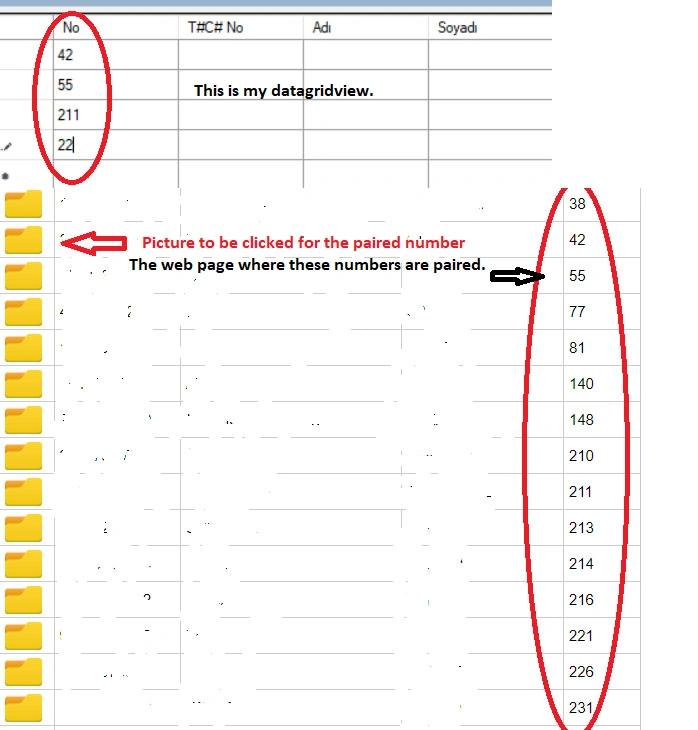

I want to search for student numbers in the datagridview on the web page with Selenium and click on the image link at the beginning of the number line found. But I couldn't understand the logic. Would you mind helping me, plaese?
Know the answer? Post it. Somebody with the same question will find it here.
Answer a question in the forums and earn +20 SHARP for every answer.
See unanswered questions Arun PottiAnswers in the forums20answers02
 Tahir AnsariAnswers in the forums5answers03
 Kamlesh KumarAnswers in the forums5answers04
 Sam HobbsAnswers in the forums4answers05
 Željko PerićAnswers in the forums3answersFull leaderboard →
 DevSocialUpcoming · 3rd editionAI Agents ConferenceDec 1–3, 2026Live onlineFree to attend5days leftRegister

Naimish MakwanaRank #324 · 7.7K reputationPosted Jan 10, 2024, 11:29 PM EST
Here’s a basic example of how you might use Selenium WebDriver in C# to search for student numbers in a datagridview and click on the image link at the beginning of the number line found.
Please note that this is a simplified example and the actual code might need to be adjusted based on the structure of your webpage.
using OpenQA.Selenium;
using OpenQA.Selenium.Chrome;
using OpenQA.Selenium.Support.UI;
using System;

class Program
{
    static void Main()
    {
        // Initialize the Chrome driver
        IWebDriver driver = new ChromeDriver();

        // Open the webpage
        driver.Navigate().GoToUrl("http://your-web-page-url.com");

        // Wait for the page to load
        WebDriverWait wait = new WebDriverWait(driver, TimeSpan.FromSeconds(10));

        // Find the datagridview element
        IWebElement datagridview = wait.Until(driver => driver.FindElement(By.Id("datagridview-id")));

        // Find the student number in the datagridview
        IWebElement studentNumberElement = datagridview.FindElement(By.XPath("//td[contains(text(), 'student-number')]"));

        // Find the image link at the beginning of the number line found
        IWebElement imageLink = studentNumberElement.FindElement(By.XPath(".//preceding::img[1]"));

        // Click on the image link
        imageLink.Click();

        // Close the driver
        driver.Quit();
    }
}
In this code:
"http://your-web-page-url.com"with the URL of your webpage."datagridview-id"with the id of your datagridview element.'student-number'with the actual student number you’re searching for.Remember to install the Selenium WebDriver and ChromeDriver NuGet packages in your project. You can do this in Visual Studio by right-clicking on your project -> Manage NuGet Packages -> Search for Selenium.WebDriver and Selenium.Chrome.WebDriver -> Install. Also, ensure that the ChromeDriver version matches the version of Chrome installed on your machine. If they don’t match, you might encounter issues.
I hope this helps! Let me know if you have any other questions. ??
Mehmet FatihRank #1,474 · 1.1K reputationPosted Jan 11, 2024, 1:53 AM EST
Thanks Naimish for your help. I modified my codes with yours. But I am getting an errror in this line.
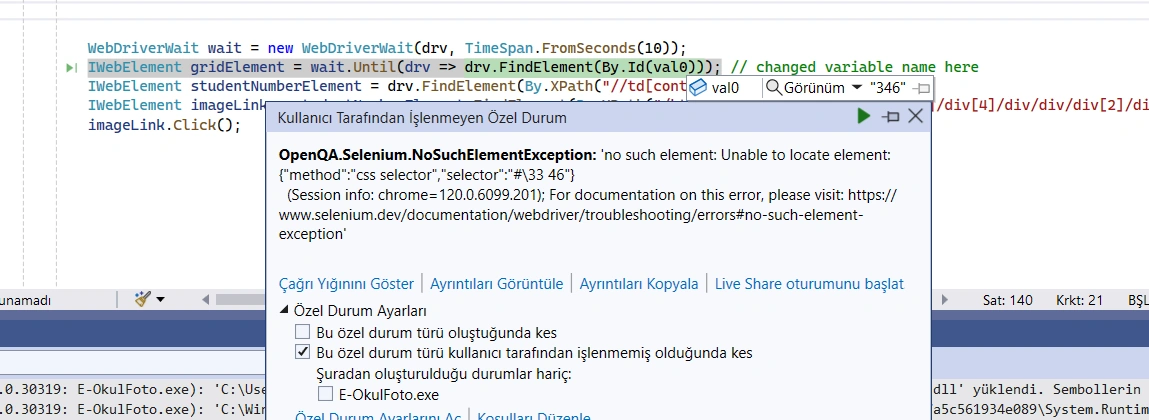
IWebElement dataGridView1 = wait.Until(driver => driver.FindElement(By.Id(val0)));
I am defining the student number like that (Hata CS0844 Ifade edilmeden önce 'dataGridView1' yerel degiskeni kullanilamiyor. Yerel degiskenin bildirimi 'Form1.dataGridView1' alanini gizler.. In English: Before being expressed, 'DatagridView1' local variable cannot be used. The notification of the local variable hides the field of 'form1.DatagridView1' field. )
var val0 = dataGridView1.Rows[i].Cells[0].Value?.ToString();//student number in the datagrdiview
driver.Navigate().GoToUrl("my link")
WebDriverWait wait = new WebDriverWait(drv, TimeSpan.FromSeconds(10));
IWebElement dataGridView1 = wait.Until(driver => driver.FindElement(By.Id(val0))); // this line is giving error.
IWebElement studentNumberElement = drv.FindElement(By.XPath("//td[contains(text(), 'val0')]")); With this line, the primary line that is defined as the number is overlapping ..
IWebElement imageLink = studentNumberElement.FindElement(By.XPath("/html/body/form[2]/div[4]/div[1]/div[4]/div/div/div[2]/div/div["+(i+1)+"]/div/div[2]/h6"));
imageLink.Click();
Naimish MakwanaRank #324 · 7.7K reputationPosted Jan 11, 2024, 2:00 AM EST
The error you’re encountering is due to the redeclaration of
dataGridView1as a local variable, which is hiding the fieldForm1.dataGridView1.To resolve this issue, you can avoid redeclaring
dataGridView1inside the method where this code is written. Instead, you can use a different variable name for theIWebElementthat you’re trying to find withWebDriverWait.Here’s how you can modify your code:
var val0 = dataGridView1.Rows[i].Cells[0].Value?.ToString(); //student number in the datagrdiview

driver.Navigate().GoToUrl("my link");
WebDriverWait wait = new WebDriverWait(drv, TimeSpan.FromSeconds(10));
IWebElement gridElement = wait.Until(driver => driver.FindElement(By.Id(val0))); // changed variable name here
IWebElement studentNumberElement = drv.FindElement(By.XPath("//td[contains(text(), 'val0')]"));
IWebElement imageLink = studentNumberElement.FindElement(By.XPath("/html/body/form[2]/div[4]/div[1]/div[4]/div/div/div[2]/div/div["+(i+1)+"]/div/div[2]/h6"));
imageLink.Click();
In this modified code, I’ve changed the name of the
IWebElementfromdataGridView1togridElementto avoid the conflict with the existingdataGridView1field12. Please replace"my link"with your actual URL and adjust the XPath queries as needed.Thanks
Mehmet FatihRank #1,474 · 1.1K reputationPosted Jan 11, 2024, 2:06 AM EST
I am getting an error like that.
Naimish MakwanaRank #324 · 7.7K reputationPosted Jan 11, 2024, 2:22 AM EST
You need to change you variable name. in find element
Mehmet FatihRank #1,474 · 1.1K reputationPosted Jan 11, 2024, 2:41 AM EST
I am sorry to say that the result is the same.