Skip to content
Loading
+1
  • +1
    private void DisplayData()
    {
    sqlcon.Open();
    DataTable dt = new DataTable();
    adapt = new SqlDataAdapter("select SN,[Reg No],Dor as 'Date Of Register',CodeNoOfMember,Name,CNICNO,Wing,HouseNumber,DOB as 'Date Of Birth',doj as 'Date Of Joining',[Pressent Address],[Previous Address],EMAIL,PHONE,[OWNER/TENANT],GENDER,nomname as 'Nominee Name',nomadd as 'Nominee Address',nomage as 'Nominee Age',nomrel as 'Nominee Relation',Remark from tbl_member", sqlcon);
    adapt.Fill(dt);
    dataGridView1.DataSource = dt;
    sqlcon.Close();
    }
    +1
  • +1
    private void Member_Register_Load(object sender, EventArgs e)
    {
    dataGridView1.EnableHeadersVisualStyles = false;
    dataGridView1.AutoGenerateColumns = false;
    dataGridView1.Columns[0].Name = "SN";
    dataGridView1.Columns[1].Name = "[Reg No]";
    dataGridView1.Columns[2].Name = "Dor";
    dataGridView1.Columns[3].Name = "CodeNoOfMember";
    dataGridView1.Columns[4].Name = "Name";
    dataGridView1.Columns[5].Name = "CNICNO";
    dataGridView1.Columns[6].Name = "Wing";
    dataGridView1.Columns[7].Name = "HouseNumber";
    dataGridView1.Columns[8].Name = "doj";
    dataGridView1.Columns[9].Name = "dol";
    dataGridView1.Columns[10].Name = "[Pressent Address]";
    dataGridView1.Columns[11].Name = "[Preovious Address]";
    dataGridView1.Columns[12].Name = "Email";
    dataGridView1.Columns[13].Name = "PHONE";
    dataGridView1.Columns[14].Name = "[OWNER/TENANT]";
    dataGridView1.Columns[15].Name = "GENDER";
    dataGridView1.Columns[16].Name = "nomname";
    dataGridView1.Columns[17].Name = "nomadd";
    dataGridView1.Columns[18].Name = "nomage";
    dataGridView1.Columns[19].Name = "nomrel";
    dataGridView1.Columns[20].Name = "Remark";
    dataGridView1.Columns[0].Width = 50;
    dataGridView1.Columns[1].Width = 50;
    dataGridView1.Columns[2].Width = 140;
    dataGridView1.Columns[3].Width = 140;
    dataGridView1.Columns[4].Width = 200;
    dataGridView1.Columns[5].Width = 200;
    dataGridView1.Columns[6].Width = 100;
    dataGridView1.Columns[7].Width = 100;
    dataGridView1.Columns[8].Width = 100;
    dataGridView1.Columns[9].Width = 110;
    dataGridView1.Columns[10].Width = 200;
    dataGridView1.Columns[11].Width = 200;
    dataGridView1.Columns[12].Width = 200;
    dataGridView1.Columns[13].Width = 150;
    dataGridView1.Columns[14].Width = 150;
    dataGridView1.Columns[15].Width = 100;
    dataGridView1.Columns[16].Width = 200;
    dataGridView1.Columns[17].Width = 200;
    dataGridView1.Columns[18].Width = 100;
    dataGridView1.Columns[19].Width = 150;
    dataGridView1.Columns[20].Width = 100;
    }
    +1
  • +1
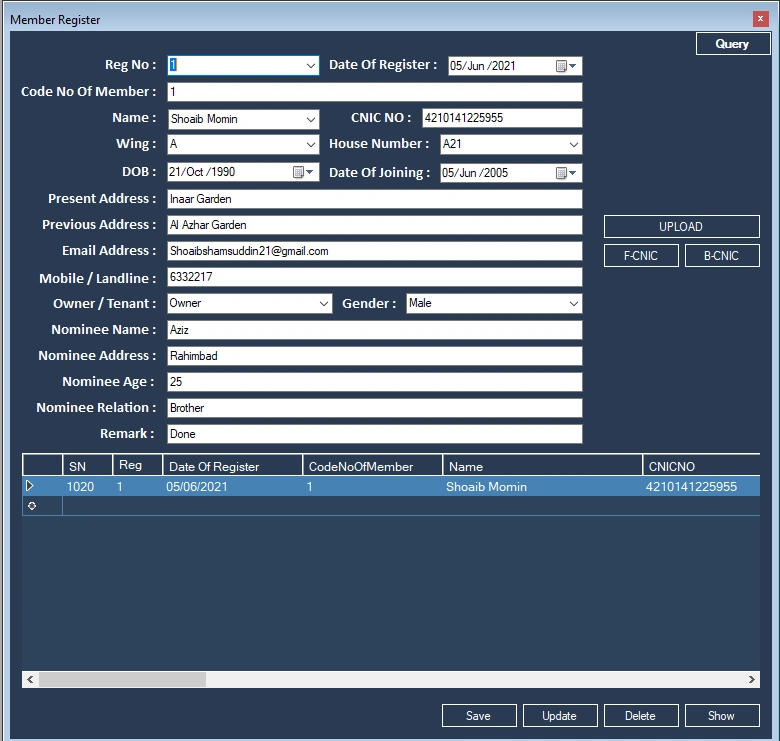
    private void dataGridView1_RowHeaderMouseClick(object sender, DataGridViewCellMouseEventArgs e)
    {
    SN = Convert.ToInt32(dataGridView1.Rows[e.RowIndex].Cells[0].Value.ToString());
    Regno.Text = dataGridView1.Rows[e.RowIndex].Cells[1].Value.ToString();
    dor.Text = dataGridView1.Rows[e.RowIndex].Cells[2].Value.ToString();
    cnofm.Text = dataGridView1.Rows[e.RowIndex].Cells[3].Value.ToString();
    name.Text = dataGridView1.Rows[e.RowIndex].Cells[4].Value.ToString();
    cnicno.Text = dataGridView1.Rows[e.RowIndex].Cells[5].Value.ToString();
    wing.Text = dataGridView1.Rows[e.RowIndex].Cells[6].Value.ToString();
    housenumber.Text = dataGridView1.Rows[e.RowIndex].Cells[7].Value.ToString();
    dob.Text = dataGridView1.Rows[e.RowIndex].Cells[8].Value.ToString();
    doj.Text = dataGridView1.Rows[e.RowIndex].Cells[9].Value.ToString();
    PressentAddress.Text = dataGridView1.Rows[e.RowIndex].Cells[10].Value.ToString();
    PreviousAddress.Text = dataGridView1.Rows[e.RowIndex].Cells[11].Value.ToString();
    Email.Text = dataGridView1.Rows[e.RowIndex].Cells[12].Value.ToString();
    MobileLandline.Text = dataGridView1.Rows[e.RowIndex].Cells[13].Value.ToString();
    OwnerTenant.Text = dataGridView1.Rows[e.RowIndex].Cells[14].Value.ToString();
    Gender.Text = dataGridView1.Rows[e.RowIndex].Cells[15].Value.ToString();
    NomineeName.Text = dataGridView1.Rows[e.RowIndex].Cells[16].Value.ToString();
    NomineeAddress.Text = dataGridView1.Rows[e.RowIndex].Cells[17].Value.ToString();
    NomineeAge.Text = dataGridView1.Rows[e.RowIndex].Cells[18].Value.ToString();
    NomineeRelation.Text = dataGridView1.Rows[e.RowIndex].Cells[19].Value.ToString();
    Remark.Text = dataGridView1.Rows[e.RowIndex].Cells[20].Value.ToString();
    }
    +1
  • Arnab Mukherjee
    +1
    DisplayData() method only get the data from DB and bind it to the datagrid but the given code will help yout to display the image of a selected row from datagrid in picturebox if the image stored in DB  as a byte format.
    +1
  • Arnab Mukherjee
    +1
    1. private void dataGridView1_RowHeaderMouseClick(object sender, DataGridViewCellMouseEventArgs e)  
    2. {  
    3. SN = Convert.ToInt32(dataGridView1.Rows[e.RowIndex].Cells[0].Value.ToString());  
    4. Regno.Text = dataGridView1.Rows[e.RowIndex].Cells[1].Value.ToString();  
    5. dor.Text = dataGridView1.Rows[e.RowIndex].Cells[2].Value.ToString();  
    6. cnofm.Text = dataGridView1.Rows[e.RowIndex].Cells[3].Value.ToString();  
    7. name.Text = dataGridView1.Rows[e.RowIndex].Cells[4].Value.ToString();  
    8. cnicno.Text = dataGridView1.Rows[e.RowIndex].Cells[5].Value.ToString();  
    9. wing.Text = dataGridView1.Rows[e.RowIndex].Cells[6].Value.ToString();  
    10. housenumber.Text = dataGridView1.Rows[e.RowIndex].Cells[7].Value.ToString();  
    11. dob.Text = dataGridView1.Rows[e.RowIndex].Cells[8].Value.ToString();  
    12. doj.Text = dataGridView1.Rows[e.RowIndex].Cells[9].Value.ToString();  
    13. PressentAddress.Text = dataGridView1.Rows[e.RowIndex].Cells[10].Value.ToString();  
    14. PreviousAddress.Text = dataGridView1.Rows[e.RowIndex].Cells[11].Value.ToString();  
    15. Email.Text = dataGridView1.Rows[e.RowIndex].Cells[12].Value.ToString();  
    16. MobileLandline.Text = dataGridView1.Rows[e.RowIndex].Cells[13].Value.ToString();  
    17. OwnerTenant.Text = dataGridView1.Rows[e.RowIndex].Cells[14].Value.ToString();  
    18. Gender.Text = dataGridView1.Rows[e.RowIndex].Cells[15].Value.ToString();  
    19. NomineeName.Text = dataGridView1.Rows[e.RowIndex].Cells[16].Value.ToString();  
    20. NomineeAddress.Text = dataGridView1.Rows[e.RowIndex].Cells[17].Value.ToString();  
    21. NomineeAge.Text = dataGridView1.Rows[e.RowIndex].Cells[18].Value.ToString();  
    22. NomineeRelation.Text = dataGridView1.Rows[e.RowIndex].Cells[19].Value.ToString();  
    23. Remark.Text = dataGridView1.Rows[e.RowIndex].Cells[20].Value.ToString();  
    24.   
    25. //Note : Display image in picture box  if the image stored in DB  as a byte format  
    26.  MemoryStream ms = new MemoryStream((byte[])((DataTable)dataGridView1.DataSource).Rows[e.RowIndex][21]);  //Your Image source column index goes here  
    27. PicBox1.Image = new Bitmap(ms);  
    28.   
    29. }  
    +1
  • Arnab Mukherjee
    +1
    Check the below link for your reference
     
    http://mauricemuteti.info/how-to-display-selected-row-image-from-datagridview-to-picturebox-in-another-form-in-c-windows-application/ 
    +1