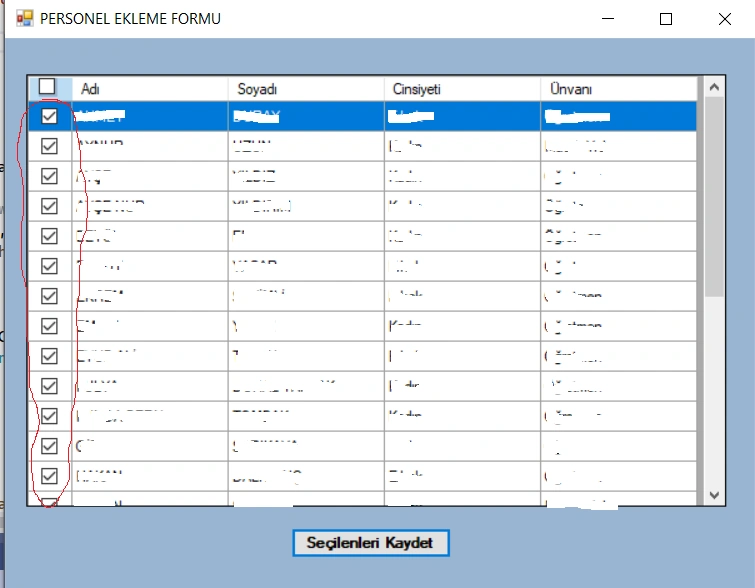
I want all checkboxes to appear as “false” initially. CBColumn.DataPropertyName = "id"; is causing all checkboxes to be checked. But when I remove the line CBColumn.DataPropertyName = "id"; then I can’t send the “id” value. I want to sendi d value. How can I succed this?







Amit MohantyRank #112 · 20K reputationPosted Jun 9, 2023, 5:53 AM EDT
Create a separate column for the "id" values in your data grid view. You can add a new column of type DataGridViewTextBoxColumn.
DataGridViewTextBoxColumn idColumn = new DataGridViewTextBoxColumn(); idColumn.HeaderText = "ID"; idColumn.DataPropertyName = "id"; idColumn.Visible = false; // if you don't want to show the ID column dataGridView1.Columns.Add(idColumn);Mehmet FatihRank #1,474 · 1.1K reputationPosted Jun 9, 2023, 8:37 AM EDT
I want my checkboxes to appear as false value. When I put the line Column.DataPropertyName = "id";, it is causing checkboxes to appear as true. When I remove the line idColumn.DataPropertyName = "id"; then it is saving all of the values not only checkedboxes. I want both the checkboxes comes as false initilaly and sending only checkedboxes.
Abhishek YadavRank #217 · 11.3K reputationPosted Jun 10, 2023, 11:46 AM EDT
DataGridViewTextBoxColumn idColumn = new DataGridViewTextBoxColumn();
idColumn.HeaderText = "ID";
idColumn.DataPropertyName = "id";
idColumn.Visible = false; // if you don't want to show the ID column
dataGridView1.Columns.Add(idColumn);