Hello Team,
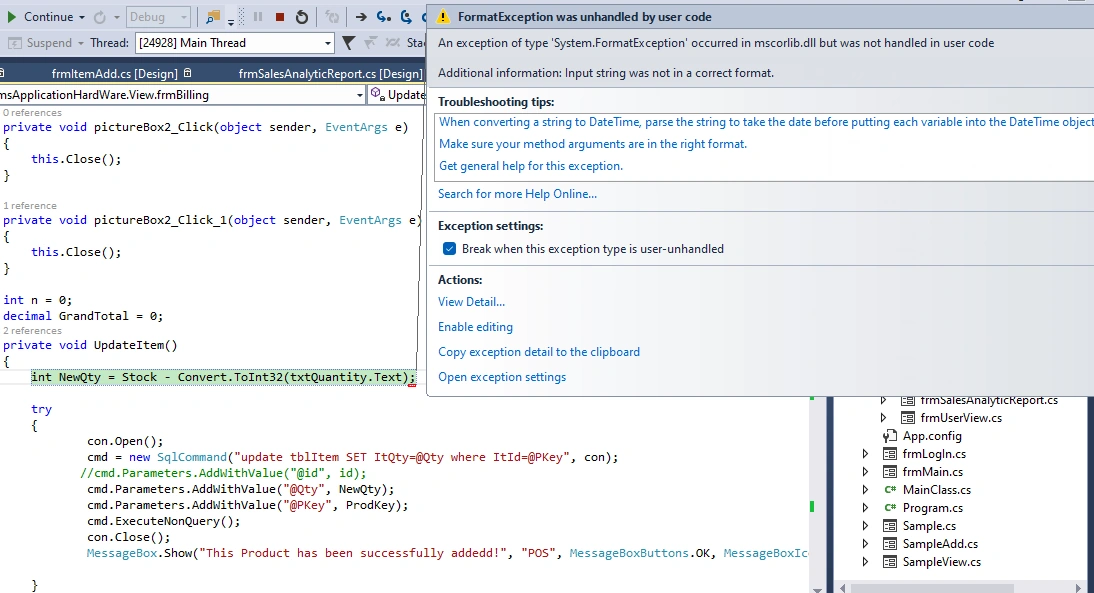
Am having this error in my code
C#
private void UpdateItem()
{
    int NewQty = Stock - Convert.ToInt32(txtQuantity.Text);

    try
    {
            con.Open();
            cmd = new SqlCommand("update tblItem SET ItQty=@Qty where ItId=@PKey", con);
           //cmd.Parameters.AddWithValue("@id", id);
            cmd.Parameters.AddWithValue("@Qty", NewQty);
            cmd.Parameters.AddWithValue("@PKey", ProdKey);
            cmd.ExecuteNonQuery();
            con.Close();
            MessageBox.Show("This Product has been successfully addedd!", "POS", MessageBoxButtons.OK, MessageBoxIcon.Information);

    }
    catch (Exception ex)
    {
        con.Open();
        MessageBox.Show(ex.Message);
    }
}

int ProdKey = 0;
int Stock = 0;
private void dataGridView1_CellContentClick(object sender, DataGridViewCellEventArgs e)
{
         txtProductName.Text = Convert.ToString(dataGridView1.CurrentRow.Cells["dgvName"].Value);
        Stock = Convert.ToInt32(dataGridView1.SelectedRows[0].Cells[3].Value.ToString());
        txtSellingPrice.Text = Convert.ToDecimal(dataGridView1.CurrentRow.Cells["dgvSellingPrice"].Value).ToString("#0.00");

    if(txtProductName.Text =="")
    {
        ProdKey = 0;
    }
    else
    {
        ProdKey = Convert.ToInt32(dataGridView1.SelectedRows[0].Cells[0].Value.ToString());
    }
}







Amit MohantyRank #112 · 20K reputationPosted Nov 23, 2023, 1:05 AM EST
Hey Emmmanuel, I think you have called the "UpdateItem()" method in wrong palce. That's why you are getting error before the product dataGridView data load.
Emmmanuel FIADUFERank #947 · 2.2K reputationPosted Nov 18, 2023, 10:12 AM EST
In the diagram below, I have two dataGridView the product dataGridView and ClientBilling dataGridView, so when I select product from the product dataGridView to the client dataGridView the quantity on the product dataGridView should be updated, that is what am trying to do and am getting this error
I use a different approach here but still,
Rajanikant HawaldarRank #110 · 20.2K reputationPosted Nov 19, 2023, 10:53 AM EST
Your reading from data reader which is already closed.
Sam HobbsRank #107 · 20.5K reputationPosted Nov 19, 2023, 12:12 PM EST
You can use the debugger to see what the data actually is that is not valid. In the image you posted, when you have that error, you can just hover over txtQuantity.Text to see what is there. Or you can select it and press Shift-F9.
It is better to use Int32.TryParse instead of Convert.ToInt32 and then if the conversion fails you can issue an error for the user.
Emmmanuel FIADUFERank #947 · 2.2K reputationPosted Nov 19, 2023, 1:17 PM EST
Thank you Sam and Rajanikant
I have remodify the code this way but it says input string was not in a correct format
public void UpdateItem()
{
try
{
con.Open();
cmd = new SqlCommand("update tblItem set ItQty = ItQty - " + int.Parse(txtQuantity.Text) + "where ItId like '" + Convert.ToInt32(dataGridView1.SelectedRows[0].Cells[0].Value.ToString()) + "'", con);
cmd.Parameters.AddWithValue("@ItId", Convert.ToInt32(dataGridView1.CurrentRow.Cells["dgvID"].Value.ToString()));
cmd.ExecuteNonQuery();
con.Close();
MessageBox.Show("This Product has been successfully addedd!", "POS", MessageBoxButtons.OK, MessageBoxIcon.Information);
}
catch (Exception ex)
{
con.Close();
MessageBox.Show(ex.Message);
}
}
Rajanikant HawaldarRank #110 · 20.2K reputationPosted Nov 20, 2023, 1:07 PM EST
It's saying why it is saying?Google how to use and purpose of int32.TryParse(), learn to mouse over on value and see what value it contains, check value has any white space etc while debugging code.
Prasad RaveendranRank #320 · 7.8K reputationPosted Nov 22, 2023, 10:25 PM EST
Please do confirm whether the control txtQuantity.Text is a required field in UI.
In your code, there are several places where you are performing conversions from string to other data types (
Convert.ToInt32,Convert.ToDecimal). If the string is not a valid representation of an integer or decimal number, this error will occur.One potential issue in your code could be in the
dataGridView1_CellContentClickmethod. The error might occur ifdataGridView1.CurrentRow.Cells[0].Valueis not a valid integer string.here is the modified code for dataGridView1_CellContentClick
private void dataGridView1_CellContentClick(object sender, DataGridViewCellEventArgs e)
{
    txtProductName.Text = Convert.ToString(dataGridView1.CurrentRow.Cells["dgvName"].Value);

    if (dataGridView1.SelectedRows.Count > 0 && dataGridView1.SelectedRows[0].Cells[3].Value != null)
    {
        if (!int.TryParse(dataGridView1.SelectedRows[0].Cells[3].Value.ToString(), out Stock))
        {
            // Handle the case where the value cannot be parsed to an integer
            Stock = 0; // Set default value or perform necessary error handling
        }
    }
    else
    {
        Stock = 0; // Set default value if no value is present
    }

    decimal sellingPrice;
    if (decimal.TryParse(dataGridView1.CurrentRow.Cells["dgvSellingPrice"].Value?.ToString(), out sellingPrice))
    {
        txtSellingPrice.Text = sellingPrice.ToString("#0.00");
    }
    else
    {
        txtSellingPrice.Text = "0.00"; // Set default value or perform necessary error handling
    }

    if (string.IsNullOrEmpty(txtProductName.Text))
    {
        ProdKey = 0;
    }
    else
    {
        if (!int.TryParse(dataGridView1.SelectedRows[0].Cells[0].Value?.ToString(), out ProdKey))
        {
            // Handle the case where the value cannot be parsed to an integer
            ProdKey = 0; // Set default value or perform necessary error handling
        }
    }
}
By using
int.TryParseanddecimal.TryParsemethods, the code attempts to convert strings to integers or decimals safely without throwing exceptions if the conversion fails. This helps in preventing the "input string was not in a correct format" error.Emmmanuel FIADUFERank #947 · 2.2K reputationPosted Nov 23, 2023, 8:33 AM EST
Thank Amit, I just notice that
Amit MohantyRank #112 · 20K reputationPosted Nov 21, 2023, 1:00 AM EST
To resolve this issue, consider implementing the following modifications in your code.
private void txtQuantity_KeyPress(object sender, KeyPressEventArgs e) { if (e.KeyChar >= 48 && e.KeyChar <= 57 || e.KeyChar == 8) { e.Handled = false; } else { e.Handled = true; } }int.TryParseto check if the conversion is valid before performing the subtraction operation.private void UpdateItem() { int.TryParse(txtQuantity.Text, out int quantityValue); int NewQty = Stock - quantityValue; // rest of your code }Emmmanuel FIADUFERank #947 · 2.2K reputationPosted Nov 22, 2023, 10:56 AM EST
Hello Amit, Please when I used your format as you said it is not working because I load the data from product dataGridView into the textboxes and then to the Billing dataGridView.
This code seems to be working alright because when I click the error popup ok buttong and it goes away, the ("update tblItem set ItQty = ItQty - " + Int32.Parse(txtQuantity.Text) + function work fine but when I run the project before the product dataGridView Load the first message that popup is the input string is not in the correct format.
public void UpdateItem()
{
try
{
con.Open();
cmd = new SqlCommand("update tblItem set ItQty = ItQty - " + Int32.Parse(txtQuantity.Text) + "where ItId like '" + Int32.Parse(dataGridView1.SelectedRows[0].Cells[1].Value.ToString()) + "%'", con);
cmd.Parameters.AddWithValue("@ItQty", Int32.Parse(dataGridView1.CurrentRow.Cells["dgvQty"].Value.ToString()));
cmd.ExecuteNonQuery();
con.Close();
MessageBox.Show("This Product has been successfully addedd!", "POS", MessageBoxButtons.OK);
LoadProducts();
}
catch (Exception ex)
{
con.Close();
MessageBox.Show(ex.Message);
}
}
Anandu G NathRank #681 · 3.5K reputationPosted Dec 30, 2023, 8:29 AM EST
Hai @Emmmanuel FIADUFE
Check the textbox value is null or not.
if(txtQuantity.Text!=null
{
int NewQty = Stock - Convert.ToInt32(txtQuantity.Text);
}