
Hello,
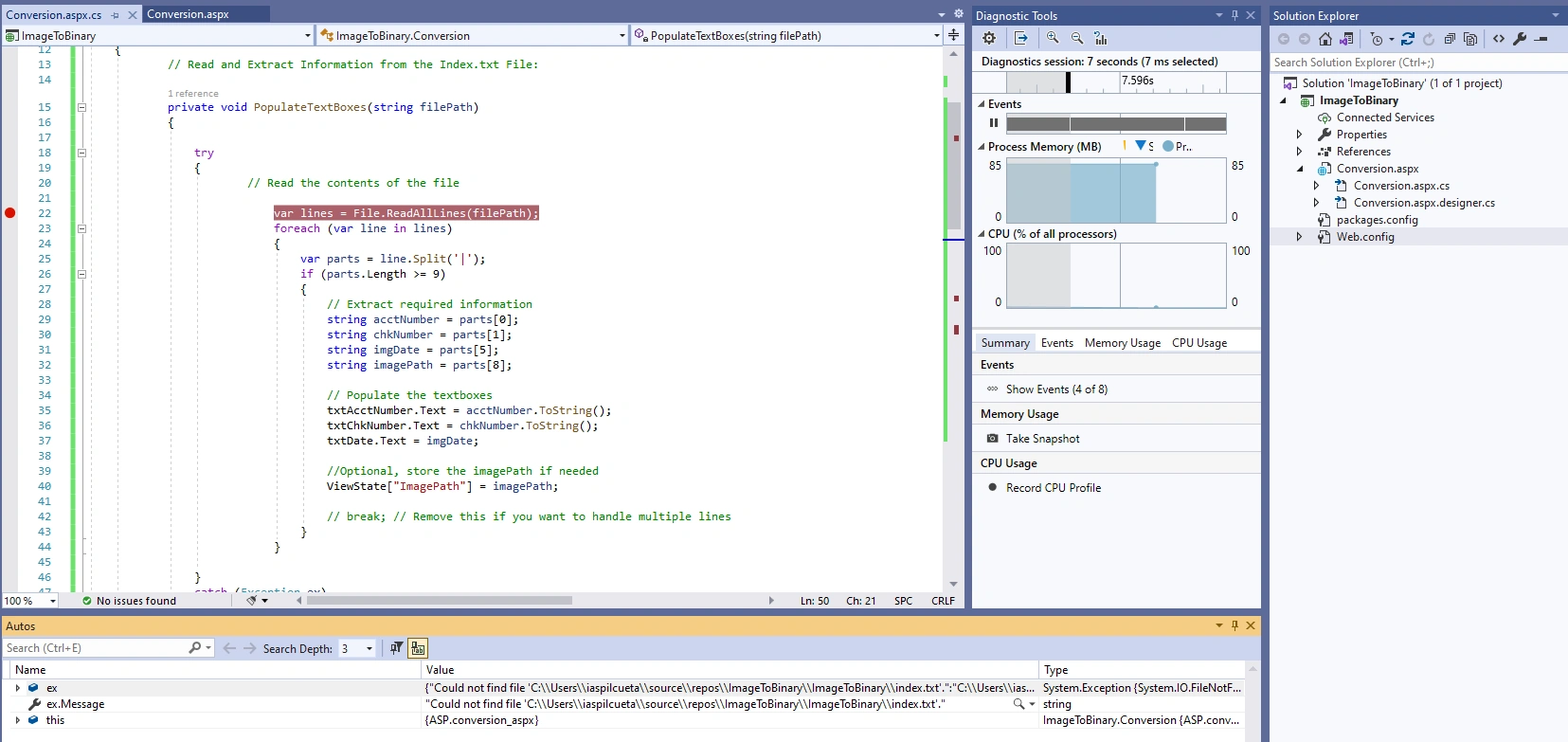
I am having problems with this code, it errors the following:
System.Exception {System.IO.FileNotFoundException} ex.Message "Could not find file 'C:\\Users\\iaspilcueta\\source\\repos\\ImageToBinary\\ImageToBinary\\index.txt'.
I have tried to fix it by adding System.IO.StreamReader Streamreader, but same error.
Screen Shot and Code below.
C#
            // Read and Extract Information from the Index.txt File:

            private void PopulateTextBoxes(string filePath)
            {

                try
                {
                    // Check if the file exists
                    if (System.IO.File.Exists(filePath))
                    {
                        // Read the contents of the file
                        using (System.IO.StreamReader reader = System.IO.File.OpenText(filePath))
                        {
                            string fileContents = reader.ReadToEnd();

                            var lines = File.ReadAllLines(filePath);
                            foreach (var line in lines)
                            {
                                var parts = line.Split('|');
                                if (parts.Length >= 9)
                                {
                                    // Extract required information
                                    string acctNumber = parts[0];
                                    string chkNumber = parts[1];
                                    string imgDate = parts[5];
                                    string imagePath = parts[8];

                                    // Populate the textboxes
                                    txtAcctNumber.Text = acctNumber.ToString();
                                    txtChkNumber.Text = chkNumber.ToString();
                                    txtDate.Text = imgDate;

                                    //Optional, store the imagePath if needed
                                    ViewState["ImagePath"] = imagePath;

                                    // break; // Remove this if you want to handle multiple lines
                                }
                            }
                        }
                    }
                }
                catch (Exception ex)
                {
                    // Handle any exceptions that occurred
                    Console.WriteLine("An error occurred while reading the file: " + ex.Message);
                }
            }


            //Convert the Image to a Byte Array:
            private byte[] ConvertImageToByteArray(string imagePath)
            {
                string fullPath = Server.MapPath("~/Images/") + imagePath;
                return File.ReadAllBytes(fullPath);
            }

            //Save the Data into the Database:

            protected void Button1_Click(object sender, EventArgs e)
            {
                if (!FileUpload1.HasFile) //Validation
                {
                    Response.Write("No file Selected"); return;
                }
                else
                {
                    // Read and populate textboxes from Index.txt

                    string indexFilePath = Server.MapPath("~/index.txt");
                    PopulateTextBoxes(indexFilePath);

                    // Extract values from textboxes
                    string acctNumber = txtAcctNumber.Text;
                    string chkNumber = txtChkNumber.Text;
                    string imgDate = txtDate.Text;
                    string imagePath = ViewState["ImagePath"].ToString();

                    // Convert the image to byte array
                    byte[] imageData = ConvertImageToByteArray(imagePath);

                    // Insert the data into the database
                    using (SqlConnection connection = new SqlConnection(ConfigurationManager.ConnectionStrings["DBCS"].ToString()))
                    {
                        connection.Open();
                        SqlCommand cmd = new SqlCommand("INSERT INTO chkImages (acctNumber, chknumber, imgdate, imageData) VALUES (@acctNumber, @chknumber, @imgdate, @imageData)", connection);

                        cmd.Parameters.AddWithValue("@acctNumber", acctNumber);
                        cmd.Parameters.AddWithValue("@chknumber", chkNumber);
                        cmd.Parameters.AddWithValue("@imgdate", imgDate);
                        cmd.Parameters.AddWithValue("@imageData", imageData);

                        cmd.ExecuteNonQuery();
                        connection.Close();

                        Response.Write("Image has been Added");
                    }
                }







Anoop Kumar SharmaRank #127 · 17.4K reputationPosted Jul 15, 2024, 11:08 PM EDT
Hi Ivonne Aspilcueta,
As you are getting the "System.Exception {System.IO.FileNotFoundException}" exception which clearly means that the file is not present at the path (C:\\Users\\iaspilcueta\\source\\repos\\ImageToBinary\\ImageToBinary\\index.txt). Please verify that you have the path and try again.
I hope this will help you
Vishal JoshiRank #377 · 6.7K reputationPosted Jul 16, 2024, 12:35 AM EDT
Hello
Using / or \\ for folder paths in C# is an issue.
Use Path.Combine() method to avoid file path issues.
Please replace the below line of code and try again.
var lines = File.ReadAllLines(Path.Combine(filePath));From your code, it looks like there are two approaches to reading the file, StreamReader and ReadAllLines. you can skip ReadAllLines and keep the code below
private void PopulateTextBoxes(string filePath)
        {

            try
            {
                // Check if the file exists
                if (System.IO.File.Exists(filePath))
                {
                    // Read the contents of the file
                    using (System.IO.StreamReader reader = System.IO.File.OpenText(filePath))
                    {
                        string line;

                        while ((line = reader.ReadLine()) != null)
                        {
                            var parts = line.Split('|');
                            if (parts.Length >= 9)
                            {
                                // Extract required information
                                string acctNumber = parts[0];
                                string chkNumber = parts[1];
                                string imgDate = parts[5];
                                string imagePath = parts[8];

                                // Populate the textboxes
                                txtAcctNumber.Text = acctNumber.ToString();
                                txtChkNumber.Text = chkNumber.ToString();
                                txtDate.Text = imgDate;

                                //Optional, store the imagePath if needed
                                ViewState["ImagePath"] = imagePath;

                                // break; // Remove this if you want to handle multiple lines
                            }
                        }
                    }
                }
            }
            catch (Exception ex)
            {
                // Handle any exceptions that occurred
                Console.WriteLine("An error occurred while reading the file: " + ex.Message);
            }
        }
Thanks
Vishal Joshi