How to encrypt and decrypt the text file in c# insted of JAVA.
Can anyone help me to do in C#?
Know the answer? Post it. Somebody with the same question will find it here.
Answer a question in the forums and earn +20 SHARP for every answer.
See unanswered questions Arun PottiAnswers in the forums20answers02
 Tahir AnsariAnswers in the forums5answers03
 Kamlesh KumarAnswers in the forums5answers04
 Sam HobbsAnswers in the forums4answers05
 Željko PerićAnswers in the forums3answersFull leaderboard →
 DevSocialUpcoming · 3rd editionAI Agents ConferenceDec 1–3, 2026Live onlineFree to attend5days leftRegister

Mohamed Azarudeen ZRank #297 · 8.5K reputationPosted Jul 4, 2023, 1:22 PM EDT
using System;
using System.IO;
using System.Security.Cryptography;
using System.Security.Cryptography.Pkcs;
using System.Security.Cryptography.X509Certificates;
using System.Text;

class Program
{
    static void Main()
    {
        // Step 1: Load the PKCS#12 keystore (pfx file) and get the private key
        string pfxPath = "path/to/your/certificate.pfx";
        string pfxPassword = "your-pfx-password";
        X509Certificate2 certificate = new X509Certificate2(pfxPath, pfxPassword, X509KeyStorageFlags.Exportable);
        RSACryptoServiceProvider privateKey = (RSACryptoServiceProvider)certificate.PrivateKey;

        // Step 2: Specify the signature algorithm
        string signatureAlgorithm = "SHA256";

        // Step 3: Read the original file
        string filePath = "path/to/your/original/file.txt";
        byte[] originalData = File.ReadAllBytes(filePath);

        // Step 4: Create a SignedCms object to generate the PKCS#7 signature
        ContentInfo contentInfo = new ContentInfo(originalData);
        SignedCms signedCms = new SignedCms(contentInfo, true);

        // Step 5: Create a signer with the private key and signature algorithm
        CmsSigner signer = new CmsSigner(privateKey);
        signer.DigestAlgorithm = new Oid(signatureAlgorithm);

        // Step 6: Initiate the signature
        signedCms.ComputeSignature(signer);

        // Step 7: Get the signature bytes
        byte[] signature = signedCms.Encode();

        // Step 8: Convert the signature bytes to Base64
        string base64Signature = Convert.ToBase64String(signature);

        // Step 9: Encode the original file to Base64
        string base64OriginalFile = Convert.ToBase64String(originalData);

        // Step 10: Extract the public key certificate and encode it to Base64
        string base64PublicKeyCertificate = Convert.ToBase64String(certificate.RawData);

        // Now you have the base64Signature, base64OriginalFile, and base64PublicKeyCertificate.
        // You can use them as needed for further processing or verification.

        // Example: Save the signed data to a new file
        string signedFilePath = "path/to/your/signed/file.txt";
        File.WriteAllText(signedFilePath, $"{base64Signature}\n{base64OriginalFile}\n{base64PublicKeyCertificate}");
    }
}
Hi Ashid
you can use the .NET Framework's cryptography libraries to achieve text file signing using a PKCS#7 signature. Here's the equivalent C# code for the steps involved in signing:
ashid das130 reputationPosted Jul 5, 2023, 12:49 AM EDT
Hi Mohamed Azarudeen,
Please share how to decrypt that encrypted file.
ashid das130 reputationPosted Jul 5, 2023, 12:54 AM EDT
Hi Mohamed Azarudeen,
It is showing below error.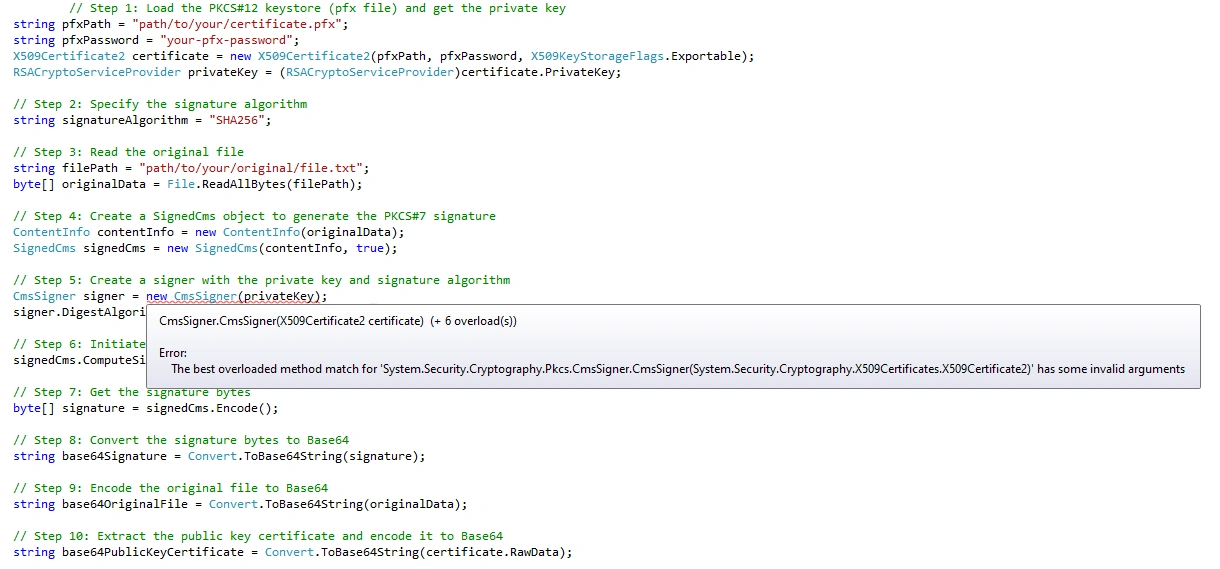
Amit MohantyRank #112 · 20K reputationPosted Jul 5, 2023, 1:49 AM EDT
Check this:
using System; using System.IO; using System.Security.Cryptography; using System.Text; public class FileEncryption { public static void EncryptFile(string inputFile, string outputFile, X509Certificate2 recipientCertificate) { ContentInfo contentInfo = new ContentInfo(File.ReadAllBytes(inputFile)); EnvelopedCms envelopedCms = new EnvelopedCms(contentInfo); CmsRecipient recipient = new CmsRecipient(recipientCertificate); envelopedCms.Encrypt(recipient); byte[] encryptedBytes = envelopedCms.Encode(); File.WriteAllBytes(outputFile, encryptedBytes); } public static void DecryptFile(string inputFile, string outputFile, X509Certificate2 recipientCertificate) { byte[] encryptedBytes = File.ReadAllBytes(inputFile); EnvelopedCms envelopedCms = new EnvelopedCms(); envelopedCms.Decode(encryptedBytes); envelopedCms.Decrypt(new X509Certificate2Collection(recipientCertificate)); byte[] decryptedBytes = envelopedCms.ContentInfo.Content; File.WriteAllBytes(outputFile, decryptedBytes); } } // how to use string inputFile = "path/to/input.txt"; string encryptedFile = "path/to/encrypted.p7"; string decryptedFile = "path/to/decrypted.txt"; // Load the recipient certificate X509Certificate2 recipientCertificate = new X509Certificate2("path/to/recipient.pfx", "certificatePassword"); FileEncryption1.EncryptFile(inputFile, encryptedFile, recipientCertificate); FileEncryption1.DecryptFile(encryptedFile, decryptedFile, recipientCertificate); Console.WriteLine("Encryption and decryption completed successfully!");Imap Backup13 reputationPosted Jul 5, 2023, 8:13 AM EDT
thanks