How can i search like this top 10 or 25 or 50 or 100 pls help me
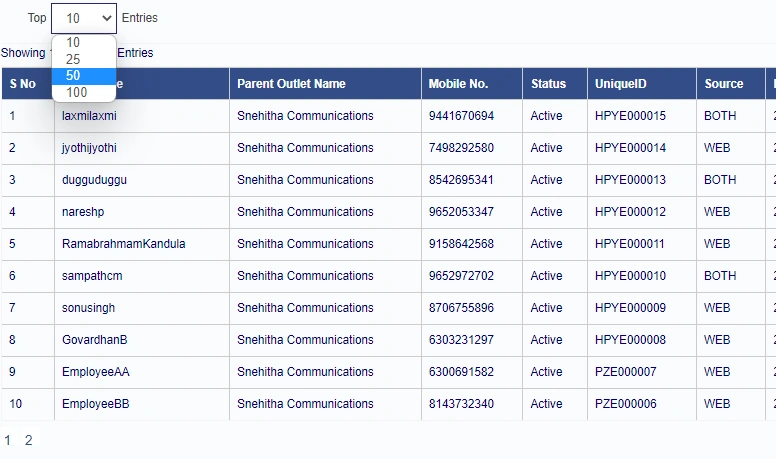
How can i search like this top 10 or 25 or 50 or 100 pls help me
Know the answer? Post it. Somebody with the same question will find it here.
Answer a question in the forums and earn +20 SHARP for every answer.
See unanswered questions Arun PottiAnswers in the forums20answers02
 Tahir AnsariAnswers in the forums5answers03
 Kamlesh KumarAnswers in the forums5answers04
 Sam HobbsAnswers in the forums4answers05
 Željko PerićAnswers in the forums3answersFull leaderboard →
 DevSocialUpcoming · 3rd editionAI Agents ConferenceDec 1–3, 2026Live onlineFree to attend5days leftRegister

Naimish MakwanaRank #324 · 7.7K reputationPosted Mar 8, 2023, 11:57 PM EST
Hello Jaya,
You can use Top filter in your SQL query to get top data.
You need to pass one parameter in your proc. And then use it in query like below.
DECLARE @N INT;
SET @N = ?; -- Placeholder for user-specified parameter

SELECT TOP (@N)
    name
FROM Table
Thanks
Naimish Makwana
Vishal JoshiRank #377 · 6.7K reputationPosted Mar 8, 2023, 11:57 PM EST
Hello
On client side use this
On server side use
SettingsPager.PageSize=50;Thanks
Amit MohantyRank #112 · 20K reputationPosted Mar 9, 2023, 12:49 AM EST
Check the attached zip file, this may help you to fix your issue.
Jaya PrakashRank #1,293 · 1.3K reputationPosted Mar 21, 2023, 3:59 AM EDT
Tuhin PaulRank #7 · 71.9K reputationPosted Mar 22, 2023, 9:42 AM EDT
here is the linq version of the accepted answer:
int n = //user-specified parameter

var topNames = context.Table
                    .Select(t => t.name)
                    .Take(n)
                    .ToList();
context is an instance of your Entity Framework DbContext and Table is the name of the corresponding table.
Tuhin PaulRank #7 · 71.9K reputationPosted Mar 22, 2023, 9:45 AM EDT
IF I try the Mongodb version of the accepted answer:
int n = //user-specified parameter

var topNames = collection.Find(_ => true)
                         .Project(t => t.name)
                         .Limit(n)
                         .ToList();
collection is an instance of IMongoCollection and t represents the documents in the collection. I think Mongodb databases don't support a TOP keyword since they don't have a concept of ordering.
Jaya PrakashRank #1,293 · 1.3K reputationPosted Mar 9, 2023, 5:22 AM EST
Thank You all
Jaya PrakashRank #1,293 · 1.3K reputationPosted Mar 21, 2023, 2:28 AM EDT
protected void GridView1_RowDataBound(object sender, GridViewRowEventArgs e) { if (e.Row.RowType == DataControlRowType.DataRow) { Label lblPgTotal = (Label)e.Row.FindControl("lblTotalPrice"); dPageTotal += Decimal.Parse(lblPgTotal.Text); } if (e.Row.RowType == DataControlRowType.Footer) { if (ViewState["TotalPrice"] != null && dPageTotal != 0) { Label lblPageTotal = (Label)e.Row.FindControl("lblPageTotal"); lblPageTotal.Text = dPageTotal.ToString("N2"); Label lblGrandTotal = (Label)e.Row.FindControl("lblGrandTotal"); lblGrandTotal.Text = ViewState["TotalPrice"].ToString(); } } } protected void lnkPage_Click(object sender, EventArgs e) { int pageIndex = int.Parse((sender as LinkButton).CommandArgument); this.GetCustomersPageWise(pageIndex); }Jignesh KumarRank #91 · 22.9K reputationPosted Mar 9, 2023, 12:24 AM EST
Hello jaya prakash,
Please refer this one,
https://www.c-sharpcorner.com/blogs/custom-page-size-and-paging-for-asp-net-grid-view