I am currently working on a .NET Core 6.0 Web API solution and encountering an error when attempting to test it using Postman. Despite disabling the proxy and exploring various possibilities, I have been unsuccessful in resolving the issue. Additionally, I have noticed that the breakpoint does not hit the controller, and this error occurs beforehand. It is worth mentioning that I am running the API on port 8080, as indicated in the console when the .NET Core application is executed.
I would greatly appreciate any guidance or suggestions on how to troubleshoot and resolve this problem. Thank you in advance for your assistance. below is my reponse
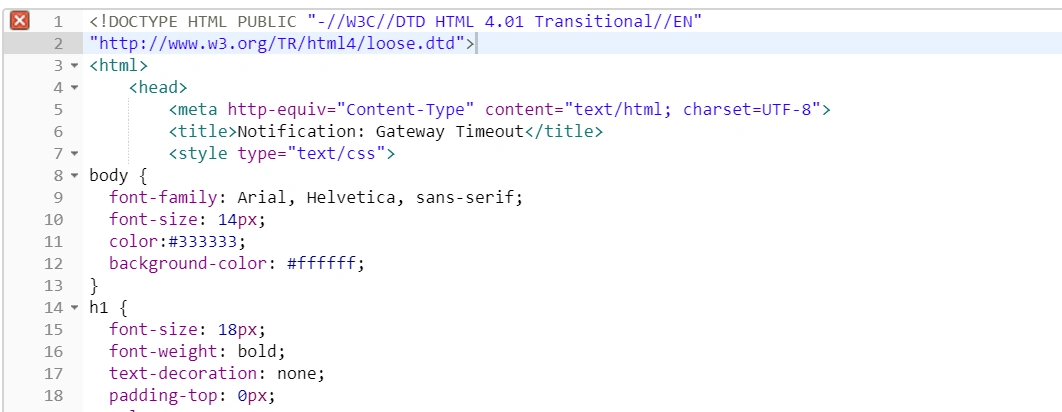
my .net core controller and postman







Sujeet RamanRank #1,329 · 1.3K reputationPosted Jun 23, 2023, 6:36 AM EDT
below is my controller code
  [HttpPost("saveRoom")]
        public async Task> SaveRoom([FromBody] string roomData)
        {
            Request.Headers.TryGetValue("Entitlement", out var entitlement);
            roomData = HttpUtility.UrlDecode(roomData);

            if (string.IsNullOrWhiteSpace(entitlement) || string.IsNullOrWhiteSpace(roomData))
            {
                _log.LogWarning($"POST /saveRoom without entitlement");
                return BadRequest();
            }

            _log.LogInformation($"POST /saveRoom entitlement={entitlement}");

            var roomObject = JObject.Parse(roomData);
            if (!roomObject.IsValid(_roomSchema))
            {
                return BadRequest();
            }

            return await _roomDataService.SaveRoom(entitlement, roomData);
        }
    }
when i run the application a comman prompt from .net core coming and displaying
[16:01:29 INF] Now listening on: http://[::]:8080
[16:01:29 INF] Application started. Press Ctrl+C to shut down.
[16:01:29 INF] Hosting environment: Development
[16:01:29 INF] Content root path: C:\my_learn\WebAppApi
Sujeet RamanRank #1,329 · 1.3K reputationPosted Jun 23, 2023, 6:37 AM EDT
break point also not hitting to the controller method.dont understand why
Mayooran NavamanyRank #438 · 5.7K reputationPosted Jun 23, 2023, 6:50 AM EDT
What do you get an error message from post-man and Error Status 404 or 403
can you try this
http://localhost::8080/api/saveRoom
Ravi PatelRank #439 · 5.7K reputationPosted Jun 24, 2023, 12:46 AM EDT
Hi Sujeet Raman,
by seeing your controller code
public async Task> SaveRoom([FromBody] string roomData){}
accepting as string not as model class
but from postman you are passing json format
two things you can try
Vijay Pratap SinghRank #381 · 6.6K reputationPosted Jun 23, 2023, 4:35 AM EDT
Please send the controller code and the endpoint you hit in postman.
Mayooran NavamanyRank #438 · 5.7K reputationPosted Jun 23, 2023, 6:28 AM EDT
I think you did not attach the correct file here, Please attach the controller code with the endpoint, We can fix this
Sujeet RamanRank #1,329 · 1.3K reputationPosted Jun 24, 2023, 1:09 AM EDT
i have tried with both ways but still controller not getting hitted.both i am getting response like
i have disabled all proxy from postman
my requirment is send data in the form of plain/text format not json.so i need to keep this method as it is.
below i my start up class if you want to check
public class Startup { public Startup(IConfiguration configuration) { Configuration = configuration; } private IConfiguration Configuration { get; } // This method gets called by the runtime. Use this method to add services to the container. public void ConfigureServices(IServiceCollection services) { var openIdConfiguration = Configuration.GetSection("OpenID"); var baseUrl = openIdConfiguration.GetSection("BaseURL").Value; var clientId = openIdConfiguration.GetSection("ClientID").Value; var clientSecret = openIdConfiguration.GetSection("ClientSecret").Value; services.AddDistributedMemoryCache(); services.AddAuthentication(OAuth2IntrospectionDefaults.AuthenticationScheme) .AddOAuth2Introspection(options => { options.EnableCaching = true; options.CacheDuration = new TimeSpan(0, 1, 0, 0); options.Authority = baseUrl; options.ClientId = clientId; options.ClientSecret = clientSecret; options.Events.OnAuthenticationFailed = ctxt => { var logger = ctxt.HttpContext.RequestServices.GetRequiredService>(); logger.LogInformation($"Authentication failure for {ctxt?.Principal?.Identity?.Name}"); return Task.CompletedTask; }; }); services.AddOptions(); services.Configure(Configuration.GetSection("IpRateLimiting")); services.AddSingleton(); services.AddSingleton(); services.AddSingleton(); services.AddDistributedRateLimiting(); services.AddControllers(); services.AddSingleton(Configuration); services.AddDbContext(optionsBuilder => optionsBuilder.UseNpgsql(Configuration.GetConnectionString("RoomDb"), options => options.EnableRetryOnFailure())); services.AddSingleton(provider => new AuthenticationService(baseUrl, provider.GetRequiredService>())); services.AddScoped(provider => new S3Repository( provider.GetRequiredService>(), Configuration)); services.AddScoped(provider => new RoomDataService( provider.GetRequiredService>(), provider.GetRequiredService(), provider.GetRequiredService())); services.AddScoped(); services.AddMvc(options => { options.InputFormatters.Insert(0, new RawJsonBodyInputFormatter()); }); services.AddSwaggerGen(); } public void Configure(IApplicationBuilder app, IWebHostEnvironment env) { using var scope = app.ApplicationServices.CreateScope(); var services = scope.ServiceProvider; var dbContext = services.GetRequiredService(); dbContext.Database.EnsureCreated(); try { var databaseCreator = dbContext.Database.GetService() as RelationalDatabaseCreator; databaseCreator.CreateTables(); } catch (Exception ex) { Console.WriteLine("Error while creation database tables (maybe they exist already?)"); } app.UseRouting(); app.UseAuthentication(); app.UseAuthorization(); app.UseIpRateLimiting(); app.Use(async (context, next) => { context.Response.Headers.Add("X-Content-Type-Options", "nosniff"); context.Response.Headers.Add("Strict-Transport-Security", "max-age=31536000; includeSubdomains"); await next(); }); if (env.IsDevelopment()) { app.UseSwagger(); app.UseSwaggerUI(); } app.UseEndpoints(endpoints => { if (env.IsDevelopment()) { // endpoints.MapControllers().WithMetadata(new AllowAnonymousAttribute()); } else { endpoints.MapControllers(); } }); } }Sujeet RamanRank #1,329 · 1.3K reputationPosted Jun 26, 2023, 12:46 AM EDT
hi i have to send data as text. so i need to keep the same method format.i tried with text also in postman still controller not hitting the break point.For testing i also changed method and tried with json.no break point hit happening
Jaimin ShethiyaRank #177 · 13.7K reputationPosted Aug 31, 2023, 7:24 AM EDT
Hello Sujeet,
Please follow the below steps:
API controller
Run the application.
Below is the request in the postman and it's working as expected.
curl --location 'https://localhost:7051/api/Values' \
--header 'Content-Type: application/json' \
--data '{
"id": "",
"firstName": "Jaimin",
"lastName": "Shethiya",
"mno": 7990233523
}'
Prasad RaveendranRank #320 · 7.8K reputationPosted Sep 3, 2023, 2:54 PM EDT
I assume you are passing the Entitilement inside the Header. Could you please check whether you run in debug mode or release mode.