When I select a class from the dropdownlist, only the students from that class should appear in the gridview. Currently, all the students from all classes get displayed. When I select mark attendance(Button1) the gridview should reflect students from the class selected. Could someone help me out with the code that needs to be written under Button1 in aspx.cs page.
attendance.aspx:
attendance.aspx.cs:
using System;
using System.Collections.Generic;
using System.Linq;
using System.Web;
using System.Web.UI;
using System.Web.UI.WebControls;
using System.Data.SqlClient;
using System.Data;
public partial class Faculty_attendance : System.Web.UI.Page
{
SqlConnection cn = new SqlConnection("Data Source=DESKTOP-UIGAOQI\\SQLEXPRESS;Initial Catalog=mydb;Integrated Security=True;");
protected void Page_Load(object sender, EventArgs e)
{
}
protected void Button1_Click(object sender, EventArgs e)
{
}
protected void Button2_Click(object sender, EventArgs e)
{
foreach (GridViewRow row in GridView1.Rows)
{
String RegNo = row.Cells[0].Text;
String Name = row.Cells[1].Text;
RadioButton rbtn1 = (row.Cells[2].FindControl("RadioButton1") as RadioButton);
RadioButton rbtn2 = (row.Cells[2].FindControl("RadioButton2") as RadioButton);
String status1;
if (rbtn1.Checked)
{
status1 = "Present";
}
else
{
status1 = "Absent";
}
String dateofclass1 = date.Text;
String sclass1 = DropDownList1.SelectedItem.Text;
saveattendance(RegNo, Name, dateofclass1, status1, sclass1);
}
Label4.Text = "Attendance has been saved succesfully";
}
private void saveattendance(String regno, String studentname, String dateofclass1, String status, String sclass)
{
String query = "insert into attendance(RegNo,Name, Date,Status,Class) values('" + regno + "','" + studentname + "', '" + dateofclass1 + "','" + status + "','" + sclass + "')";
String mycon = "Data Source=DESKTOP-UIGAOQI\\SQLEXPRESS;Initial Catalog=mydb;Integrated Security=True";
SqlConnection cn = new SqlConnection(mycon);
cn.Open();
SqlCommand cmd = new SqlCommand();
cmd.CommandText = query;
cmd.Connection = cn;
cmd.ExecuteNonQuery();
}
protected void GridView1_SelectedIndexChanged(object sender, EventArgs e)
{
}
protected void DropDownList1_SelectedIndexChanged1(object sender, EventArgs e)
{
}
protected void Calendar1_SelectionChanged(object sender, EventArgs e)
{
date.Text = Calendar1.SelectedDate.ToLongDateString();
}
protected void TxtBoxDate_TextChanged(object sender, EventArgs e)
{
}
}







Amit MohantyRank #112 · 20K reputationPosted Apr 12, 2024, 5:31 AM EDT
Try this:
protected void Button1_Click(object sender, EventArgs e) { string selectedClass = DropDownList1.SelectedItem.Text; SqlDataSource2.SelectCommand = "SELECT [RegNo], [Name] FROM [student] WHERE [Class] = @Class"; SqlDataSource2.SelectParameters.Clear(); SqlDataSource2.SelectParameters.Add("Class", selectedClass); GridView1.DataBind(); } protected void DropDownList1_SelectedIndexChanged(object sender, EventArgs e) { string selectedClass = DropDownList1.SelectedItem.Text; SqlDataSource2.SelectCommand = "SELECT [RegNo], [Name] FROM [student] WHERE [Class] = @Class"; SqlDataSource2.SelectParameters.Clear(); SqlDataSource2.SelectParameters.Add("Class", selectedClass); GridView1.DataBind(); }Sumathi44 reputationPosted Apr 12, 2024, 7:24 AM EDT
Hi Amit, I tried your code and amgetting the below error:
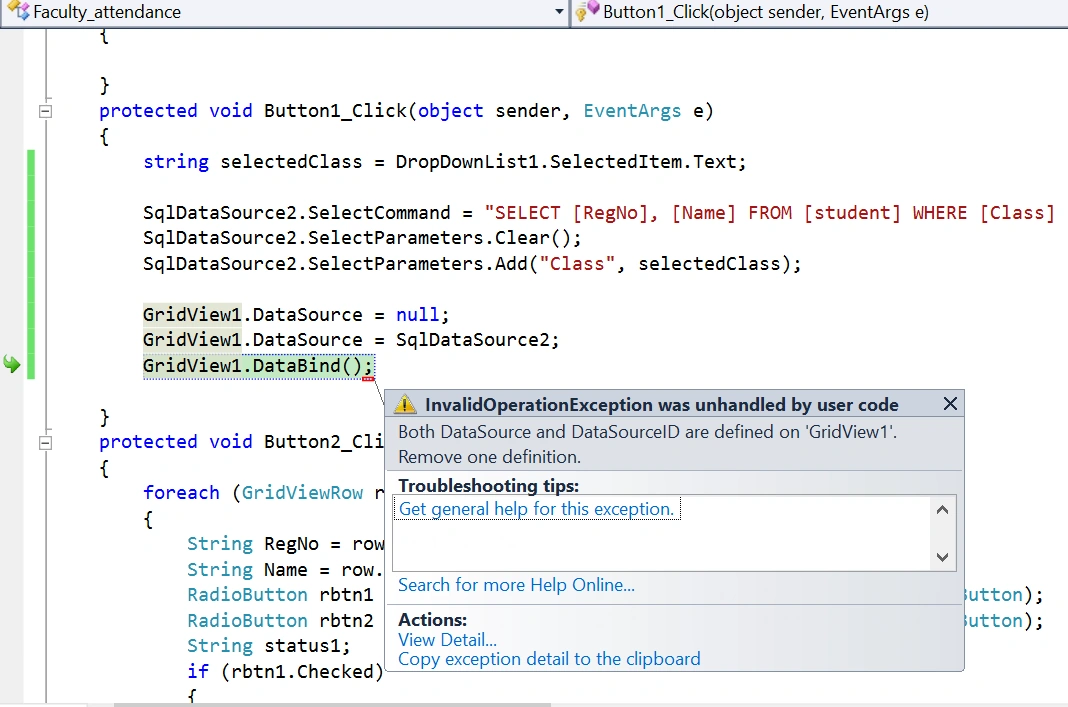
Amit MohantyRank #112 · 20K reputationPosted Apr 12, 2024, 7:39 AM EDT
Remove below lines:
GridView1.DataSource = null; GridView1.DataSource = SqlDataSource2;Sumathi44 reputationPosted Apr 12, 2024, 10:48 AM EDT
Thank you Amit, I am getting the desired output now :)
Jithu ThomasRank #437 · 5.7K reputationPosted Apr 12, 2024, 6:53 AM EDT
I'd be glad to help you with the code for the
Button1_Clickevent in your ASP.NET application to filter the GridView based on the selected class and mark attendance. Here's the improved code:attendance.aspx.cs:
using System;
using System.Collections.Generic;
using System.Linq;
using System.Web;
using System.Web.UI;
using System.Web.UI.WebControls;
using System.Data.SqlClient;
using System.Data;

public partial class Faculty_attendance : System.Web.UI.Page
{
    SqlConnection cn = new SqlConnection("Data Source=DESKTOP-UIGAOQI\\SQLEXPRESS;Initial Catalog=mydb;Integrated Security=True;");

    protected void Page_Load(object sender, EventArgs e)
    {
        if (!IsPostBack) // Only load data on initial page load
        {
            BindDropDown();
        }
    }

    private void BindDropDown()
    {
        // Assuming you have a connection string in your Web.config
        string connectionString = ConfigurationManager.ConnectionStrings["mydbConnectionString"].ConnectionString;
        cn.ConnectionString = connectionString;

        string sql = "SELECT DISTINCT [Class] FROM [student]";
        SqlCommand cmd = new SqlCommand(sql, cn);

        try
        {
            cn.Open();
            SqlDataAdapter adapter = new SqlDataAdapter(cmd);
            DataTable dt = new DataTable();
            adapter.Fill(dt);

            DropDownList1.DataSource = dt;
            DropDownList1.DataTextField = "Class";
            DropDownList1.DataValueField = "Class";
            DropDownList1.DataBind();
            DropDownList1.Items.Insert(0, new ListItem("-- Select Class --", "")); // Add default item
        }
        catch (SqlException ex)
        {
            // Handle database connection or query errors
            Label4.Text = "Error loading classes: " + ex.Message;
        }
        finally
        {
            cn.Close();
        }
    }

    protected void Button1_Click(object sender, EventArgs e)
    {
        string selectedClass = DropDownList1.SelectedValue;

        if (selectedClass != "") // Check if a class is selected
        {
            string connectionString = ConfigurationManager.ConnectionStrings["mydbConnectionString"].ConnectionString;
            cn.ConnectionString = connectionString;

            // Update SqlDataSource2 to filter by class
            string sql = "SELECT DISTINCT [RegNo], [Name] FROM [student] WHERE Class = @Class";
            SqlDataSource2.SelectCommand = sql;
            SqlDataSource2.SelectParameters.Clear();
            SqlDataSource2.SelectParameters.Add(new SqlParameter("@Class", selectedClass));

            SqlDataSource2.DataBind();
            GridView1.DataBind(); // Rebind the GridView
        }
        else
        {
            Label4.Text = "Please select a class to filter.";
        }
    }

    protected void Button2_Click(object sender, EventArgs e)
    {
        // Implement your attendance update logic here
        // ...
    }

    // ... other event handlers
}