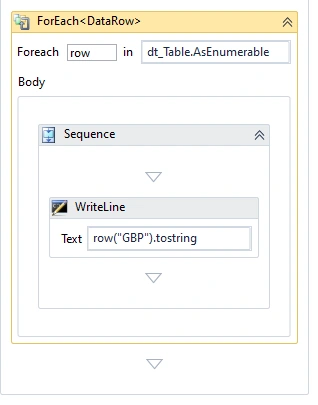
we are using inbuilt system foreachworkflow activity in below image.
but our requirement to not use AsEnumerable after datatable name only we need to pass datatable name but it is expecting AsEnumerable it is system activity how can we modify or how can we create this foreach loop activity in work flow.
if it will modify this is also fine otherwise need to go with create custom loop activity similar this.







Rajkiran SwainRank #165 · 14.4K reputationPosted May 17, 2023, 12:57 AM EDT
If you want to create your own custom foreach activity in a workflow without using the
AsEnumerablemethod on a datatable, you can follow these steps:NativeActivity.Executemethod of theNativeActivityclass.Executemethod, access the input datatable property and loop through its rows.Here's an example of how you can create a custom foreach activity in a workflow using the
NativeActivityclass:using System.Activities; using System.Data; public class CustomForEachActivity : NativeActivity { public InArgument DataTable { get; set; } protected override void Execute(NativeActivityContext context) { // Get the input datatable DataTable dataTable = context.GetValue(this.DataTable); // Perform the custom foreach loop foreach (DataRow row in dataTable.Rows) { // Perform actions on each row // ... // You can access column values using row[columnName] // For example: string value = row["ColumnName"].ToString(); } } }raj rajRank #5,629 · 292 reputationPosted May 17, 2023, 2:26 AM EDT
we want the same foreach box in designer window. is it possible to show?
same body also wants in designer level we want same it is foreach box in workflow c#