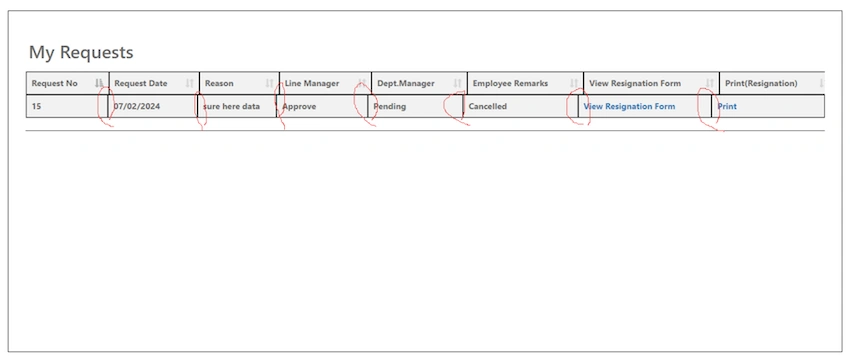
I work on asp.net mvc i notice that cell header width different from width of cell content details
so how to make cell header width and cell details content to be same
I make red marks to columns not have same width header and details
as request date and Dept.Manager columns as examples
I using datat table as below
my code details as below
Python
    My Requests


                    Request No


                    Request Date


                    Reason


                    Line Manager


                    Dept.Manager


                    Employee Remarks

                View Resignation Form
                Print(Resignation)
                Exit Interview


            @foreach (var item in Model.MyRequests)
            {


                        @Html.DisplayFor(modelItem => item.RequestNo)


                        @Convert.ToDateTime(item.ResignationSubmissionDate).ToString("dd/MM/yyyy")


                        @Html.DisplayFor(modelItem => item.Reason)


                        @if (item.LineManagerStatus == "Waiting for Line Manager Approval")
                        {
                            Pending
                        }
                        else if (item.LineManagerStatus == "Rejected by Line Manager")
                        {
                            Rejected
                        }
                        else
                        {
                            @Html.DisplayFor(modelItem => item.LineManagerStatus)
                        }


                        @if (item.DirectManagerStatus == "Waiting for Department Head Approval")
                        {
                            Pending
                        }
                        else if (item.DirectManagerStatus == "Rejected by Head Department")
                        {
                            Rejected
                        }
                        else
                        {
                            @Html.DisplayFor(modelItem => item.DirectManagerStatus)
                        }


                        @if (item.RevokeRequest == "1")
                        {
                            Cancelled
                        }

                        else
                        {

                        }


                        Exit Interview


            }
and on jquery i do as below
JavaScript
  $(document).ready(function () {

      $('#dtbl').DataTable({
          "scrollX": true,
          "pageLength": 10,
          "dom": 't', // Only show the table without search and other elements
          "language": {
              "search": "", // Empty string to remove the search text
              "searchPlaceholder": "" // Empty string to remove the search input
          },
          initComplete: function () {

              $('.buttons-excel, .buttons-pdf, .buttons-print, .buttons-csv, .buttons-copy').remove();

          }
      });
my issue display on image below







Amit MohantyRank #112 · 20K reputationPosted Feb 8, 2024, 12:46 AM EST
Try to use CSS to set fixed widths for your table cells. It's always better to separate your CSS from your HTML.
#dtbl th, #dtbl td { width: auto !important; white-space: nowrap; /* Prevent wrapping */ border: 1px solid black; }My Requests Request No Request Date Reason Line Manager Dept. Manager Employee Remarks View Resignation Form Print(Resignation) Exit Interview @foreach (var item in Model.MyRequests) { @Html.DisplayFor(modelItem => item.RequestNo) @Convert.ToDateTime(item.ResignationSubmissionDate).ToString("dd/MM/yyyy") @Html.DisplayFor(modelItem => item.Reason) @if (item.LineManagerStatus == "Waiting for Line Manager Approval") { Pending } else if (item.LineManagerStatus == "Rejected by Line Manager") { Rejected } else { @Html.DisplayFor(modelItem => item.LineManagerStatus) } @if (item.DirectManagerStatus == "Waiting for Department Head Approval") { Pending } else if (item.DirectManagerStatus == "Rejected by Head Department") { Rejected } else { @Html.DisplayFor(modelItem => item.DirectManagerStatus) } @if (item.RevokeRequest == "1") { Cancelled } Exit Interview }