I work on razor asp.net . I face issue I can't get value of blackprintername on bootstrap model
although I get the values of this property on page model but on razor html not display on input text box Black server Ip or black printer name .
I execute method type function OnGetCheckColors to get black server IP and black printer name but this not happen so why this happen and how to solve this issue
code details
JavaScript
$('#editbootstarp tbody').on('click', 'tr', function () {
    // Get the data from the clicked row
    var rowData = $(this).children('td').map(function () {
        return $(this).text();
    }).get();

    // Set the values of the modal's input fields

    $('#editshelflabelModal #edit-id').val(rowData[0]);

    $('#editshelflabelModal #edit-Location').val(rowData[6]);

    // Show the modal
    $.ajax({
        url: '?handler=CheckColors',
        type: "GET",
        data: { LocationName: rowData[6]},
        success: function (result) {
            $('#editshelflabelModal').modal('show');
            console.log(result);
        },
        error: function (xhr, status, error) {
            console.log(error);
        }
    });
    $('#editshelflabelModal').modal('show');
});
C#
public ActionResult OnGetCheckColors(string LocationName)
{
    List subPrintlist = _IAdcSupportService.GetAvailablePrintersLists(Session.GetString("BranchCodesSelected"), LocationName, "SUB");
    if (subPrintlist != null && subPrintlist.Count > 0)
    {
        foreach (SubPrinters subPrint in subPrintlist)
        {
            if (subPrint.Category == "Red" && subPrint.IsActive)
            {
                Redprintername = subPrint.PrinterName;
                Redserverip = subPrint.PrinterIP;

            }

            else if (subPrint.Category == "Black" && subPrint.IsActive)
            {
                Blackprintername = subPrint.PrinterName;
                Blackserverip = subPrint.PrinterIP;

            }
        }
    }
    return new JsonResult("success");
}
Code
                Hi,@TempData["UserID"]

                    ×


                        Server IP


                        Printer Name


                        Location Name


                                    Black Printer


                                    IP Address


                                    Printer Shared Name
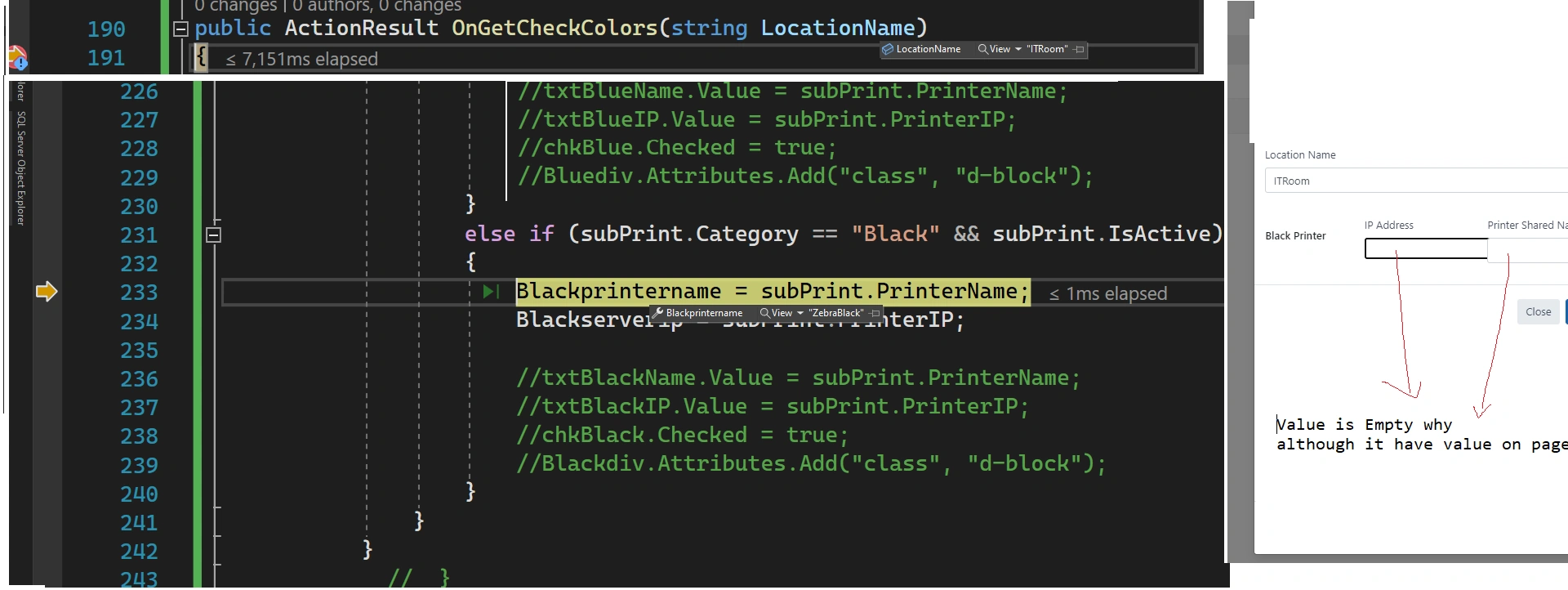
Image for debugging issue as below :







Amit MohantyRank #112 · 20K reputationPosted Jul 2, 2023, 1:38 AM EDT
success: function (result) { // Update the input element with the obtained value $('#txtBlackName').val(result.Blackprintername); // Show the modal $('#editshelflabelModal').modal('show'); },Sachin SinghRank #66 · 26.2K reputationPosted Jul 3, 2023, 9:01 AM EDT
make two changes
1.
public ActionResult OnGetCheckColors(string LocationName)
{
    List subPrintlist = _IAdcSupportService.GetAvailablePrintersLists(Session.GetString("BranchCodesSelected"), LocationName, "SUB");
    if (subPrintlist != null && subPrintlist.Count > 0)
    {
        foreach (SubPrinters subPrint in subPrintlist)
        {
            if (subPrint.Category == "Red" && subPrint.IsActive)
            {
                Redprintername = subPrint.PrinterName;
                Redserverip = subPrint.PrinterIP;

            }

            else if (subPrint.Category == "Black" && subPrint.IsActive)
            {
                Blackprintername = subPrint.PrinterName;
                Blackserverip = subPrint.PrinterIP;

            }
        }
    }
    return new JsonResult(new {Redprintername =Redprintername ,Blackprintername =Blackprintername } );
}
2.
success: function (result) {

    $('#txtBlackName').val(result.Blackprintername);
    $('#txtRedName').val(result.Redprintername);
    $('#editshelflabelModal').modal('show');
},
Note:- Why does property binding not affect:- because you are using ajax, so even though it is working you can't see the changes because the page is not refreshed when we use ajax. So when using ajax , you need to explicitely set the values.