
Google's Gemini Robotics team announced Gemini 4 Hydrogen and a new Robotics plugin for Google Antigravity on November 17, 2026. The release combines a faster Gemini model with tools for bringing up a robot arm, building a MuJoCo simulation, and controlling the physical robot through plain-language prompts.
Key takeaways
Gemini 4 Hydrogen is now available for robot-control and spatial-reasoning workloads through Google Antigravity, the Gemini API, and Google AI Studio.
The Antigravity Robotics plugin can install drivers, find cameras, calibrate supported arms, test motion, and create robot-control applications.
Google says a demonstrated I2RT YAM arm moved from USB connection to calibration in about 10 minutes.
The independent AA-Robotics v0.1 benchmark lists Gemini 4 Hydrogen with a score of 58 for eight real-world tabletop robot tasks.
Developers need a paid Google AI Pro or Ultra subscription to use Google Antigravity, while API usage has separate token pricing.
What Google released for robotics developers
Gemini 4 Hydrogen is Google's fast general-purpose Gemini 4 model. Google introduced the broader model on November 12, 2026, positioning it for coding and agentic workflows, then announced its robotics use case and Antigravity plugin five days later.
For a beginner, the important point is simple: a language model normally answers questions or writes code, while this setup is intended to help it see a camera feed, plan a physical task, generate control code, run that code, and adjust based on what the robot sees. Google calls that closed-loop perception and control.
The new plugin turns Antigravity into a robotics workbench, according to Google. It groups several hard setup tasks that developers usually have to connect by hand: device drivers, cameras, calibration, simulation, perception, robot control, and an application interface.
How the Robotics plugin works
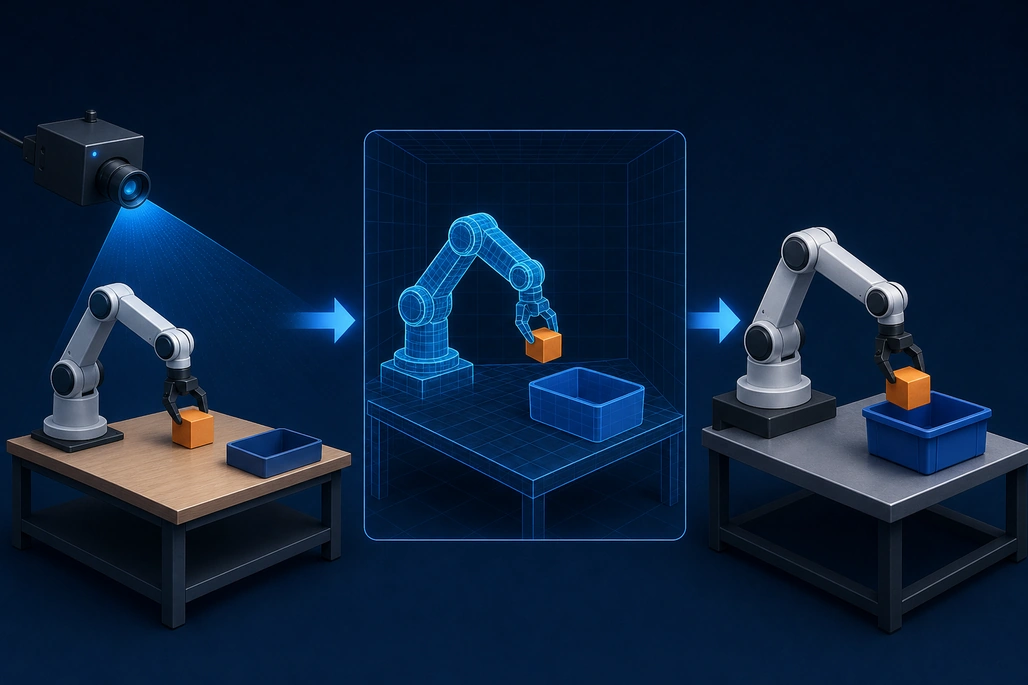
The plugin is designed to connect setup, simulation, and physical robot control in one workflow.
The plugin has four main parts. Robot bring-up handles the first connection to the arm. It installs required software, discovers cameras, calibrates the arm, and verifies that motion is safe before the developer starts a task.
Its MuJoCo integration creates a simulated version of the robot workspace inside Antigravity. MuJoCo is a physics simulator used to model how objects and robots move. A developer can use a prompt, a workspace photo, an uploaded asset, or a linked document to create and adjust that scene before sending commands to the real arm.
The remaining parts cover perception and application building. Google says Hydrogen can identify objects, plan grasps, and control the arm in a feedback loop. It can also generate the controller and simulation code for a real-to-sim-to-real workflow, where developers first test a task in simulation and then run it on the physical machine.
Plugin capability | What it means for a beginner |
|---|---|
Robot bring-up | Connect an arm and camera, then use the plugin to install, detect, calibrate, and test the hardware. |
MuJoCo simulation | Build a virtual work area and test reaching or grasping before the arm moves near real objects. |
Perception and control | Use camera input so the model can locate an object and guide a robot action. |
Application building | Generate the software around the task, including controller logic and the simulation setup. |
Google's demonstrations and benchmark result
Google demonstrated the setup with an I2RT YAM arm and external depth camera. In the company demonstration, the arm was calibrated and ready for tasks in about 10 minutes after being connected to a laptop. Google also showed flows for the SO-ARM101 and FR3 Duo arms.
Google's examples include making an arm wave, picking up a pen, stacking snacks, sorting snacks from a moving conveyor, packing soap orders with two arms, and playing chess. These are demonstrations, not a promise that every robot, workspace, or task will work in the same time.
For a published comparison, the AA-Robotics v0.1 benchmark lists Gemini 4 Hydrogen at 58. The benchmark, published by Artificial Analysis, tests models controlling a six-axis Hiwonder NexArm across eight everyday tabletop tasks through cameras and a simple HTTP API. Google says Hydrogen's score is similar to Gemini 4 Argon's result while costing less per token.
Google also says Hydrogen outperforms its Gemini Robotics ER 2 model on the public ERQA spatial-reasoning benchmark. ERQA measures tasks such as relating views from different cameras and reasoning about a three-dimensional path. Developers already using Gemini Robotics ER 2 should test Hydrogen against their own camera setup and robot before switching production work.
Availability, pricing, and how to start
To use the Robotics plugin, Google says developers should select the gemini-4-hydrogen model in Google Antigravity, open Customizations, and search for Robotics in the Build With Google shelf. Antigravity access requires a paid Google AI Pro or Google AI Ultra subscription.
Developers who want to build their own integration can use gemini-4-hydrogen through the Gemini Interactions API. Google says the model has day-one support in the google-genai SDKs, while Google AI Studio supports spatial prompts, live camera streams, and structured tool calls in the browser.
Google's November 12 launch announcement lists Gemini 4 Hydrogen at $1.50 per 1 million input tokens and $7.50 per 1 million output tokens across a 1 million-token context window. The current Gemini Developer API pricing documentation should be checked before a deployment because API pricing and plan availability can change.
What developers should watch before using it
A robot arm can cause damage or injury if it receives incorrect commands. Google says the plugin verifies safe motion during bring-up, but developers remain responsible for the physical workspace. Start at low speed, keep people outside the operating area, use an emergency stop, and test with clear space around the arm.
The announcement does not provide a complete public compatibility list, hardware prices, or a general availability timeline for every robot brand. It shows I2RT YAM, SO-ARM101, and FR3 Duo examples, but a developer should confirm that a specific arm, gripper, camera, operating system, and driver stack are supported before buying hardware.
For a first project, Google suggests a prompt such as Bring up my SO-101 arm and make it wave. That is a sensible starting point because it tests connection, calibration, movement, and basic control before a developer tries grasping, conveyors, or a multi-arm workflow.
Based on reporting by developers.googleblog.com, Google Blog, Ridge, Artificial Analysis and Google AI for Developers.




Sarthak VarshneyTOP 100editedPosted Nov 23, 2026, 11:04 AM ESTEdited Nov 23, 2026, 12:07 PM EST
Well explained