
Google announced Gemini 4 Neon on November 18, 2026, a Gemini 4 model for complex coding, document analysis, research, and agent workflows. It is rolling out through the paid Gemini API in Google AI Studio, Gemini for business, Google Antigravity, and the Gemini app for Google AI Pro and Ultra subscribers.
Key takeaways
Gemini 4 Neon has a 1 million-token context window and accepts text, images, audio, and video as input.
Google lists pricing at $3 per million input tokens, $0.15 per million cached input tokens, and $15 per million output tokens.
Developers can use Neon through the paid Gemini API in Google AI Studio and Android Studio.
Independent benchmark trackers place Neon near the top of several model rankings, though results and cost vary by test and thinking level.
Google says a cyber-focused version will reach eligible Fairwind Program defenders in the coming days.
What Google launched on November 18
Gemini 4 Neon is positioned between the other Gemini 4 models. Google describes Hydrogen as the model for fast everyday work and Carbon as the option for its hardest, long-running projects. Neon is the middle choice for teams that need deeper reasoning than a quick task, but want to control time and token spending.
A context window is the amount of material a model can consider in one request. Neon has a 1 million-token context window, which Google says can combine inputs such as spreadsheets, PDFs, charts, audio, and video. For a beginner, that means you could provide a large set of project documents and ask for one structured output, such as a summary, issue list, or implementation plan.
Google also offers four thinking levels for Neon: low, medium, high, and xhigh. Higher levels ask the model to spend more work on multi-step reasoning. That can help with difficult debugging or analysis, but it can also increase wait time and token use.
Item | Gemini 4 Neon details |
|---|---|
Release date | November 18, 2026 |
Context window | 1 million tokens |
Input price | $3 per million tokens |
Cached input price | $0.15 per million tokens |
Output price | $15 per million tokens |
Thinking levels | low, medium, high, xhigh |
Inputs | Text, image, speech, and video |
Output | Text |
How developers can use Gemini 4 Neon
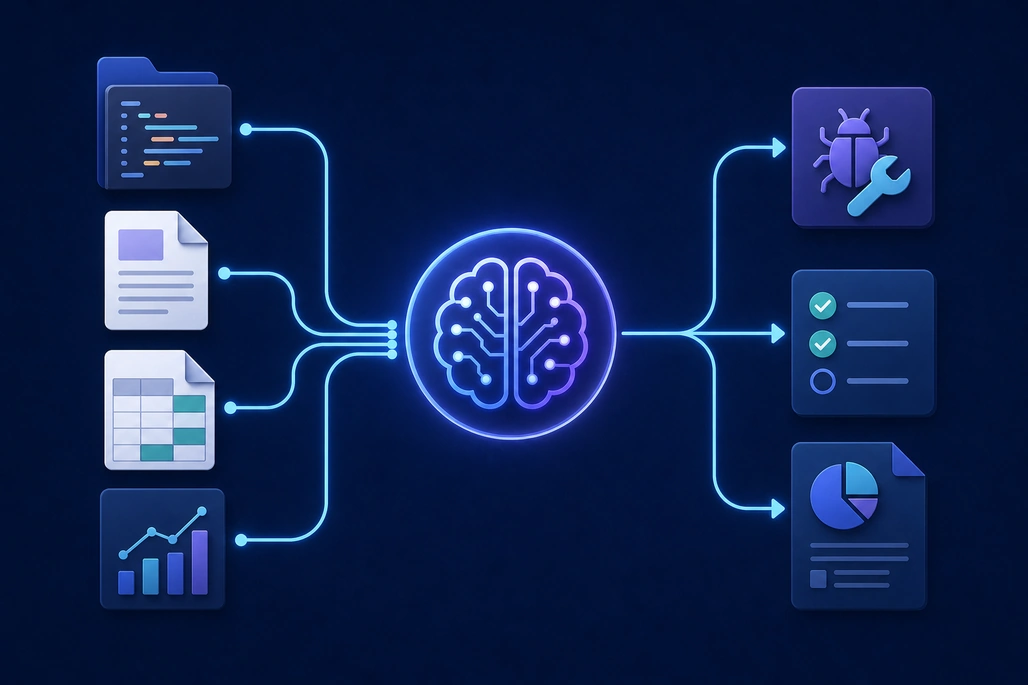
A large context window can combine several types of project material in one request.
For developers, Google says Neon is available on the paid Gemini API tier in Google AI Studio and Android Studio. It is also available in Gemini for business through the API or model selector. Google AI Pro and Ultra subscribers can use it in Google Antigravity, and Pro and Ultra subscribers can select it from the model menu in the Gemini app.
That split matters. API access is for applications and automated workflows. The Gemini app is for direct use by an individual. Antigravity is Google’s environment for longer-running agent work, where a model can use tools and work through a task over multiple steps.
Google says Neon is intended for repository-scale coding work such as multi-file debugging and refactoring. It also says the model can act as an orchestrator that directs parallel Hydrogen subagents in Antigravity. Beginners should start with a smaller task, such as asking the model to explain an error, review a pull request, or turn a requirements document into a list of development tasks.
Do not give an AI model secrets, production credentials, or customer data unless the organization has approved that use and the relevant controls are in place. Review code before merging it, run tests, and verify any factual output that affects a customer, a contract, a financial decision, or a security fix.
Independent benchmarks show strong scores and tradeoffs
Google reported that Neon scored 61 on the Artificial Analysis Intelligence Index at the xhigh thinking level. Artificial Analysis lists the same score, but ranks the xhigh configuration sixth out of 96 models in its broader listing. Its page also reports an average 21.5 minutes per Intelligence Index task at xhigh and an estimated $6.44 cost per task.
Those details are useful because they add context to a benchmark score. A high score does not mean every task will be fast or cheap. Artificial Analysis says Neon is notably slow per task at xhigh and generates far more output tokens than the median model it compares. Teams should test the high and medium settings with their own prompts before making a cost or latency decision.
Vals AI evaluated Neon at 70.87% on its Vals Index and ranked it second among 42 models as of November 18, 2026. Vals reported a $7.40 cost per test for that index. It also ranked Neon first on its Legal Research Bench and Tax Agent Bench, while its broader results show that rankings change across finance, science, coding, and legal tests.
Benchmark results are signals, not guarantees. They use defined tasks, specific settings, and particular tool setups. A .NET team that wants code review help should test Neon against its own repository structure, build process, test suite, and security rules.
Safety and cybersecurity access
Google says Neon includes the Gemini 4 family’s safeguards against severe misuse and indirect prompt injection. Prompt injection is when hostile instructions are hidden in content that an AI system reads, such as a web page, email, document, or code file, in an attempt to make the system ignore its intended task.
Google also announced Gemini 4 Neon for cyber, a version for vulnerability finding, validation, and patching workflows. Access is not broadly available at launch. Google says eligible members of its Fairwind Program will begin receiving access in the days after the November 18 announcement, and organizations must contact their Google Cloud account team to request access.
Google has not published model weights for Neon. It is a proprietary model, so developers use it through Google’s services rather than downloading and running the model themselves.
What beginners should do next
Start by deciding which access path matches the job. Use the Gemini app if you need help understanding a document, planning a feature, or explaining code. Use the API if you are building a product feature, internal tool, or repeatable workflow. Use a lower thinking level for simple work, then compare it with high or xhigh only when the task needs more careful multi-step reasoning.
Track input, cached input, and output tokens in your tests. Neon’s output tokens cost more than its input tokens, so a prompt that produces long reports or repeated reasoning can cost more than expected. Set clear output limits, keep requests focused, and measure real results before moving a workflow into production.
Based on reporting by Google, Google DeepMind, Artificial Analysis and Vals AI.



Sarthak VarshneyTOP 100Posted Nov 24, 2026, 9:29 AM EST
Thanks for sharing
Baibhav KumarTOP 100Posted Nov 20, 2026, 12:42 AM EST
Very helpful