

ASP.NET MVC : Working With Helper Methods
In this article, we will implement the HTML custom helper methods. This facility allows developers to define the UI as needed by their business requirements.
Task 1: Open VS2010 and create a new MVC 3 application, name it "RAZOR_MVC3_Html_Helper_Methods". In this project add a new Folder, name it "HelperMethodsRepository".
Task 2: In the Model folder add a new class file, name it "DataClasses.cs" and add a classes as in the following:
- using System;
- using System.Collections.Generic;
- using System.Linq;
- using System.Web;
- namespace RAZOR_MVC3_Html_Helper_Methods.Models
- {
- public class Person
- {
- public int PersonId { get; set; } public string PersonName { get; set; }
- }
- public class PersonList : List<Person>
- {
- public PersonList()
- {
- Add(new Person() { PersonId = 101, PersonName = "Mahesh Joshi"});
- Add(new Person() { PersonId = 102, PersonName = "Tejas Joshi" });
- Add(new Person() { PersonId = 103, PersonName = "Leena Joshi" });
- Add(new Person() { PersonId = 104, PersonName = "Rahul Patil" });
- Add(new Person() { PersonId = 105, PersonName = "Anagha Patil"});
- }
- }
- }
Task 3: In the folder "HelperMethodsRepository" add a new class file, name it "MyHtmlHelperExtensionClass.cs". This file will contain a HTML helper extension class. Implement it as below:
- using System;
- using System.Collections.Generic;
- using System.Linq;
- using System.Web;
- using System.Web.Mvc;
- using RAZOR_MVC3_Html_Helper_Methods.Models;
- using System.Collections;
- using System.Reflection;
- namespace RAZOR_MVC3_Html_Helper_Methods.HelperMethodsRepository
- {
- public static class MyHtmlHelperExtensionClass
- {
- private const string Nbsp = " ";
- private const string SelectedAttribute = "
- selected='selected'";
- /// <summary>
- /// Html Helper method for the Specific Collection
- /// </summary>
- /// <param name="helper"></param>
- /// <param name="per"></param>
- /// <returns></returns>
- public static MvcHtmlString ListData(this HtmlHelper helper,PersonList per)
- {
- MvcHtmlString resultString = null; string renderedResult = string.Empty; foreach (var item in per)
- {
- renderedResult += "<table><tr><td>" + item.PersonId + "</td> <td>" + item.PersonName + "</td></tr></table>";
- }
- resultString = new MvcHtmlString(renderedResult); return resultString;
- }
- }
- }
The method "ListData" is an extension method for the HtmlHelper class. This returns a "MvcHtmlSting" that contains a HTML Table with Person data in it.
Task 4: Build the project and ensure that it is error free.
Task 5: Add a new PersonController in the project in the Controller Project and add a constructor and an Index action as in the following:
- using System;
- using System.Collections.Generic;
- using System.Linq;
- using System.Web;
- using System.Web.Mvc;
- using RAZOR_MVC3_Html_Helper_Methods.Models;
- namespace RAZOR_MVC3_Html_Helper_Methods.Controllers
- {
- public class PersonController : Controller
- {
- PersonList personList;
- public PersonController()
- {
- personList = new PersonList();
- }
- //
- // GET: /Person/
- public ActionResult Index()
- {
- return View(personList);
- }
- }
- }
Task 6: Now generate an "Empty" Scaffold "Index" view from the person controller with "PersonList" as Model class as in the following: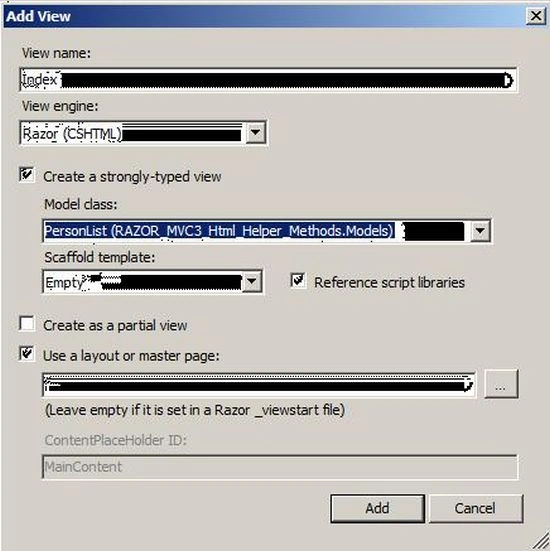
Task 7: An Empty View will be generated. Add the following code in an Empty view:
- @model RAZOR_MVC3_Html_Helper_Methods.Models.PersonList
- @{
- ViewBag.Title = "Index";
- }
- <h2>Index</h2>
- <br /> <br /> <br /> <br />
My New Extension Method to Display Data
@Html.ListData(Model)
The preceding markup shows that the ListData method is called using an object of the HtmlHelper class.
Task 8: In "_Layout.cshtml" add an ActionLink for the newly added Index page "menucontainer" div tag as in the following:
<li>@Html.ActionLink("Person", "Index", "Person")</li>
Task 9: Run the application, you will get the Person Tab. Click on it, and get the result.
Join the conversation! Your thoughts help the community grow.