
In almost every Power Platform implementation, one requirement appears sooner or later:
"Where should we store documents?"
At first glance, the answer seems straightforward—store documents in Dataverse. However, experienced architects know that document management is much more than simply uploading files. The right approach depends on factors such as scalability, storage costs, security, collaboration requirements, retention policies, and long-term maintainability.
This article explores the most common document management approaches in Dataverse, their advantages and limitations, and when each option should be used.
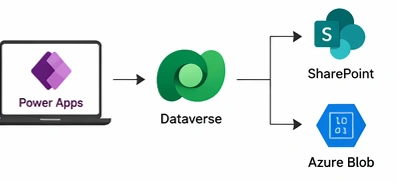
Option 1: Dataverse Notes (Annotation Table)
The Annotation table, commonly known as Notes, is one of the simplest ways to store documents in Dataverse.

How It Works
When a user uploads a file from Power Apps:
A Note record is created.
The file is stored as Base64 content.
The Note is linked to the business record.
Users can access documents directly from the related record.
Typical Use Cases
Small attachments
Approval workflows
Internal business applications
Supporting documents
Advantages
✅ Quick implementation
✅ Native Power Apps support
✅ No external repository required
✅ Inherits Dataverse security
✅ Easy retrieval from related records
Limitations
❌ Storage consumption increases rapidly
❌ Not ideal for large repositories
❌ Limited document management capabilities
❌ No advanced version control
Recommended When
Use Notes when:
Files are relatively small
Document volume is low
Fast implementation is required
Enterprise document management features are not needed
Option 2: Dataverse File Columns
Microsoft introduced File Columns to provide a more modern and structured approach to storing files within Dataverse.
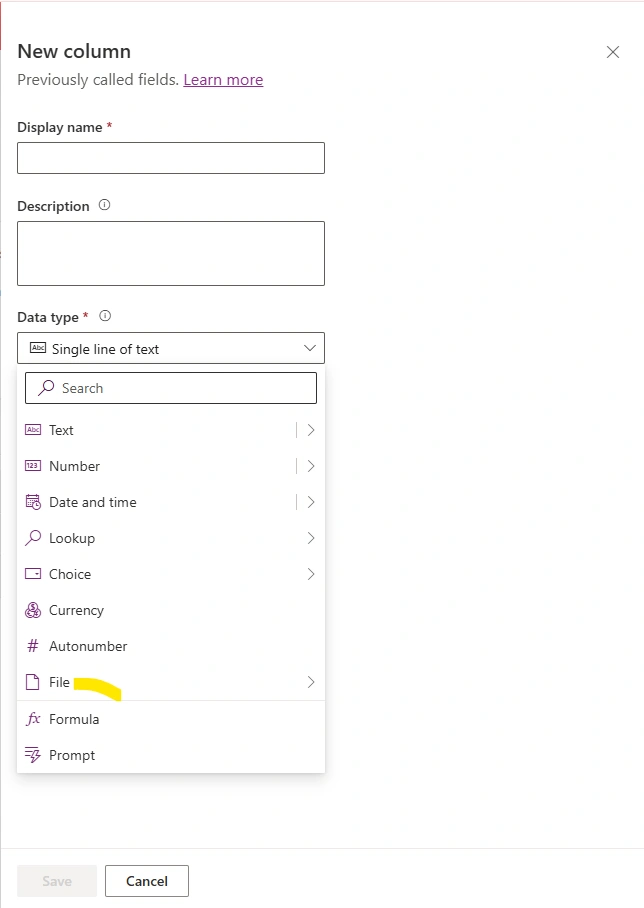
How It Works
A file column is added directly to a Dataverse table.
Examples
Contract Document
Employee Resume
Customer Certificate
Product Specification
The uploaded file is stored directly within the record.
Advantages
✅ Native Dataverse capability
✅ Better user experience
✅ Simple implementation
✅ Reduced custom development effort
✅ Secure storage
Typical Use Cases
Contracts
Certificates
Customer Documents
Employee Records
Product Documentation
Limitations
❌ Storage costs can increase significantly
❌ Capacity planning is required
❌ Not ideal for massive repositories
Recommended When
Use File Columns when:
Files belong directly to a business record
Volume is moderate
Dataverse-centric architecture is preferred
SharePoint integration is not required
Option 3: SharePoint + Dataverse (Enterprise Best Practice)
For most enterprise applications, this is the preferred architecture.
Instead of storing files in Dataverse, organizations store document metadata in Dataverse and actual files in SharePoint.
Architecture

Store in Dataverse
Document Name
Document Type
Upload Date
Status
Owner
SharePoint URL
Business Reference ID
Store in SharePoint
Actual Documents
Large Files
Version History
Comments
Collaboration Information
Advantages
✅ Lower storage costs
✅ Built-in version control
✅ Document sharing
✅ Co-authoring support
✅ Enterprise-ready governance
✅ Better scalability
✅ Document lifecycle management
Typical Enterprise Scenario
For a Purchase Order Application
Dataverse stores:
PO Number
Requestor
Vendor
Status
Document Links
SharePoint stores
Quotation
Contract
Statement of Work
Approval Documents
Recommended When
Use SharePoint + Dataverse when:
Building enterprise applications
Document collaboration is required
Version history is important
Storage optimization is a priority
This is the architecture used by many large organizations because it provides an excellent balance between functionality and cost.
Option 4: Azure Blob Storage + Dataverse
For large-scale enterprise solutions, Azure Blob Storage is often the preferred option.
Architecture

Store in Dataverse
File Name
Blob URL
Category
Status
Owner
Upload Date
Store in Azure Blob
Actual Files
Media Files
Archived Documents
Historical Data
Advantages
✅ Extremely scalable
✅ Cost-effective for large volumes
✅ Supports millions of files
✅ Global availability
✅ Advanced integration capabilities
✅ Long-term archival support
Typical Use Cases
Insurance documents
Loan applications
Enterprise archives
High-volume customer uploads
Regulatory document repositories
Recommended When
Use Azure Blob Storage when:
File volumes are very large
Long-term storage is required
Cost optimization is critical
Large file support is needed

Join the conversation! Your thoughts help the community grow.