

Introduction
Kendo MultiSelect is one of the widgets from Kendo UI package. This article explains how to implement the add new Item functionality in Kendo MultiSelect control, using ASP.NET WEB API and Entity Framework. To explain it, I have created a RESTful GET Service, using ASP.NET WEB API, which is used to load the DataSource of Kendo MultiSelect.
Prerequisites
Basic knowledge of ASP.NET Web API, jQuery and Kendo UI.
Content
- Creating an ASP.NET WEB API Application.
- Creating a Model.
- Creating a Context in an Entity Framework.
- Creating a Controller.
- Adding a new item in Kendo MultiSelect control.
Creating an ASP.NET Web API Application
Create a Web API Application, using an installed Web template in Visual Studio, as shown below. In my case, I named the Application “KendoMultiSelect”.
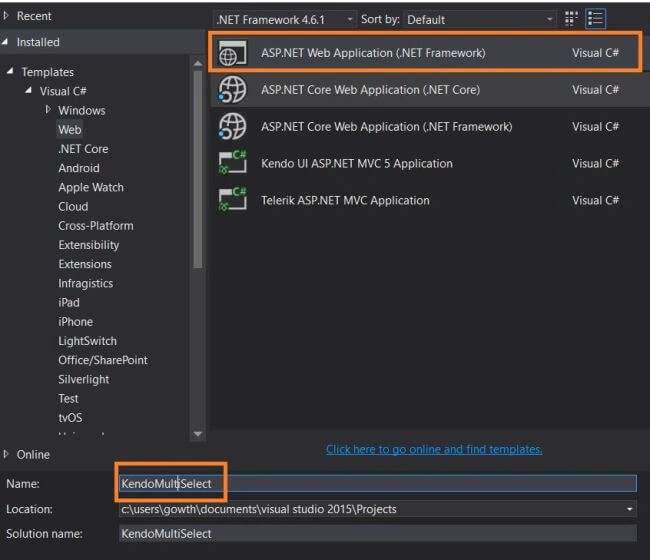
Figure 1
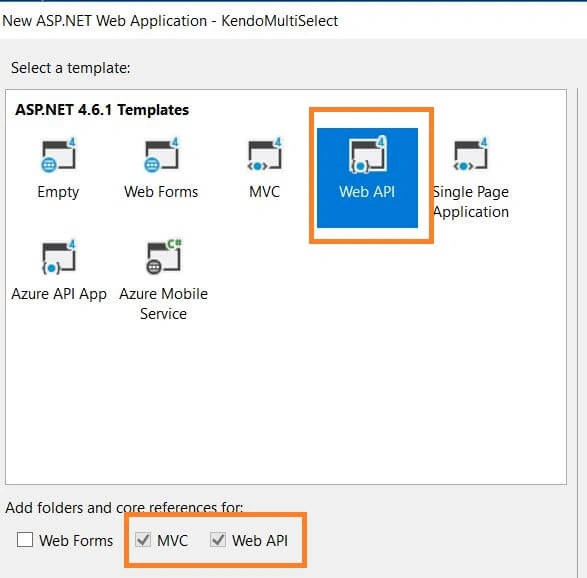
Figure 2
Creating a Model
In Solution Explorer, right click the Models folder, select Add, followed by class and name it as Technology.cs.
Technology.cs
- public class Technology
- {
- [Key]
- [DatabaseGenerated(DatabaseGeneratedOption.Identity)]
- public int Value { get; set; }
- public string Text { get; set; }
- }
Creating a context
Create a new folder in the project and name it as DAL . Right click on DAL folder, add new class and name it as TechnologyContext.cs, which is given below.
Create a new folder in the project and name it as DAL . Right click on DAL folder, add new class and name it as TechnologyContext.cs, which is given below.
- public class TechnologyContext:DbContext
- {
- public TechnologyContext()
- : base("TechnologyConnection")
- {
- Database.SetInitializer<TechnologyContext>(new CreateDatabaseIfNotExists<TechnologyContext>());
- }
- public DbSet<Technology> Technologies { get; set; }
- }
- <connectionStrings>
- <add name="TechnologyConnection" connectionString="Data Source=DESKTOP-585QGBN;Initial Catalog=Employee;Integrated Security=True" providerName="System.Data.SqlClient" />
- </connectionStrings>
Right click on the Controller folder and add a new Web API 2- Empty controller, as shown in the figure 3. In my case, I named it as TechnologiesController.
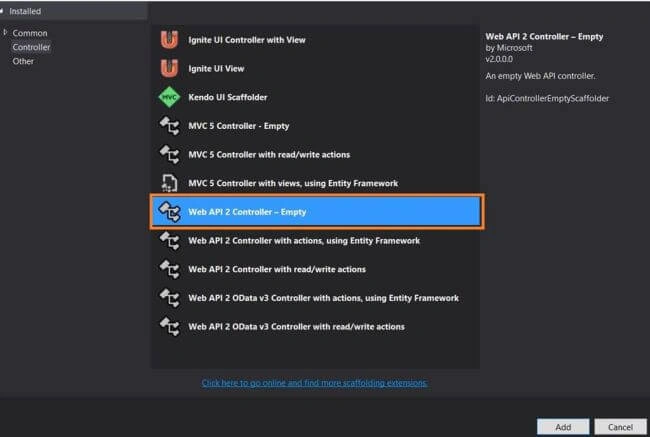
Figure 3
TechnologiesController.cs
- using System.Linq;
- using System.Web.Http;
- using System.Web.Http.Description;
- using KendoMultiSelect.DAL;
- using KendoMultiSelect.Models;
- namespace KendoMultiSelect.Controllers
- {
- public class TechnologiesController : ApiController
- {
- private TechnologyContext db = new TechnologyContext();
- // GET: api/Technologies
- public IQueryable<Technology> GetTechnologies()
- {
- return db.Technologies;
- }
- // POST: api/Technologies
- [ResponseType(typeof(Technology))]
- public IHttpActionResult PostTechnology(Technology technology)
- {
- if (!ModelState.IsValid)
- {
- return BadRequest(ModelState);
- }
- db.Technologies.Add(technology);
- db.SaveChanges();
- return CreatedAtRoute("DefaultApi", new { id = technology.Value }, technology);
- }
- protected override void Dispose(bool disposing)
- {
- if (disposing)
- {
- db.Dispose();
- }
- base.Dispose(disposing);
- }
- }
- }
Remote data binding in Kendo MultiSelect control and adding a new item
Create a new HTML page in our Application. In my case, I named it as kendoMultiSelect.html
KendoMultiSelect.html
- <!DOCTYPE html>
- <html>
- <head>
- <title>Kendo Multi Select</title>
- <meta charset="utf-8" />
- <link rel="stylesheet" href="http://kendo.cdn.telerik.com/2017.1.118/styles/kendo.common.min.css">
- <link rel="stylesheet" href="http://kendo.cdn.telerik.com/2017.1.118/styles/kendo.rtl.min.css">
- <link rel="stylesheet" href="http://kendo.cdn.telerik.com/2017.1.118/styles/kendo.default.min.css">
- <link rel="stylesheet" href="http://kendo.cdn.telerik.com/2017.1.118/styles/kendo.mobile.all.min.css">
- <script src="http://code.jquery.com/jquery-1.12.3.min.js"></script>
- <script src="http://kendo.cdn.telerik.com/2017.1.118/js/angular.min.js"></script>
- <script src="http://kendo.cdn.telerik.com/2017.1.118/js/jszip.min.js"></script>
- <script src="http://kendo.cdn.telerik.com/2017.1.118/js/kendo.all.min.js"></script>
- </head>
- <body>
- <h3> Kendo Multi Select</h3>
- <div class="demo-section k-content">
- <select id="technologies" data-placeholder="Select Technology..."></select>
- </div>
- <script id="noDataTemplate" type="text/x-kendo-template">
- <div>
- No data found. Do you want to add new item - '#: instance.input.val() #' ?
- </div>
- <br />
- <button class="k-button" onclick="addNew('#: instance.element[0].id #', '#: instance.input.val() #')">Add new item</button>
- </script>
- <script>
- $(document).ready(function () {
- var dataSource = new kendo.data.DataSource({
- transport: {
- read: {
- url: "api/Technologies",
- dataType: "json"
- },
- create: {
- url: "api/Technologies",
- type:"POST",
- dataType: "json",
- parameterMap: function(options, operation) {
- if (operation !== "read" && options.models) {
- return {models: kendo.stringify(options.models)};
- }
- }
- },
- },
- schema: {
- model: {
- id: "Value",
- fields: {
- Value: { type: "number" },
- Text: { type: "string" }
- }
- }
- }
- });
- $("#technologies").kendoMultiSelect({
- filter: "startswith",
- dataTextField: "Text",
- dataValueField: "Value",
- dataSource: dataSource,
- noDataTemplate: kendo.template($("#noDataTemplate").html())
- });
- });
- function addNew(widgetId, value) {
- var widget = $("#" + widgetId).getKendoMultiSelect();
- var dataSource = widget.dataSource;
- if (confirm("Are you sure?")) {
- dataSource.add({
- Value: 0,
- Text: value
- });
- dataSource.one("requestEnd", function (args) {
- if (args.type !== "create") {
- return;
- }
- var newValue = args.response[0].Value;
- dataSource.one("sync", function () {
- widget.value(widget.value().concat([newValue]));
- });
- });
- dataSource.sync();
- }
- }
- </script>
- </body>
- </html>
- The no Data template is created, where the respective HTML template will render, if there is no item in Kendo MultiSelect, which we have discussed in my previous article.
- In the no data template, we have the Add new item button, while clicking on it; it will fire the addNew function, which will call the POST API to insert the newly entered record.
Result in Browser
Initially, there is no record in our Kendo MultiSelect control to display.
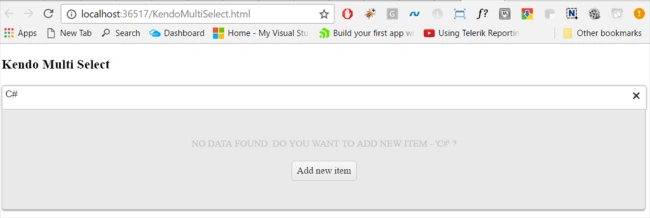
Figure 4
Enter some text in the control. In my case, I entered C#, which is not in the list, so it will render the no data template. Now, click Add new item button to add C# in the list and you will get the confirmation alert. Click OK to save the text.
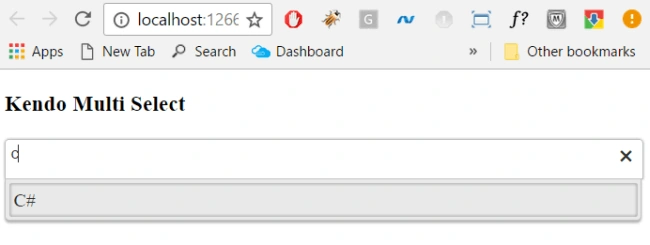
Now, C# is added successfully in the list
Figure 5
Updated SQL table
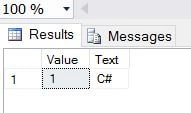
Figure 6
Reference
- http://docs.telerik.com/kendo-ui/api/javascript/ui/multiselect
I hope, you have enjoyed this article. Your valuable feedback, questions or comments about this article are always welcome.
Join the conversation! Your thoughts help the community grow.