
When creating a new web application in SharePoint Server 2013 we need to add a content database name to create a new content database for the specific web application.
SharePoint 2013 Central Admin
SharePoint 2013 by default creates only one new content database for the new web application, the newly created content database consists of site collection information that has the single content database. In SharePoint 2013 using Central Administration we can create a new multiple-content database for an existing web application. Let's start to create new a content database using Central Administration.
The following is the procedure to create/add a new content database with the selected web application.s
1. Open SharePoint Central Administration
Under Central Administration select "Application Management" and click on the "Manage Content Databases" Tab.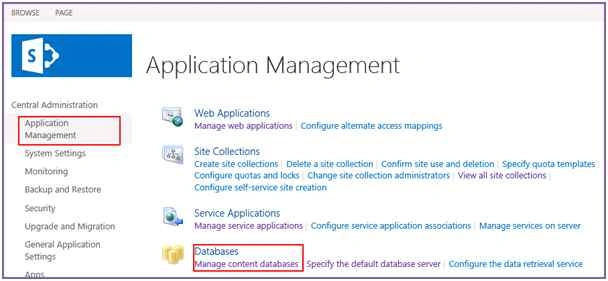
2. "Manage Content Databases" displays all the content databases in the application. By default it shows one content database for the selected web application (http://...:4444/"). To change the web application click on web application – http://...:4444/ and click on Change web application then a new web page dialog box opens that displays all the new web applications. Select the web application to create multiple content databases for, select http://.....:4444/.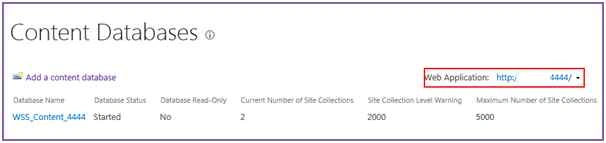

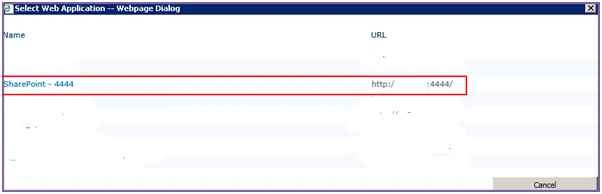
3. After selecting the web application, click on Add a new content database as in the following: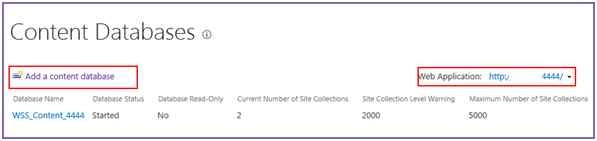
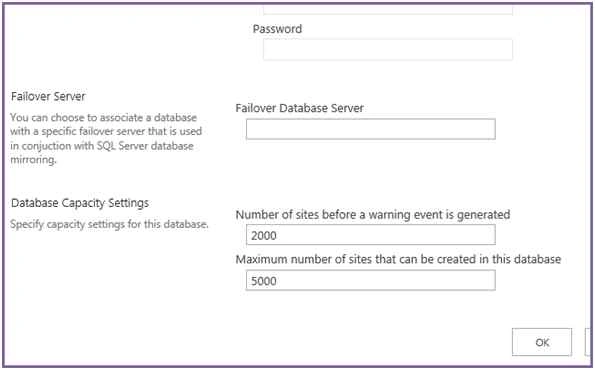
After clicking on Add a new content database a new window opens that displays all the information about the database name, web application and database capacity. Fill in all the appropriate information and click on OK. 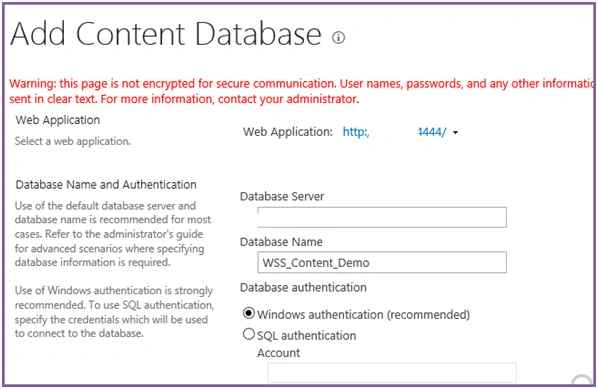
The following shows the two content databases in which the new and default databases were successfully something for the selected web application. 
In this way we can add multiple content databases for a single web application.
If you click on the selected database a new window opens with "Manage Content Database Settings" .
When the user creating the new site collection does something we need to select the status "Ready or "Offline" for the content database. If the status of the Offline Site collection does not belong to that content database and if the status "Ready" of the new site collection belongs to the selected content database then something and something.
Add New Content Database in SharePoint 2013
This article shows how to add a new Content database in SharePoint Web applications.


Rajeesh MenothPosted Aug 30, 2015, 8:32 PM EDT
Nice Share
Sibeesh VenuTOP 100Posted Aug 29, 2015, 9:14 PM EDT
Nice Share
Santhakumar MunuswamyPosted Aug 29, 2015, 12:26 AM EDT
Good article. Thanks for sharing
Yashwanth MuthineniPosted Aug 28, 2015, 11:09 PM EDT
Nice Share
Mohammed IbrahimPosted Aug 28, 2015, 9:50 PM EDT
nice
Gopi ChandPosted Aug 28, 2015, 7:40 PM EDT
Nice one
Karthikeyan KPosted Aug 28, 2015, 5:14 PM EDT
Good one sir nice explain...Thanks for sharing
Gowtham KTOP 100Posted Aug 28, 2015, 4:56 PM EDT
Good one
Pankaj Kumar ChoudharyTOP 100Posted Aug 28, 2015, 4:24 PM EDT
Nice Explain Sumit Sir..........