

Introduction
In this article I will explain Ajax Live Search in PHP. Ajax can be used for more user-friendly and interactive searches. Here this example will demonstrate a live search wherein you get the result while you enter or type in the text box. The live searches have many benefits compared with traditional searches.
- Results appear as you type.
- Results are narrowed as you continue typing.

The results are found in an XML file. This article is simply for live searches and only six results are available.
Example
This is a HTML file. When the user types a character in the input field, the function "showoutput()" is executed. This function is triggered by the "onkyey" event.
<html>
<head>
<script>
function showoutput(str) {
if (str.length == 0) {
document.getElementById("livesearch").innerHTML = "";
document.getElementById("livesearch").style.border = "0px";
return;
}
if (window.XMLHttpRequest) {
xmlhttp = new XMLHttpRequest();
}
else {
xmlhttp = new ActiveXObject("Microsoft.XMLHTTP");
}
xmlhttp.onreadystatechange = function () {
if (xmlhttp.readyState == 4 && xmlhttp.status == 200) {
document.getElementById("livesearch").innerHTML = xmlhttp.responseText;
document.getElementById("livesearch").style.border = "1px solid #A5ACB2";
}
}
xmlhttp.open("GET", "search.php?q=" + str, true);
xmlhttp.send();
}
</script>
</head>
<body bgcolor="pink">
<form>
Search For<input type="text" size="30" onKeyUp="showoutput(this.value)">
<div id="livesearch"></div>
</form>
</body>
</html>
If the input field is empty (str.length==0) then the function clears the content of the live search place holder and exits the function.
If the input field is not empty then the showoutput() function is executed.
- Create an XMLHttpRequest object.
- The function create is to be executed when the server response is ready.
- Send the request off to a file on the server.
- The parameter (q) is added to the URL with the content of the input field.
This is a PHP file to be saved as "search.php". The page on the server is called by JavaScript and the PHP file is called "search.php." It searches by XML file and matches the title then returns the result.
<?php
$xmlDoc=new DOMDocument();
$xmlDoc->load("links.xml");
$x=$xmlDoc->getElementsByTagName('link');
//get the q parameter from URL
$q=$_GET["q"];
//lookup all links from the xml file if length of q>0
if (strlen($q)>0)
{
$hint="";
for($i=0; $i<($x->length); $i++)
{
$y=$x->item($i)->getElementsByTagName('title');
$z=$x->item($i)->getElementsByTagName('program');
if ($y->item(0)->nodeType==1)
{
//find a link matching the search text
if (stristr($y->item(0)->childNodes->item(0)->nodeValue,$q))
{
if ($hint=="")
{
$hint="<a href='" .
$z->item(0)->childNodes->item(0)->nodeValue .
"' target='_blank'>" .
$y->item(0)->childNodes->item(0)->nodeValue . "</a>";
}
else
{
$hint=$hint . "<br /><a href='" .
$z->item(0)->childNodes->item(0)->nodeValue .
"' target='_blank'>" .
$y->item(0)->childNodes->item(0)->nodeValue . "</a>";
}
}
}
}
}
// Set output to "no suggestion" if no hint were found
// or to the correct values
if ($hint=="")
{
$response="Result Not found";
}
else
{
$response=$hint;
}
//output the response
echo $response;
?>
Here an XML file is loaded into a new XML dome file and sets the current program title in the "$response" variable. If a match is found then all matches are added to the variable. If no matches are found then the $response variable is set to "Result Not found".
This is a XML file; save this file as "links.xml."
<pages>
<link>
<title>Poll in PHP</title>
<program>poll.php</program>
</link>
<link>
<title>Ajax</title>
<program>Ajaxuse.html</program>
</link>
<link>
<title>Validated Registration</title>
<program>
regis.php
</program>
</link>
<link>
<title>How to validate card</title>
<program>card.php</program>
</link>
<link>
<title>How to use Captcha</title>
<program>captchaa.php</program>
</link>
<link>
<title>how to use pdf in php</title>
<program>pdf.php</program>
</link>
</pages>
Output
As you type, all the results will be shown without reloading the page.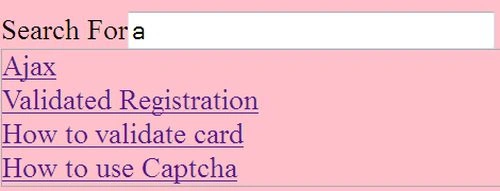
Next, I will select "Ajax".
This file search is from your "www" directory.
Oliver RussellPosted Apr 10, 2018, 6:15 AM
Creating live search in php is really easy with the use of jQuery AJAX. Whether you have a xampp or lamp server, you can add live search function with PHP and mysql (https://www.cloudways.com/blog/live-search-php-mysql-ajax/ ) on your website by incorporating AJAX.