

Overview
In this article, we will see UI-Router HTML5 Mode and Active State CSS in AngularJS, with an example.
For more articles on AngularJS, do refer to these links-
- Overview Of AngularJS
- Modules And Controller In AngularJS
- Controllers in AngularJS
- AngularJS ng src Directive
- AngularJS ng-Repeat Directive
- Handling Events In AngularJS
- How To Use Two-Way Data Binding In AngularJS
- Filters In AngularJS
- Sorting Data In AngularJS
- Sorting Rows By Table Header In AngularJS
- Creating Custom Filters In AngularJS
- ng-Hide And ng-Show In AngularJS
- ng-init Directive In AngularJS
- Search And MultiSearch In AngularJS
- ngInclude Directive In AngularJS
- $http Service In AngularJS
- Consuming ASP.NET WebService In AngularJS
- AnchorScroll Service In AngularJS
- AngularJS Page Refresh Problems
- RouteParams In AngularJS
- Angular AnchorScroll With Database Part
- AngularJS Routing Using WebService
- AngularJS Controller As Syntax
- AngularJS Nested Scopes And Controllers As Syntax
- AngularJS CaseSensitive And Inline Templates
Step- 1 The first step is pretty simple. To enable HTML5 Mode, we will be using $locationProvider service in config function and setting this to true. Let’s see how.
- .config(function ($stateProvider, $urlMatcherFactoryProvider, $urlRouterProvider,$locationProvider)
$locationProvider.html5Mode(true);
So, our final Controller code is the following.
- /// <reference path="angular.min.js" />
- /// <reference path="angular-route.min.js" />
- var app = angular.module("Demo", ["ui.router"])
- .config(function ($stateProvider, $urlMatcherFactoryProvider, $urlRouterProvider,$locationProvider) {
- // $routeProvider.caseInsensitiveMatch = true;
- $urlRouterProvider.otherwise("/home");
- $urlMatcherFactoryProvider.caseInsensitive(true);
- $stateProvider
- .state("home", {
- url: "/home",
- templateUrl: "Templates/home.html",
- controller: "homeController as homeCtrl",
- data:{
- customData1: "Home State Custom Data 1",
- customData2:"Home Statae custom Data 2"
- }
- })
- .state("courses", {
- url: "/courses",
- templateUrl: "Templates/courses.html",
- controller: "coursesController as coursesCtrl",
- data: {
- customData1: "Courses State Custom Data 1",
- customData2: "Courses Statae custom Data 2"
- }
- })
- .state("students", {
- url: "/students",
- templateUrl: "Templates/students.html",
- controller: "studentsController as studentsCtrl",
- resolve: {
- studentsList: function ($http) {
- return $http.get("StudentService.asmx/GetAllStudents")
- .then(function (response) {
- return response.data;
- })
- }
- }
- })
- .state("studentDetails", {
- url: "/students/:id",
- templateUrl: "Templates/studentDetail.html",
- controller: "studentdetailcontroller as StudentDetailCtrl"
- })
- // .when("/studentssearch/:name?", {
- // templateurl: "templates/studentssearch.html",
- // controller: "studentssearchcontroller as studentssearchctrl"
- // })
- // .otherwise({
- // redirectto: "/home"
- // })
- $locationProvider.html5Mode(true);
- })
- .controller("homeController", function ($state) {
- this.message = "Home Page";
- this.homeCustomData1 = $state.current.data.customData1;
- this.homeCustomData2 = $state.current.data.customData2;
- this.coursesCustomData1 = $state.get("courses").data.customData1;
- this.coursesCustomData2 = $state.get("courses").data.customData2;
- })
- .controller("coursesController", function () {
- this.courses = ["c#", "SQL", "Oracle"];
- })
- .controller("studentsController", function (studentsList, $state, $location) {
- var vm = this;
- vm.searchStudents = function () {
- if (vm.name) {
- $location.url("/studentsSearch/" + vm.name);
- }
- else {
- $location.url("/studentsSearch/");
- }
- }
- vm.reloadData = function () {
- $state.reload();
- }
- vm.students = studentsList;
- })
- .controller("studentdetailcontroller", function ($http, $stateParams) {
- var vm = this;
- $http({
- url: "StudentService.asmx/GetStudents",
- method: "get",
- params: {id:$stateParams.id}
- })
- .then(function (response) {
- vm.student = response.data;
- })
- })
- //.controller("studentsSearchController", function ($http, $routeParams) {
- // var vm = this;
- // if ($routeParams.name) {
- // $http({
- // url: "StudentService.asmx/GetStudentsByName",
- // params: { name: $routeParams.name },
- // })
- //.then(function (response) {
- // vm.students = response.data;
- //})
- // }
- // else {
- // $http.get("StudentService.asmx/GetAllStudents")
- // .then(function (response) {
- // vm.students = response.data;
- // })
- // }
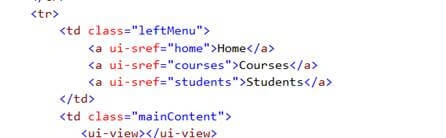
As you can see, we are using si-sref attribute and we don’t have any # symbols there. Similarly, we don’t have any # symbols in students.html and studentsdetail.html files.
Step- 3 Now, the next step is to include re-write routing rule in our web.config file. So, just copy paste this code in your file.
- <system.webServer>
- <rewrite>
- <rules>
- <rule name="RewriteRules" stopProcessing="true">
- <match url=".*"/>
- <conditions logicalGrouping="MatchAll">
- <add input="{REQUEST_FILENAME}" matchType="IsFile" negate="true"/>
- <add input="{REQUEST_FILENAME}" matchType="IsDirectory" negate="true"/>
- <add input="{REQUEST_URI}" pattern="^/(api)" negate="true"/>
- </conditions>
- <action type="Rewrite" url="/index.html"/>
- </rule>
- </rules>
- </rewrite>
- </system.webServer>
- <action type="Rewrite" url="/index.html"/>
Step- 4 Now, the final step is to include base href=”/” in your layout page which we already have. Now, let’s save our changes and run the app.
As you can see in the URL, the # symbol has disappeared. Now, the HTML5 Mode is in action. See the output below.
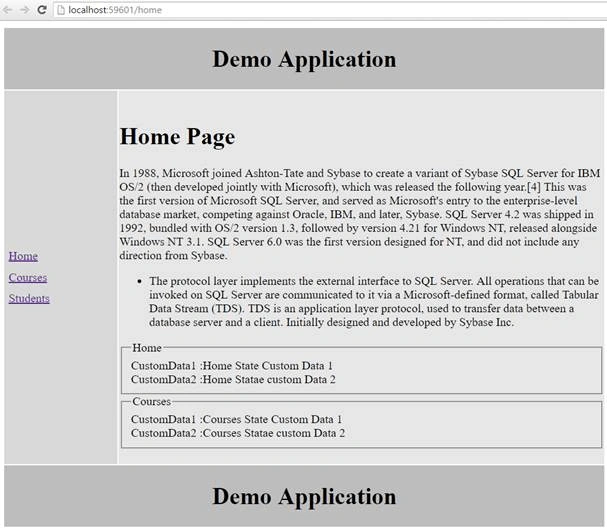
Similarly, for courses and students, the # symbol has disappeared, which means that we have successfully enabled the HTML5 routing in our application.
NOTE - The base href element makes sure that you place it below the title element.
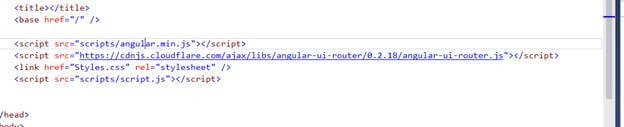
If the base href element is placed anywhere else, it will not search for the / root directory when you reload the Controller.
Part -2
Now, let's move to the next part of this article i.e Active State CSS.
In this section, we will see how to highlight the navigation menu item if the user is currently on that page. Suppose, when the user clicks on the home page, we want the home to be highlighted, and similar effect for the courses and students pages. Let’s see how to do that.
1. First, we include a CSS class that we want to apply to the active menu items. We will create a CSS class in styles.css.
- .activeState {
- background-color:orangered;
- color:white;
- }
2. The next step is to modify the links in the index.html. In that, we will apply a different directive to those links.
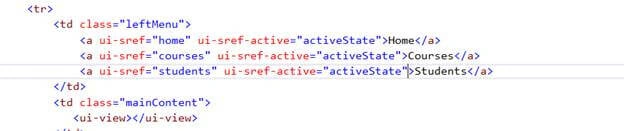
This directive will apply two things automatically to the state that is active. It will automatically remove that class from any state that has become inactive. So, with these changes we should get the desired output.
3. Save the changes and reload the app.
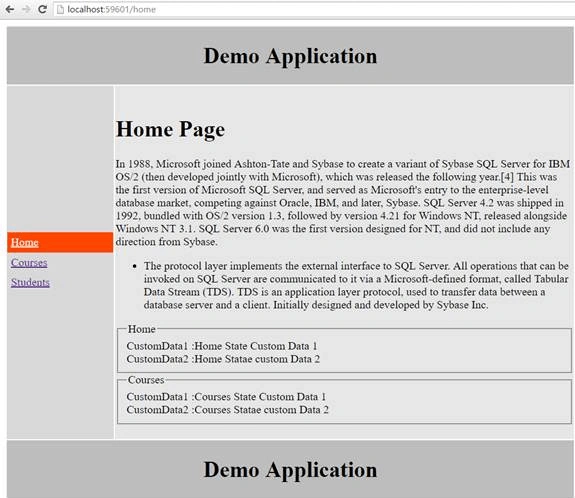
As you can see from the above output, currently I am in Home Controller and it highlighted the Home menu which is currently active. So, we got the desired result for home. Now, let’s check it for other Controllers as well.
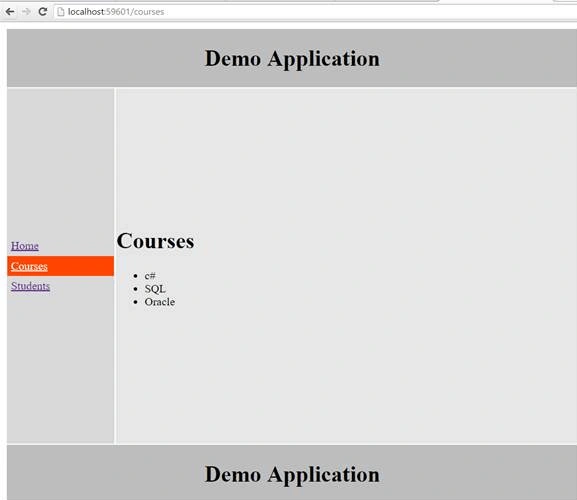
For courses,
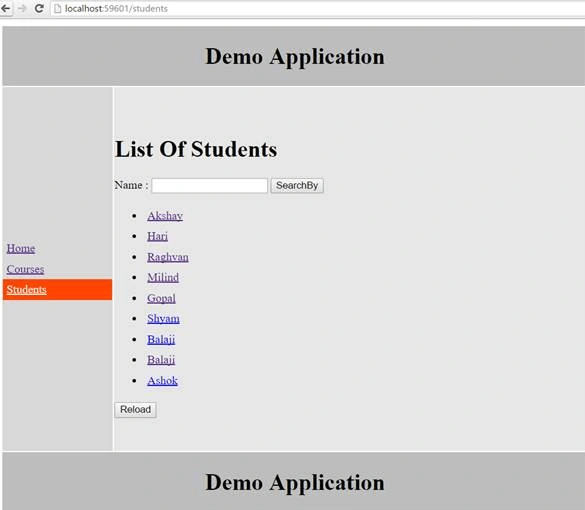
And, for Students,
Conclusion - So, this was all about AngularJS UI-Router HTML5 Mode and active State CSS. Hope this article was helpful!!
Prasanna MuraliPosted Sep 20, 2016, 9:39 PM
Nice share