

An array is a collection of similar types of values. Each value in the array is to be called an element. The total number of array elements is called the array size. In this article, we will learn how to implement single dimensional array, a 2-dim array, and a multi-dim array.
Code Example of a Single Dimension Array
- namespace ArrayDemo
- {
- //Demo on Single-Dim Array. class Program
- static void Main(string[] args)
- {
- //read the number of students int n;
- Console.Write("Enter number of students: "); n = Convert.ToInt32(Console.ReadLine());
- //check n value whether it is greater than 0 or not.
- if (n > 0)
- {
- //declare the arrays
- string[] Names = new string[n]; int[] Marks = new int[n]; string[] Result = new string[n];
- //read student names
- Console.WriteLine("\nEnter " + n + " students names:");
- for (int i = 0; i < n; i++)
- {
- Console.Write((i + 1) + ": "); Names[i] = Console.ReadLine();
- }
- //read student marks
- Console.WriteLine("\nEnter " + n + " students marks:");
- for (int i = 0; i < n; i++)
- {
- Console.Write((i + 1) + ": ");
- Marks[i] = Convert.ToInt32(Console.ReadLine());
- }
- //calculate results
- for (int i = 0; i < n; i++)
- {
- if (Marks[i] >= 0 && Marks[i] <= 100)
- {
- if (Marks[i] >= 80) Result[i] = "Distinction";
- else if (Marks[i] >= 60) Result[i] = "First Class";
- else if (Marks[i] >= 50) Result[i] = "Second Class";
- else if (Marks[i] >= 35) Result[i] = "Third Class";
- else
- Result[i] = "Fail";
- }
- else
- Result[i] = "Invalid";
- }
- //display the student names and marks
- Console.WriteLine("\n\nStudent Details:");
- for (int i = 0; i < n; i++)
- {
- Console.WriteLine((i + 1) + ". " + Names[i] + " - " + Marks[i] + " - " + Result[i]);
- }
- }
- else
- Console.WriteLine("N value can't be zero."); Console.Read();
- }
- }
- namespace MultiDimArrays
- //Demo on Multi-Dimensional Arrays class Program
- {
- static void Main(string[] args)
- {
- //Single dimensional arrays int[] x = { 10, 20, 30, 40};
- Console.WriteLine("Single dimensional array:");
- for (int i = 0; i < x.Length; i++)
- Console.Write(x[i] + ", "); //Double dimensional arrays
- int[,] y = { { 10, 20 }, { 30, 40 }, { 50, 60 } };
- Console.WriteLine("\n\nDouble dimensional array:");
- for (int i = 0; i < 3; i++)
- {
- for (int j = 0; j < 2; j++) Console.Write(y[i, j] + " ");
- Console.WriteLine();
- }
- //Multi dimensional arrays
- int[,,] z = { { { 5, 10 }, { 15, 20 } }, { { 25, 30 }, { 35, 40 } }, { { 45, 50 }, { 55, 60 } } };
- Console.WriteLine("\nMulti dimensional array:");
- for (int i = 0; i < 3; i++)
- {
- for (int j = 0; j < 2; j++)
- {
- for (int k = 0; k < 2; k++) Console.Write(z[i, j, k] + " ");
- Console.WriteLine();
- }
- Console.WriteLine();
- }
- Console.Read();
- }
- }
foreach Loop
One of the most common usages of the for loop is to iterate through a collection of values (an array). C# offers a simple and easier syntax of for loop called a foreach loop, designed only for such kind of array iterations.
foreach (datatype variable in arrayname)
{ -----------;
-----------;
}
In the preceding syntax, the loop will be executed once for each value in the array. For every iteration, the values of the array will be assigned to the variable.
For example, the following is a for loop:
- int[] nums = { 10, 20, 30};
- for (int i = 0;i < nums.Length; i++)
- {
- Console.WriteLine(nums[i]));
- }
- int[] nums = { 10, 20, 30};
- foreach (int n in nums)
- {
- Console.WriteLine(n);
- }
Note: The arrayname.Length property gets the size of the array. We explain about the "Array" class in the future.
Jagged Arrays
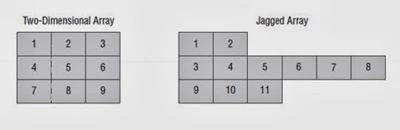
Code Example of a Jagged Array
- using System;
- using System.Collections.Generic;
- using System.Linq;
- using System.Text;
- namespace JaggedArraysDemo
- {
- class Program
- {
- static void Main(string[] args)
- {
- int[][] a = new int[3][]; a[0] = new int[] { 1, 2 };
- a[1] = new int[] { 3, 4, 5, 6, 7, 8 }; a[2] = new int[] { 9, 10, 11 };
- for (int i = 0; i < a.Length; i++)
- {
- for (int j = 0; j < a[i].Length; j++)
- {
- Console.Write(a[i][j] + " ");
- }
- Console.WriteLine();
- }
- Console.Read();
- }
- }
- }
Join the conversation! Your thoughts help the community grow.