

Introduction
Description
In this session, I will show you how to insert records using AP.NET Web API using HttpClient to post the data in SQL Server. In this session, you can see get and post operations by Web API. In another way, I can say we'll insert and retrieve records using button click event.
Before going through this session, visit my previous sessions:
In this session, I will show you how to insert records using AP.NET Web API using HttpClient to post the data in SQL Server. In this session, you can see get and post operations by Web API. In another way, I can say we'll insert and retrieve records using button click event.
Before going through this session, visit my previous sessions:
Part 6 - ASP.NET Web API Using MVC, Entity Framework And HttpClient For Get And Post With Validation
Steps to be followed.
Step 1
Add a folder in the Web API application for saving the uploaded files. Go to Solution Explorer > Right-click on Project Name (Web API) > Add > New Folder > Rename folder (here I renamed "uploadFiles").
Step 2
Add a new controller in our Web API application. Right-click on controller folder (in Web API application) > Add > Controller > Enter controller name(UploadController) > select "Empty API Controller" from Scaffolding options > Add.
Code Ref
- using System;
- using System.Collections.Generic;
- using System.IO;
- using System.Linq;
- using System.Net;
- using System.Net.Http;
- using System.Threading.Tasks;
- using System.Web;
- using System.Web.Http;
- namespace SatyaWebApi.Controllers
- {
- public class UploadController : ApiController
- {
- public Task<HttpResponseMessage> Post()
- {
- List<string> savedFilePath = new List<string>();
- if (!Request.Content.IsMimeMultipartContent())
- {
- throw new HttpResponseException(HttpStatusCode.UnsupportedMediaType);
- }
- string rootPath = HttpContext.Current.Server.MapPath("~/uploadFiles");
- var provider = new MultipartFileStreamProvider(rootPath);
- var task = Request.Content.ReadAsMultipartAsync(provider).
- ContinueWith<HttpResponseMessage>(t =>
- {
- if (t.IsCanceled || t.IsFaulted)
- {
- Request.CreateErrorResponse(HttpStatusCode.InternalServerError, t.Exception);
- }
- foreach (MultipartFileData item in provider.FileData)
- {
- try
- {
- string name = item.Headers.ContentDisposition.FileName.Replace("\"", "");
- string newFileName = Guid.NewGuid() + Path.GetExtension(name);
- File.Move(item.LocalFileName, Path.Combine(rootPath, newFileName));
- Uri baseuri = new Uri(Request.RequestUri.AbsoluteUri.Replace(Request.RequestUri.PathAndQuery, string.Empty));
- string fileRelativePath = "~/uploadFiles/" + newFileName;
- Uri fileFullPath = new Uri(baseuri, VirtualPathUtility.ToAbsolute(fileRelativePath));
- savedFilePath.Add(fileFullPath.ToString());
- }
- catch (Exception ex)
- {
- string message = ex.Message;
- }
- }
- return Request.CreateResponse(HttpStatusCode.Created, savedFilePath);
- });
- return task;
- }
- }
- }
Added a new Action into the controller (in Web API application) for uploading the file. I have mentioned the upload file path as mentioned below.
- string rootPath = HttpContext.Current.Server.MapPath("~/uploadFiles");
- try
- {
- string name = item.Headers.ContentDisposition.FileName.Replace("\"", "");
- string newFileName = Guid.NewGuid() + Path.GetExtension(name);
- File.Move(item.LocalFileName, Path.Combine(rootPath, newFileName));
- Uri baseuri = new Uri(Request.RequestUri.AbsoluteUri.Replace(Request.RequestUri.PathAndQuery, string.Empty));
- string fileRelativePath = "~/uploadFiles/" + newFileName;
- Uri fileFullPath = new Uri(baseuri, VirtualPathUtility.ToAbsolute(fileRelativePath));
- savedFilePath.Add(fileFullPath.ToString());
- }
- MultipartFileStreamProvider Class
Suited for writing each MIME body parts of the MIME multipart message to a file using a FileStream. - MultipartFileData Class
Represents a multipart file data.
Upload multiple files using MultipartFormDataStreamProvider in ASP.NET WebAPI. The concept is based on Multipart/form-data in which we can POST not only multiple file content but also regular form fields which will be available as NameValueCollection on the server side.
In this tutorial, we also see how to override the default behavior of MultipartFormDataStreamProvider which stores the name in a unique BodyPart_{GUID} format to a much more meaningful name. We will also invoke our Web API using Fiddler to POST file data. Alongside, we develop a sample console application which will POST file data using HttpClient class.
Step 3
Add an Action to the HomeController (in MVC Client application) for getting the view of the uploaded file.
Code Ref
- public ActionResult Part5()
- {
- return View();
- }
Add View for the Action & Design. Right-click on action method (here, right-click on form action) > Add View... > Enter Name > Add.
Code Ref
- @{
- ViewBag.Title = "Part5";
- }
- <style>
- table {
- font-family: arial, sans-serif;
- border-collapse: collapse;
- width: 100%;
- }
- td, th {
- border: 1px solid #dddddd;
- text-align: left;
- padding: 8px;
- }
- tr:nth-child(even) {
- background-color: #dddddd;
- }
- .button {
- background-color: #4CAF50;
- border: none;
- color: white;
- padding: 15px 32px;
- text-align: center;
- text-decoration: none;
- display: inline-block;
- font-size: 16px;
- margin: 4px 2px;
- cursor: pointer;
- }
- .button4 {
- border-radius: 9px;
- }
- </style>
- <fieldset>
- <legend style="font-family:Arial Black;color:blue">Upload And Download Files Here</legend>
- <div>
- <div class="form-group">
- <div id="updatePanelFile" class="alert" role="alert" style="display:none;">
- </div>
- </div>
- <div class="col-md-12" style="text-align:center;margin-bottom:10px;">
- <input type="file" id="file1" class="btn btn-primary" />
- </div>
- <input id="btnPostFile" class="button button4" type="button" value="Upload" />
- </div>
- @section Scripts{
- <script>
- $(document).ready(function () {
- $('#btnPostFile').click(function () {
- if ($('#file1').val() == '') {
- alert('Please select file');
- return;
- }
- var formData = new FormData();
- var file = $('#file1')[0];
- formData.append('file', file.files[0]);
- $.ajax({
- url: 'http://localhost:47250/api/Upload',
- type: 'POST',
- data: formData,
- contentType: false,
- processData: false,
- success: function (d) {
- $('#updatePanelFile').addClass('alert-success').html('<strong>Upload Done!</strong><a href="' + d + '">Download File</a>').show();
- $('#file1').val(null);
- },
- error: function () {
- $('#updatePanelFile').addClass('alert-error').html('<strong>Failed!</strong> Please try again.').show();
- }
- });
- });
- });
- </script>
- }
- </fieldset>
Add the following jQuery using Web API URL for uploading the file to Web API.
- $.ajax({
- url: 'http://localhost:47250/api/Upload',
- type: 'POST',
- data: formData,
- contentType: false,
- processData: false,
- success: function (d) {
- $('#updatePanelFile').addClass('alert-success').html('<strong>Upload Done!</strong><a href="' + d + '">Download File</a>').show();
- $('#file1').val(null);
- }
- success: function (d) {
- $('#updatePanelFile').addClass('alert-success').html('<strong>Upload Done!</strong><a href="' + d + '">Download File</a>').show();
- $('#file1').val(null);
- }
- error: function () {
- $('#updatePanelFile').addClass('alert-error').html('<strong>Failed!</strong> Please try again.').show();
- }
Upload the file here.

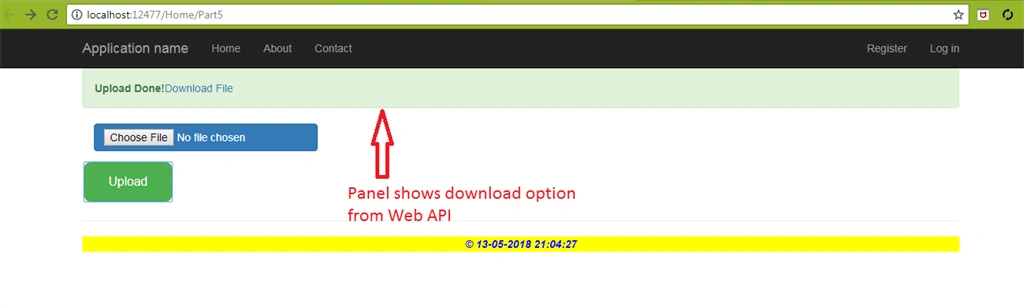
Below, the panel is showing download file option after successfully uploading in Web API.
This is the path of Web API where files are uploaded with a different name.
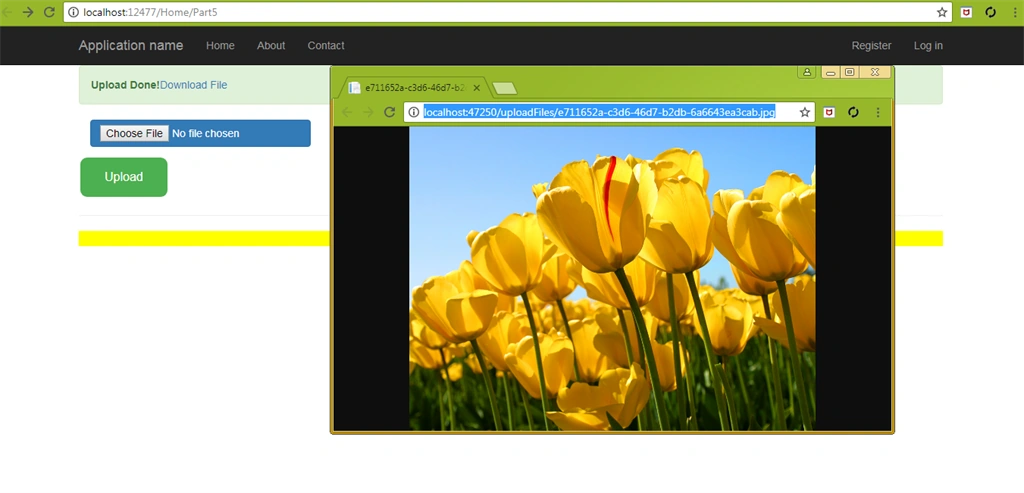
Check all uploaded files in Web API URL path.

Summary
- Upload files using Web API and Download files from it.
- Implementation of MultipartFileStreamProvider Class.
- Implementation of MultipartFileData Class.
eswar raoPosted Aug 25, 2020, 2:45 AM
How to consume that API by using MVC controller, i mean using an HTTP client