

Introduction
.NET 4.5 includes HttpClient class to overcome the limitations of WebClient. HttpClient class sends and receives data from Web API which is hosted on the local IIS web server. HttpClient is present in other .NET applications also, such as Windows form applications, Windows service applications, etc. There are so many methods of HttpClient to send different HTTP requests as mentioned below.
| Method Name | Method Description |
| GetAsync | Sends a GET request to the specified Uri as an asynchronous operation. |
| GetByteArrayAsync | Sends a GET request to the specified Uri and returns the response body as a byte array in an asynchronous operation. |
| GetStreamAsync | Sends a GET request to the specified Uri and returns the response body as a stream in an asynchronous operation. |
| GetStringAsync | Sends a GET request to the specified Uri and returns the response body as a string in an asynchronous operation. |
| PostAsync | Sends a POST request to the specified Uri as an asynchronous operation. |
| PostAsJsonAsync | Sends a POST request as an asynchronous operation to the specified Uri with the given value serialized as JSON. |
| PostAsXmlAsync | Sends a POST request as an asynchronous operation to the specified Uri with the given value serialized as XML. |
| PutAsync | Sends a PUT request to the specified Uri as an asynchronous operation. |
| PutAsJsonAsync | Sends a PUT request as an asynchronous operation to the specified Uri with the given value serialized as JSON. |
| PutAsXmlAsync | Sends a PUT request as an asynchronous operation to the specified Uri with the given value serialized as XML. |
| DeleteAsync | Sends a DELETE request to the specified Uri as an asynchronous operation. |
Description
In this session, I will show you how to implement Asp.Net Web API Url in controller class file instead of using jQuery. It is possible to retrieve data from SQL server by using Httpclient class.
Go through my previous sessions as mentioned below:
- ASP.NET Web API Using MVC And Entity Framework - Part One
- ASP.NET Web API Using MVC, Entity Framework And jQuery For Retrieve Data - Part Two
- Reuse The Model Classes Of Entity Data Model(.edmx) To Multiple Projects Using Class Library In ASP.NET Web API - Part Three
Source Code
Steps to be followed:
Step 1
Based on my part three session, I will work on this current session to retrieve data using HttpClient. Visit my previous session before going through part four.
Here, I have added "Part2" Action into "Home" Controller of SatyaConsumingApi project.
Code Ref
- using System;
- using System.Collections.Generic;
- using System.Linq;
- using System.Net.Http;
- using System.Web;
- using System.Web.Mvc;
- using Entities;
- namespace SatyaConsumingApi.Controllers
- {
- public class HomeController : Controller
- {
- public ActionResult Part1()
- {
- return View();
- }
- public ActionResult Part2()
- {
- List<Employee> list = new List<Employee>();
- HttpClient client = new HttpClient();
- var result = client.GetAsync("http://localhost:47250/api/satya").Result;
- if (result.IsSuccessStatusCode)
- {
- list = result.Content.ReadAsAsync<List<Employee>>().Result;
- }
- return View(list);
- }
- }
- }
Code Description
HttpClient class provides a base class for sending/receiving the HTTP requests/responses from a URL.
- HttpClient client = new HttpClient();
- using System.Net.Http;
- using Entities;
Remember to add the below-mentioned namespace in SatyaController of SatyaWebApi project because when you are going to use any datacontext as in our project "CrystalGranite2016Entities" or Entity Data Model class file as "Employee" in any project then you should use the namespace with the same name as Class Library name as mentioned below.
- using Entities;
- var result = client.GetAsync("http://localhost:47250/api/satya").Result;
Then after getting the result value from this HttpResponseMessege check the condition to get a value that indicates if the HTTP response was successful or not. HttpResponseMessage is a way of returning a message/data from your action. HttpResponseMessage works with HTTP protocol to return the data with status/error. We can use HTTPResponseMessage to return the data as well as some user friendly messages.
- var result = client.GetAsync("http://localhost:47250/api/satya").Result;
- if (result.IsSuccessStatusCode)
- {
- }
If the result will be successful then the below code will be executed.
- if (result.IsSuccessStatusCode)
- {
- list = result.Content.ReadAsAsync<List<Employee>>().Result;
- }
Note
To access this ReadAsAsync method you should install one package using NuGet package manager console otherwise you will get an error message "System.Net.Http.HttpContent' does not contain a definition for 'ReadAsAsync' and no extension method".
- PM> install-package Microsoft.AspNet.WebApi.Client
OR
Just right click on your project, go to Manage NuGet Packages search for Microsoft.AspNet.WebApi.Client install it and you will have access to the extension method.
Just right click on your project, go to Manage NuGet Packages search for Microsoft.AspNet.WebApi.Client install it and you will have access to the extension method.
It is an extension method in System.Net.Http.Formatting. According to the System.Net.Http.Formatting NuGet package page, the System.Net.Http.Formatting package is now legacy and can instead be found in the Microsoft.AspNet.WebApi.Client package available on NuGet.
Then create a view result object by using the model that renders a view to the response.
- return View(list);
Step 2
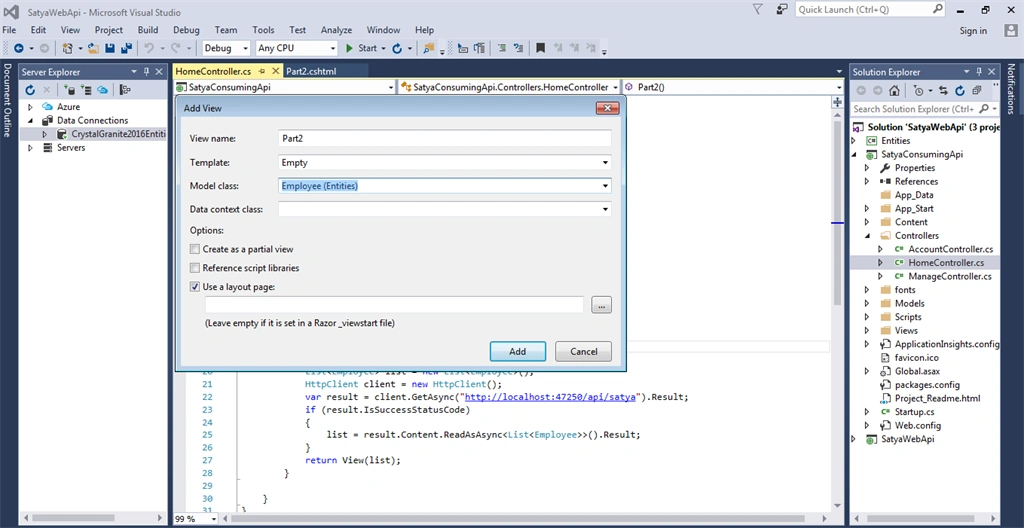
Add view for the Part2() controller action method of HomeController in SatyaConsumingApi project.
Right Click on Action Method (here right click on form action) > Add View... > Check "Create strongly typed view" > Select Model class >> Add. Here Model Class is "Employee (Entities)".
Code Ref
- @model IEnumerable<Entities.Employee>
- @{
- ViewBag.Title = "Satyaprakash - Fetch data from WebAPI using HTTPClient";
- }
- <style>
- table {
- font-family: arial, sans-serif;
- border-collapse: collapse;
- width: 100%;
- }
- td, th {
- border: 1px solid #dddddd;
- text-align: left;
- padding: 8px;
- }
- tr:nth-child(even) {
- background-color: #dddddd;
- }
- </style>
- <div style="padding:10px ; align-content:center">
- <fieldset>
- <legend style="font-family:Arial Black;color:blue">Get Data From Web API Using HTTPClient</legend>
- </fieldset>
- </div>
- <div id="updatePanel" style="width:90%; padding:10px; margin:0 auto;">
- <table class="table table-responsive table-striped table-bordered">
- <thead>
- <tr>
- <th style="background-color: Yellow;color: blue">Full Name</th>
- <th style="background-color: Yellow;color: blue">Email</th>
- <th style="background-color: Yellow;color: blue">City</th>
- <th style="background-color: Yellow;color: blue">Country</th>
- </tr>
- </thead>
- <tbody>
- @foreach (var i in Model)
- {
- <tr>
- <td>@i.FirstName @i.LastName</td>
- <td>@i.EmailID</td>
- <td>@i.City</td>
- <td>@i.Country</td>
- </tr>
- }
- </tbody>
- </table>
- </div>
Code Description
It uses IEnumerable of Employee as a model object to bind the model with a .cshtml page.
- @model IEnumerable<Entities.Employee>
- @foreach (var i in Model)
- {
- <tr>
- <td>@i.FirstName @i.LastName</td>
- <td>@i.EmailID</td>
- <td>@i.City</td>
- <td>@i.Country</td>
- </tr>
- }
OUTPUT
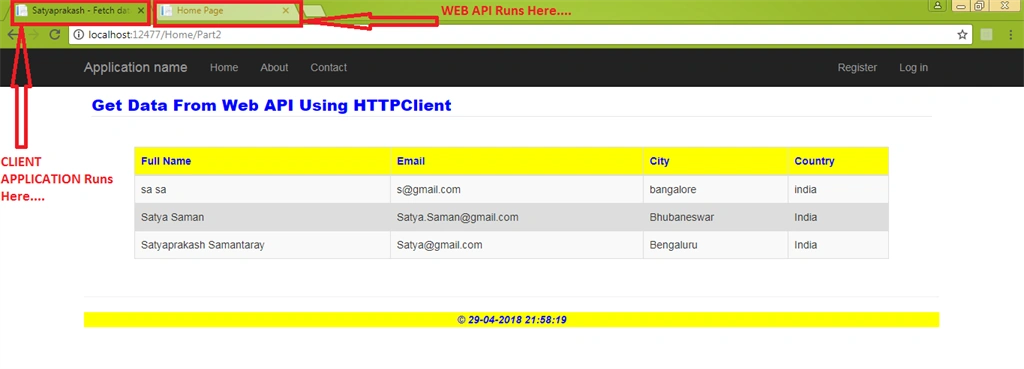
The URL is : http://localhost:12477/Home/Part2
SUMMARY
- Introduction to HttpClient ASP.NET Web API.
- Steps for retrieving data from the database using HttpClient.
Alice NguyenPosted Dec 5, 2018, 3:09 AM
Thank Satyaprakash Samantaray for sharing. So great
Arun Kumar SinghPosted May 22, 2018, 12:22 AM
Just awesome bro keep it up
Manav PandyaPosted May 4, 2018, 3:23 AM
Thanks for such stuff brother Satyaprakash Samantaray
Sachin SboaPosted May 2, 2018, 11:55 AM
Nice job satya... this web api series very helpful
Bhavesh JadavPosted May 1, 2018, 8:37 AM
Very good article for me, thanks for sharing it.