

Hi this is my first article on C# corner. I have some good topics in my mind, stay tuned.
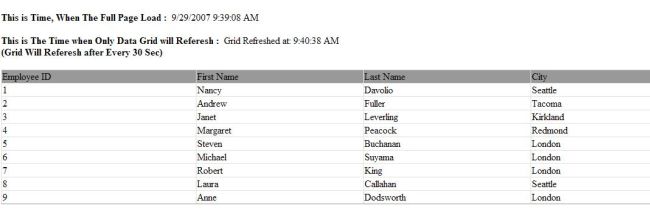
In this article, I explain how to auto-refresh data on an ASP.NET page after a certain interval using AJAX UpdatePanel and other controls. I am using some AJAX controls and using a SQL Server database and a Data Grid control. The Database name is Northwind. In this application my interval time for refresh data is 30 seconds. You can change your time by the times interval property.
Here is a snapshot:
This code is for binding data:
public void BindData()
{
con = new SqlConnection("Initial Catalog=Northwind; Data Source=localhost; Uid=sa; pwd=;");
cmd.CommandText = "select * from Employees ";
cmd.Connection = con;
con.Open();
da = new SqlDataAdapter(cmd);
da.Fill(ds);
cmd.ExecuteNonQuery();
GridData.DataSource = ds;
GridData.DataBind();
}
You can check your current time on page load. Write this code:
MyLabel.Text = System.DateTime.Now.ToString();
BindData();
And the grid refresh time is:
protected void Timer1_Tick(object sender, EventArgs e)
{
Label1.Text = "Grid Refreshed at: " + DateTime.Now.ToLongTimeString();
}
Here is the HTML design code:
<form id="form1" runat="server">
<asp:Label ID="Label2" runat="server" Text="This is Time, When The Full Page Load :" Font-Bold="true"></asp:Label>
<asp:Label ID="MyLabel" runat="server"></asp:Label><br /><br />
<asp:ScriptManager ID="ScriptManager1" runat="server" />
<div>
<asp:Timer ID="Timer1" OnTick="Timer1_Tick" runat="server" Interval="30000">
</asp:Timer>
</div>
<asp:UpdatePanel ID="UpdatePanel1" UpdateMode="Conditional" runat="server">
<Triggers>
<asp:AsyncPostBackTrigger ControlID="Timer1" EventName="Tick" />
</Triggers>
<ContentTemplate>
<asp:Label ID="Label3" runat="server" Text="This is The Time when Only Data Grid will Referesh :" Font-Bold="true"></asp:Label>
<asp:Label ID="Label1" runat="server" Text="Grid not refreshed yet."></asp:Label><br />
<asp:Label ID="Label4" runat="server" Text="(Grid Will Referesh after Every 30 Sec)" Font-Bold="true"></asp:Label>
<br /><br />
<asp:DataGrid ID=GridData runat="server" Width="100%" GridLines="Both" HeaderStyle-BackColor="#999999" AutoGenerateColumns="false">
<Columns>
<asp:BoundColumn DataField="EmployeeID" HeaderText="Employee ID"></asp:BoundColumn>
<asp:BoundColumn DataField="FirstName" HeaderText="First Name"></asp:BoundColumn>
<asp:BoundColumn DataField="LastName" HeaderText="Last Name"></asp:BoundColumn>
<asp:BoundColumn DataField="City" HeaderText="City"></asp:BoundColumn>
</Columns>
</asp:DataGrid>
</ContentTemplate>
</asp:UpdatePanel>
</form>
I hope you will like this article. If yes then drop me a line or write a comment below in the comments section.
Raj KumarPosted Apr 7, 2013, 11:53 PM
Check how many script manager have you added on page? or if you are using master page then there should be only one script manager.
firmanPosted Apr 6, 2013, 10:46 PM
why error, Only one instance of a ScriptManager can be added to the page. Description: An unhandled exception occurred during the execution of the current web request. Please review the stack trace for more information about the error and where it originated in the code. Exception Details: System.InvalidOperationException: Only one instance of a ScriptManager can be added to the page. Source Error: An unhandled exception was generated during the execution of the current web request. Information regarding the origin and location of the exception can be identified using the exception stack trace below. Stack Trace: [InvalidOperationException: Only one instance of a ScriptManager can be added to the page.] System.Web.UI.ScriptManager.OnInit(EventArgs e) +660584 System.Web.UI.Control.InitRecursive(Control namingContainer) +143 System.Web.UI.Control.InitRecursive(Control namingContainer) +391 System.Web.UI.Control.AddedControl(Control control, Int32 index) +271 BI.LBUS.WebParts.StatusLaporan.AntrianValidasi.AntrianValidasi.CreateChildControls() +155 System.Web.UI.Control.EnsureChildControls() +146 System.Web.UI.Control.PreRenderRecursiveInternal() +61 System.Web.UI.Control.PreRenderRecursiveInternal() +224 System.Web.UI.Control.PreRenderRecursiveInternal() +224 System.Web.UI.Control.PreRenderRecursiveInternal() +224 System.Web.UI.Control.PreRenderRecursiveInternal() +224 System.Web.UI.Control.PreRenderRecursiveInternal() +224 System.Web.UI.Page.ProcessRequestMain(Boolean includeStagesBeforeAsyncPoint, Boolean includeStagesAfterAsyncPoint) +3394
Navin PanditPosted Nov 15, 2012, 6:23 AM
Gr8 job! Thanx for sharing with us.
solePosted May 7, 2012, 4:23 AM
thanks
romanPosted Jan 20, 2012, 2:57 AM
I got problems with the download could anybody help me?
John MarkerPosted Jul 16, 2010, 6:08 AM
Thanks....
CrishPosted May 14, 2010, 2:03 PM
good job
jommyPosted May 12, 2010, 3:41 AM
thank you
Maulik PatelPosted Apr 9, 2010, 10:10 AM
please send me at [email protected]
Amit MPosted Apr 2, 2010, 7:13 AM
It is a good example for beginner to understand basic concepts of ajax.
kumar velayuthamPosted Apr 7, 2009, 7:08 AM
help me..reply plz....
Sathya RamasamyPosted Dec 11, 2008, 1:47 AM
i couldn't download please help me
DeepakeditedPosted Feb 22, 2008, 12:35 PMEdited Feb 22, 2008, 12:36 PM
Thanks
Madhvi ThakerPosted Jan 20, 2008, 11:56 PM
hello Raj. this is interesting..but do i need to use any ajax control for this?? if yes then how can i install that. actually i m developing a scrolling news control n i need to update it when the data in database get changed. can u help me on this?? thanx in advance.
AJPosted Dec 10, 2007, 4:46 PM
I cannot download the file. Site just redirects to a page reading that the page searched for cannot be found.
Hoai Duong QuocPosted Oct 25, 2007, 9:42 PM
I can't download, pls help me