
Azure Resource Manager APIs can manage PostgreSQL flexible server resources programmatically.
Azure Database for PostgreSQL REST APIs let developers and administrators manage Azure PostgreSQL flexible server resources programmatically through Azure Resource Manager. They can list, create, update, start, stop, restart, and delete servers, as well as manage related resources such as databases, firewall rules, network settings, configurations, backups, and Microsoft Entra administrators. These are management-plane APIs: they control Azure resources, but they do not run SQL queries against tables in a PostgreSQL database.
Key takeaways
- The current stable Azure Database for PostgreSQL management REST API version is 2025-08-01.
- Requests target the Azure Resource Manager endpoint and require a Microsoft Entra access token in the
Authorizationheader. - Flexible server resources use the
Microsoft.DBforPostgreSQL/flexibleServersresource type. - A successful request to start a long-running operation can return
201 Createdor202 Accepted, so client code must handle asynchronous completion. - Use the management API for infrastructure automation; use PostgreSQL clients, drivers, or a separate API layer for application data.
What are Azure Database for PostgreSQL REST APIs?
The Azure Database for PostgreSQL REST API is the HTTP interface for managing PostgreSQL resources in an Azure subscription. It is part of Azure Resource Manager, the Azure control plane that also powers the Azure portal, Azure CLI, Bicep, ARM templates, and infrastructure-as-code tools.
A REST API request identifies the Azure subscription, resource group, resource provider, resource type, resource name, and API version. For a PostgreSQL flexible server, the resource provider is Microsoft.DBforPostgreSQL and the resource type is flexibleServers.
This distinction matters for beginners. The management API can create a database resource named appdb, configure a server parameter, or change networking. It does not expose rows from a table such as orders as JSON. An application that needs a REST endpoint for PostgreSQL data needs an application API or a purpose-built data API layer. For example, PostgREST is a separate web server designed to turn a PostgreSQL database schema into a RESTful API.
| Need | Use | Example |
|---|---|---|
| Provision or configure Azure PostgreSQL | Azure PostgreSQL management REST API | Create a flexible server or update a configuration |
| Operate a deployed server | Azure PostgreSQL management REST API | Start, stop, restart, or inspect server state |
| Read and write application tables | PostgreSQL connection or application API | Run SQL through Npgsql, psql, or an application service |
| Expose database objects as REST endpoints | A separate data API layer | Build an ASP.NET Core API or use a tool such as PostgREST |
What did Microsoft make available in API version 2025-08-01?
Microsoft documents 2025-08-01 as the latest stable API version for Azure Database for PostgreSQL management operations. The REST API catalog includes server, database, configuration, firewall rule, migration, backup, virtual endpoint, private endpoint connection, and Microsoft Entra administrator resource operations.
For server management, the API provides operations to create or update a server, get one server, list servers by resource group or subscription, update properties, start, stop, restart, and delete a server. The same stable version is used by the Azure Native provider in Pulumi for PostgreSQL server resources, which is a useful independent confirmation of the active stable version.
Microsoft also publishes preview versions, including 2026-01-01-preview and 2026-04-01-preview. A beginner should normally start with 2025-08-01, because stable API versions are intended for generally available functionality. Preview versions are appropriate only after reviewing their specific documentation and accepting that behavior can change.
How does an Azure PostgreSQL REST request work?
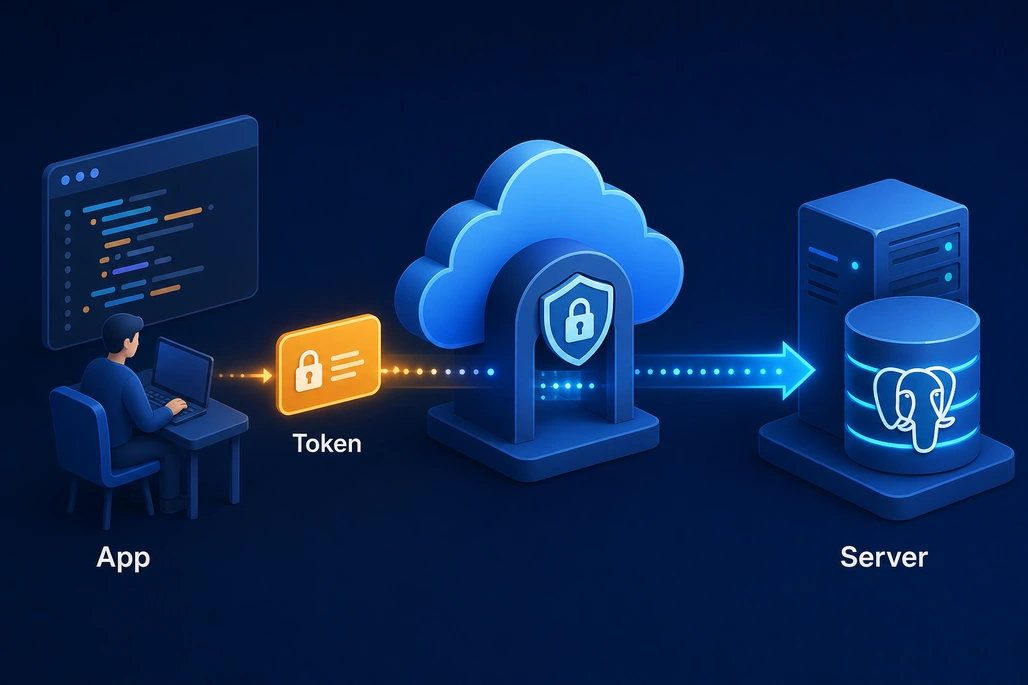
A management request combines an Azure Resource Manager URL, an API version, and a Microsoft Entra token.
An Azure management request has four essential pieces: an HTTP method, a resource URL, an API version, and a Microsoft Entra access token. Requests with a JSON body also set Content-Type: application/json.
For example, this GET request lists flexible servers in one resource group:
GET https://management.azure.com/subscriptions/{subscriptionId}/resourceGroups/{resourceGroupName}/providers/Microsoft.DBforPostgreSQL/flexibleServers?api-version=2025-08-01
Authorization: Bearer {accessToken}
Replace {subscriptionId} with the Azure subscription GUID and {resourceGroupName} with the resource group containing the servers. The service returns a JSON document with a value array when the request succeeds.
The server name has its own path segment when requesting a single resource. For example, a GET request for a server uses /flexibleServers/{serverName}. The server name must meet the constraints documented for that operation, including a length from 3 through 63 characters and a pattern that permits alphanumeric segments separated by hyphens.
Which HTTP methods should a beginner recognize?
| Method | Typical purpose | PostgreSQL flexible server example |
|---|---|---|
GET | Read resource information | List servers or get one server |
PUT | Create or replace a resource | Create a flexible server |
PATCH | Change selected resource properties | Update server properties |
POST | Run an action | Start, stop, or restart a server |
DELETE | Remove a resource | Delete a flexible server |
The HTTP method alone does not tell the complete story. The URL determines the resource or action. For example, the documented start operation sends a POST request to a URL ending in /flexibleServers/{serverName}/start.
How does Microsoft Entra authentication work for these APIs?
Azure PostgreSQL management APIs use Microsoft Entra authentication. A client obtains an access token and sends it as a bearer token in the Authorization header. The identity represented by the token also needs Azure role-based access control permissions at the appropriate subscription, resource group, or resource scope.
For local development, a practical option is to sign in with Azure CLI:
az loginA .NET application can then use the Azure.Identity package and DefaultAzureCredential. The credential checks supported credential sources in sequence and caches tokens for reuse. In a production workload, teams should deliberately select an appropriate identity strategy, such as a managed identity or workload identity, and grant only the permissions required for the job.
Management authorization and database authentication are separate concerns. A principal with permission to read a flexible server through Azure Resource Manager does not automatically have permission to connect to PostgreSQL and query its data. PostgreSQL connectivity, roles, and Microsoft Entra database authentication are configured at the data plane.
How can a .NET application list Azure PostgreSQL flexible servers?
The following beginner-oriented example uses HttpClient to call the stable 2025-08-01 list operation. It uses DefaultAzureCredential to obtain a token for Azure Resource Manager and prints each returned server name and state.
Before running it, install the identity package, sign in locally with az login, and replace the subscription ID and resource group placeholders. The signed-in identity must have permission to read PostgreSQL flexible server resources in that resource group.
dotnet add package Azure.Identityusing Azure.Core;
using Azure.Identity;
using System.Net.Http.Headers;
using System.Text.Json;
const string subscriptionId = "<subscription-id>";
const string resourceGroupName = "<resource-group-name>";
const string apiVersion = "2025-08-01";
var credential = new DefaultAzureCredential();
AccessToken token = await credential.GetTokenAsync(
new TokenRequestContext(new[] { "https://management.azure.com/.default" }));
var requestUri =
$"https://management.azure.com/subscriptions/{subscriptionId}" +
$"/resourceGroups/{resourceGroupName}" +
$"/providers/Microsoft.DBforPostgreSQL/flexibleServers" +
$"?api-version={apiVersion}";
using var httpClient = new HttpClient();
using var request = new HttpRequestMessage(HttpMethod.Get, requestUri);
request.Headers.Authorization = new AuthenticationHeaderValue("Bearer", token.Token);
using HttpResponseMessage response = await httpClient.SendAsync(request);
string responseBody = await response.Content.ReadAsStringAsync();
if (!response.IsSuccessStatusCode)
{
Console.WriteLine($"Request failed: {(int)response.StatusCode}");
Console.WriteLine(responseBody);
return;
}
using JsonDocument document = JsonDocument.Parse(responseBody);
foreach (JsonElement server in document.RootElement.GetProperty("value").EnumerateArray())
{
string name = server.GetProperty("name").GetString() ?? "(unnamed)";
string state = server.GetProperty("properties").GetProperty("state").GetString()
?? "(state unavailable)";
Console.WriteLine($"{name}: {state}");
}The API response contains resource metadata such as the server ID, location, SKU, and properties. The sample reads only name and properties.state to keep the example focused. A real management application should define response models, validate expected fields, log request correlation information, and avoid printing secrets or access tokens.
Why do some create and update requests require polling?
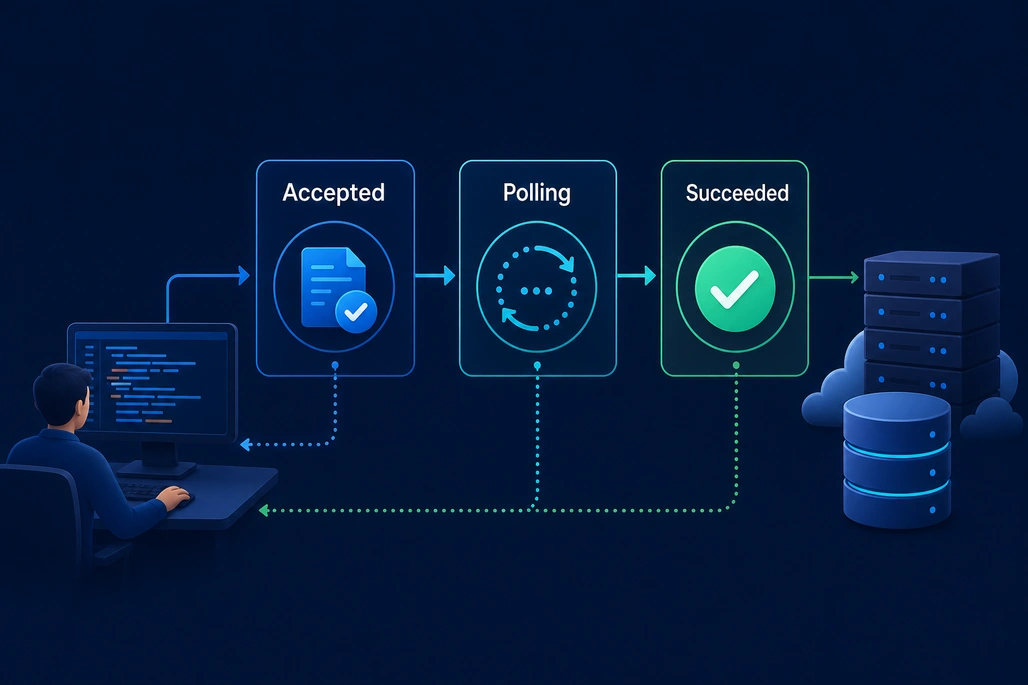
Long-running Azure operations may require clients to poll for a final status.
Creating, updating, deleting, or operating a database server can take longer than one HTTP request. Azure Resource Manager therefore supports long-running operations. The PostgreSQL create-or-update operation can return 200 OK, 201 Created, or 202 Accepted.
A 201 or 202 response does not necessarily mean the final operation has completed. Azure Resource Manager documentation instructs clients to inspect response headers. When present, Azure-AsyncOperation provides a URL that reports operation status; otherwise, clients can use Location. The Retry-After header tells the client how long to wait before checking again.
Do not repeatedly poll without a delay. Follow Retry-After when it is supplied, use bounded retries when it is not, and treat Succeeded, Failed, and Canceled as terminal states. This behavior is especially important in CI/CD systems, where a deployment should not proceed to database-dependent steps before provisioning finishes.
What are the trade-offs between REST calls, Azure CLI, SDKs, and infrastructure as code?
REST is the lowest-level option. It is useful when an organization needs direct HTTP control, must integrate with a platform that has no Azure SDK, or wants to understand the exact Azure Resource Manager request. It also creates more responsibility for token acquisition, request construction, error handling, version selection, and polling.
| Option | Best fit | Main trade-off |
|---|---|---|
| REST API | Custom integrations and direct control | More authentication and HTTP plumbing |
| Azure CLI | Interactive administration and scripts | Less suitable as an application integration boundary |
| Azure SDK for .NET | .NET management applications | Requires learning SDK resource models |
| Bicep, ARM, Pulumi, or Terraform | Repeatable declarative infrastructure | Not ideal for every imperative operational workflow |
Pulumi's Azure Native PostgreSQL server resource is generated from Azure APIs and identifies 2025-08-01 as its REST API version. That is an example of how infrastructure tools build higher-level developer experiences on top of Azure management APIs.
How should beginners get started safely?
- Create or use an Azure subscription and a test resource group.
- Sign in with
az loginand confirm the active subscription before writing code. - Start with a read-only GET operation, such as listing flexible servers in a resource group.
- Use the stable
2025-08-01API version unless a documented preview feature is required. - Inspect successful and failed JSON responses so that error handling is based on actual Azure responses.
- Move create, update, stop, restart, and delete operations into a nonproduction environment before automating them in production.
For server creation, begin with the official operation schema and examples instead of copying a minimal payload from an unrelated version. The required and optional properties vary with choices such as networking, high availability, restore mode, encryption, authentication, compute SKU, and PostgreSQL version. A PUT request that creates a server is powerful and may create billable resources, so it deserves code review and careful environment controls.
Frequently asked questions
Can Azure PostgreSQL REST APIs query tables and return rows?
No. Azure Database for PostgreSQL REST APIs manage Azure resources such as flexible servers, databases, networking, and configurations. Use a PostgreSQL driver, SQL client, or a separate application/data API layer to query and modify table data.
What is the latest stable Azure PostgreSQL REST API version?
Microsoft lists 2025-08-01 as the latest stable Azure Database for PostgreSQL management API version. Preview versions are also available, but beginners should normally prefer the stable version.
How do .NET applications authenticate to Azure PostgreSQL management APIs?
A .NET application can use DefaultAzureCredential from the Azure.Identity package to acquire a Microsoft Entra token for Azure Resource Manager, then send that token in a bearer authorization header. The identity also needs appropriate Azure RBAC permissions.
Why does an Azure PostgreSQL operation return 202 Accepted?
A 202 Accepted response usually means Azure accepted a long-running operation but has not completed it. Client code should follow the returned Azure-AsyncOperation or Location URL and respect Retry-After when polling for final status.
Should a team use direct REST calls or infrastructure as code?
Use direct REST calls when a custom integration needs precise HTTP-level control. Use infrastructure-as-code tools when the goal is repeatable, reviewable, declarative provisioning of environments. Many teams use both approaches for different tasks.
Based on reporting by learn.microsoft.com, Microsoft Learn, Pulumi Registry and PostgREST Documentation.

Join the conversation! Your thoughts help the community grow.