
Sometimes, we need to transfer data from one device to another device in a short range,and for that we need to use the Bluetooth protocol.

To manage Bluetooth is easy. An external library is available to manage Bluetooth in Universal Windows 10 applications. This library hides all the device discovery and connection stuff behind a well behaved interface. It makes it really easy to bind to events that you can use to drive your user interface.
You can find the library on Nuget with the name BluetoothManager.
Let’s see the steps.
Create new Windows 10 UWP app and install the BluetoothManager like the following screen.
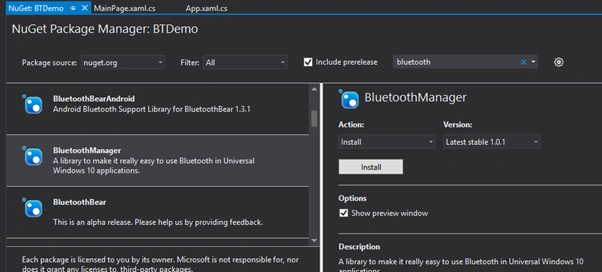
Now create instance from BluetoothManager to bind the events like the following code.
- BluetoothManager manager = new BluetoothManager();
- manager.StatusChangedNotification += new BluetoothManager.StatusChangedDelegate(statusChanged);
- manager.DiagnosticsChangedNotification += new BluetoothManager.DiagnosticsMessageDelegate(messageReceived);
- manager.Initialise("DeviceName");
- private void messageReceived(string message)
- {
- }
- private void statusChanged(BluetoothManager.ManagerStatus status)
- {
- }
- manager.SendStringAsync("Test String");


amir motahariPosted Aug 2, 2017, 12:57 PM EDT
Very nice, but i have question how to receive string
Delpin Susai RajTOP 100Posted Aug 28, 2016, 2:22 AM EDT
Good
JB LeePosted Jul 21, 2016, 5:42 PM EDT
Is it working? It always "No devices found" with all my Bluetooth devices
Ammar ShaukatPosted May 22, 2016, 11:27 PM EDT
you can make an example application using this library ? @suresh
Munesh SharmaPosted May 22, 2016, 7:45 AM EDT
nice
Kuppurasu NagarajTOP 100Posted May 22, 2016, 1:29 AM EDT
Nice Sharing..
Prasanna MuraliPosted May 19, 2016, 8:38 PM EDT
Nice one
Neeraj KumarPosted May 19, 2016, 3:16 AM EDT
Nice article
Debasis SahaTOP 100Posted May 19, 2016, 2:25 AM EDT
Good One..
Mohammed IbrahimPosted May 19, 2016, 2:06 AM EDT
nice