

In this step-by-step tutorial, you will learn how to create reports from a Database using a DataSet and the ReportViewer control and Visual Studio 2005.
Step 1. Generate a Typed DataSet
First of all, we need a typed DataSet that will represent the data types. You can generate a typed DataSet from a database table, stored procedure, and a view or from a SQL query. After generating the typed DataSet, report generation is same.
Right click on the project in Solution Explorer, select Add >> New Item and select DataSet from the list.
Change DataSet1.xsd to Company.xsd. After adding the DataSet, you will see the designer. On the designer, click Server Explorer link, which will let you create a Database connection and can view database objects including tables, views, and stored procedures.
Drag a database table, or view, or stored procedure where you want to display the data from and it will create a DataSet schema for you. Once you have a typed DataSet, just follow these steps.
Before that, make sure you Rebuild the project.
Step 2. Create a Report
Now we will add a new report file to the project. Right click on the project in Solution Explorer and select Add >> New Item and select Report from the Items list. It will add Report1.rdlc file to the project.
Once the report is added, our next step is to add a data source. First double click on the Form and select Data Menu item from the Main Menu. Click on Data Menu item and select Add New Data Source item.
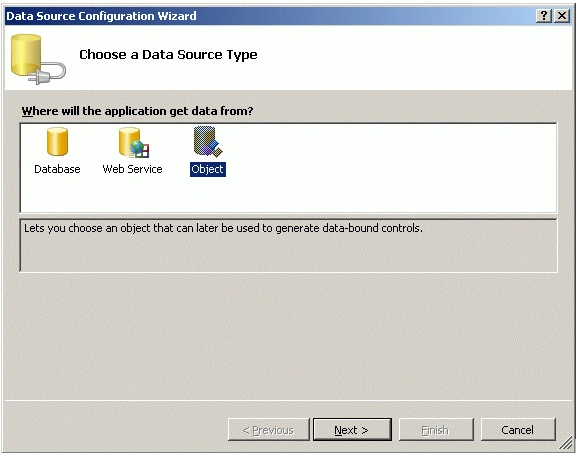
It will launch Data Source Configuration Wizard. Select Object from the list and click the Next button on the Wizard. See Figure 1.
On next dialog, you should see all namespaces and classes in your project. Expand your namespace and you will see class Company. See Figure 2.
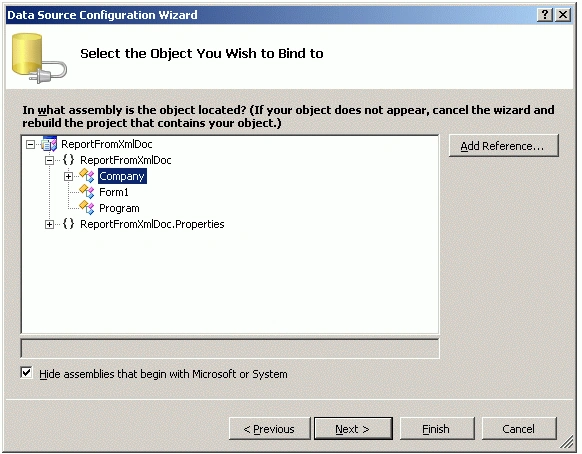
Select Company class and click the Next button. On next dialog, you will see a confirmation message. Select Finish there and get out of the wizard.
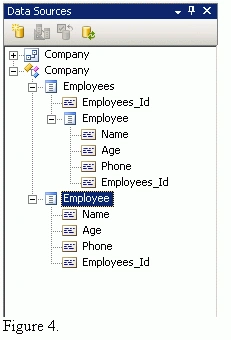
Now double click on the Report1.rdlc file and you should see Figure 3 in your Data Sources window.
Now let's create and format the report.
Drag a Table from the Toolbox and drag Name, Age, and Phone columns from the Data Sources to the report's middle row. As you can see from Figure 4, the name of the column is automatically added to the header (first) row of the report.
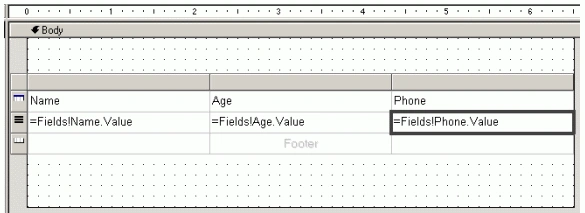
Figure 4.
Step 3. Create a Report Viewer and Bind the Report
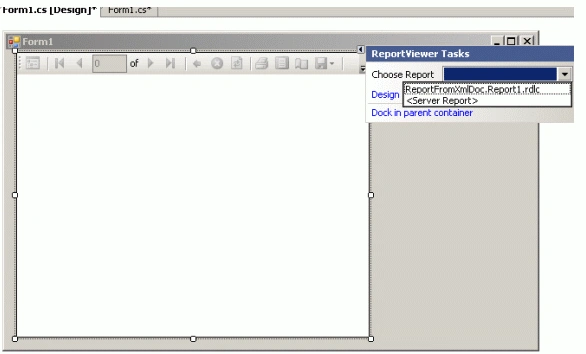
Now open the Form1 again and drag a ReportViewer control from the Toolbox to the Form. Click on the smart tag and select Report1.rdlc from the Choose Report drop down list. See Figure 5.
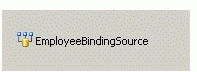
By doing so, you will see an EmployeeBindingSource control is added at the bottom of the Form. See Figure 6. The BindingSource control provides connection between the data and the ReportViewer control.
Step 4. Fill Data
Now write the code listed in Listing 2 on the Form's load event handler. This code creates a DataSet, loads the data from Data.xml file and sets EmployeeBindingSource.DataSource as DataSet. The last line is added by you by the designer.
- DataSet ds = new DataSet();
- ds.ReadXml("Data.xml");
- EmployeeBindingSource.DataSource = ds;
- this.reportViewer1.RefreshReport();
Step 5. Build and Run
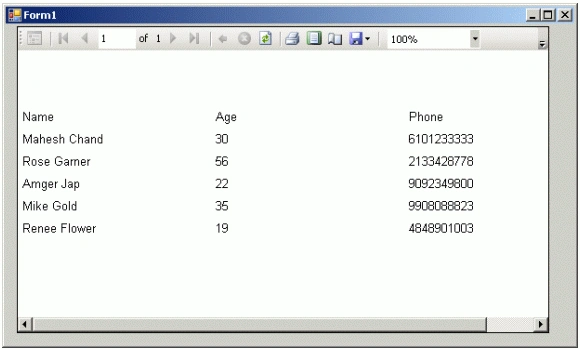
That's all. Build and run the application. The output looks like Figure 7.
Summary
In this article, I talked about how we can generate reports from a DataSet object using the ReportViewer control available in Visual Studio 2005.
azzo medPosted Aug 21, 2023, 5:30 PM
Hello Sirs When I choose Report drop down list. the bindingSource control is not added at the bottom of the Form automatically, I have to choose the Datasources in the desing . Thank to help me. Could you help me? I use VS 2002
Shehroz ImranPosted Apr 20, 2020, 2:06 AM
Hi MAnesh, Hope you are fine. How can we add data from 2 dataset in on report. i.e i have customer & staff join with unique id , how can we show data from both table in one rdlc report. Thanks
Heemanshu BhallaPosted May 11, 2015, 11:12 PM
Nice Article . But there were some things missing for newbie . I also used the following link for that http://geeksprogrammings.blogspot.com/2015/05/using-report-viewer-with-dataset-aspnet.html
Alejandro DreyerPosted Aug 15, 2014, 4:08 PM
and tank you so much
Alejandro DreyerPosted Aug 15, 2014, 4:08 PM
i?m sory for the bad english languaje, but i don?t speak god english :)
Alejandro DreyerPosted Aug 15, 2014, 4:07 PM
Hi poeple, sory for change the subject of this discussion, but I'm very desperate. Somebody tell me about the application lost focus before execute reporviewer??
Sandeep SharmaPosted Jul 3, 2014, 6:32 AM
Thank you so much Venki.. :-)
Sandeep SharmaPosted Jun 30, 2014, 2:57 AM
Q. How to pass a parameter in crystal reports ...
Robert GrayPosted Apr 10, 2013, 10:05 PM
Hello Mahesh, I got stuck here: Step 2. Create a Report Now we will add a new report file to the project. Right click on the project in Solution Explorer and select Add >> New Item and select Report from the Items list. It will add Report1.rdlc file to the project. Once the report is added, our next step is to add a data source. First double click on the Form... Right here...what "Form". I tried the .aspx page, the box on the report, nothing happens! What form? Thank you in advance! Robert
icy jiangPosted Feb 21, 2013, 9:23 PM
it's great, following this article, i build my project to create reports from a database. thx!
hari vaagPosted Jan 8, 2012, 7:03 AM
Hello, Can i get a VB./net code for this as the 4 lines code at the bottom does not work and it gives errors for dataset and so on rgds hari vaag
Jakub JurcisinPosted May 3, 2011, 8:28 AM
Hi guys. I'm posting a question quite late I realise that but hoping someone will pick this. I'd like to add two datetextboxes and filter the report on them e.g. startDate, endDate. Any clue how to achieve this?
Yogesh MorankarPosted Jul 30, 2010, 6:35 AM
Hi Mahesh, I m having 4 tables in the database, in which one is primary & other three are having child relation. I have created one dataset with four tables and filling individual dataTable by firing query on parent-child table join. On Report(.rdlc) I m having One list containing master - detail sections. One master section & two detail sections. But i m not able to manage this dataset with report fields. Is it the right approach ? And how should I cordinate data on the report ? It do not show any data on the report & sometimes when i configure grouping attributes it shows master data properly but both detail sections are populated randomely or blank. Please have a look at the scenario and give me some directions to resolve this.
GaneshPosted May 14, 2010, 10:56 AM
You are really greate.
snehal todkarPosted Apr 29, 2010, 4:10 AM
Hi boss...can u tell me 1 thing...what is Data.xml.....what r its contents.....
Tanmoy RoyPosted Mar 11, 2009, 7:21 AM
I want to display the Medical Bill.For that I created two stored procedure.One is for display all drugs name and price and another is for display the total price to the taken medicine.2 procedures I mapped with 2 different dataset.Now I want to display the values from the 2 dataset in a single report.Pls tell me how to do it.
wai waiPosted Feb 10, 2009, 6:29 AM
I 'm strange to use report,so now i meet problem to do account report.I have no habit to use report with C#.Net.So,Now this is my big problem to create good report.So if you have good easiest way to understand report creation share me. I 'm always great thanks to you.
Sri MPosted Feb 13, 2008, 1:01 PM
This article is really good. in report1.rdlc is there any way to include group by section to display grouped records togather. same feature is there in crystal reports. can we do this using report1.rdlc in vs2005? Please help me any one because its urgent for me. Thanks
zaw mnPosted Nov 11, 2007, 3:29 AM
I want to join two tables in my rdlc. e.g. CustomerTable and SalesTable So I create two datatable in my dataset. But how can I join and group records in report?
sobugPosted Oct 13, 2007, 2:38 AM
Hi,Mahesh..I used CLR Appliation.I have created a report . But,have some problem"Local report processing error.not set report 'Report2.rdlc' definition" may be I lost any step,canyou help me?Any help would be highly appreciated.
ernest lipfordPosted Jul 25, 2007, 2:21 PM
I want to generate a chart comparing two values from my XML dataset. I inserted the columns into the data fields section of the chart, and I bound the report to the reportViewer per your instructions, but I don't see anything at runtime. Is the procedure for a chart generally the same as for the table? If not, where can I find a good tutorial for turning an XML dataset into a chart?
Thabang MatlatlePosted Jul 19, 2007, 11:21 AM
I've Created a report using a reportviewer the big problem i have is that i neeed to pass parameters into the reportviewer. i have created a stored proc returns my parameter value. i'm using mt textbox to enter my parameter value into, this is all done on a webform.can anyone help me if they have done this before
Akash ChandrakarPosted Jun 18, 2007, 7:02 AM
how to load a runtime data in a dataset into a report. i am using VS 2005 and Sql server 2005.
Akash ChandrakarPosted Jun 18, 2007, 6:52 AM
how to load a runtime data in a dataset into a report. i am using VS 2005 and Sql server 2005.
Akash ChandrakarPosted Jun 18, 2007, 6:44 AM
hi mahesh, i would like to know how to load the data table from a dataset into a report viewer. Any help would be highly appreciated.
Vijay JosiahPosted May 17, 2007, 4:41 AM
Hi Mahesh, I have created a report in VWD. But i can see that it does not have a email report and print option. Can you help me how to get these features in VWD. If it is not possible, then kindly suggest a tool which has these 2 features
Vijay JosiahPosted May 17, 2007, 4:36 AM
Hi Mahesh, I have created a report in VWD. But i can see that it does not have a email report and print option. Can you help me how to get these features in VWD. If it is not possible, then kindly suggest a tool which has these 2 features