
Introduction
The CallExternalMethod
Activity define a Workflow communication activity that is used to call a method on
a local service. This activity is used send data from the Workflow to the host
through a local service. A local service is a class which are implements a local
service interface and added to the ExternalDataExchangeService. The
ExternalDataExchangeService is define as
- It comes under the namespace "System.Workflow.Activities"
- The instance of this class is added to the workflow runtime engine for local services communications to be enabled.
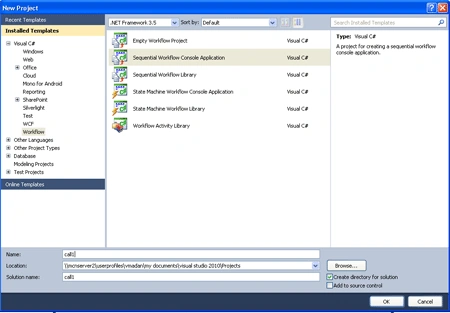
Step 1 : Open Visual Studio.
- Select File->New->Project.
- Select Sequential Workflow Console Application.
- Workflow1.cs [Design] open.
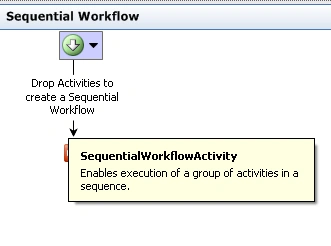
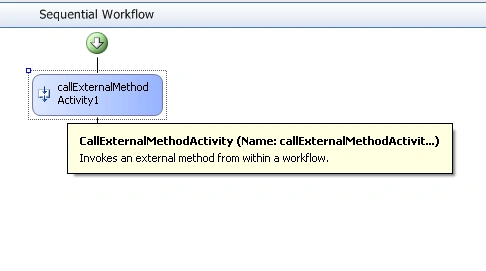
Step 2 : Go to the Toolbox.
- Drag CallExternalMethod Activity.
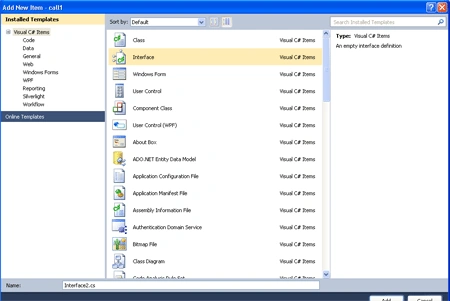
Step 3 : Go to Solution Explorer and right-click.
- Add-> New Item.
- Select Interface and Add.
- Define [ExternalDataExchange]
- Add the namespace Using System.Workflow.Activities.
Code :
using
System;
using
System.Collections.Generic;
using
System.Linq;
using
System.Text;
using
System.Workflow.Activities;
namespace call1
{
[ExternalDataExchange]
interface
Interface1
{
void WorkFlowToHost(string
msg);
}
}
Step 4 : Go to Solution
Explorer and right-click.
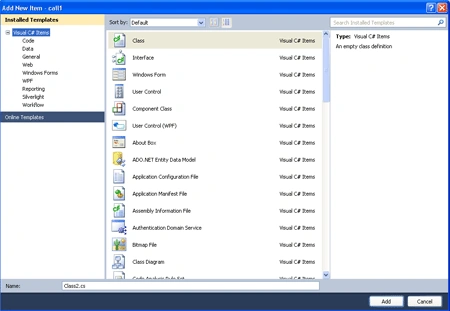
- Add-> New Item->Class.
- Implements Interface.
- Add Event.
Code :
using
System;
using
System.Collections.Generic;
using
System.Linq;
using
System.Text;
using
System.Workflow.ComponentModel.Compiler;
using
System.Workflow.ComponentModel.Serialization;
using
System.Workflow.ComponentModel;
using
System.Workflow.ComponentModel.Design;
using
System.Workflow.Runtime;
using
System.Workflow.Activities;
using
System.Workflow.Activities.Rules;
namespace call1
{
class Class1
: Interface1
{
public
event EventHandler<SenddataEventArg>
RaiseEventFromHost;
public void
WorkFlowToHost(string msg)
{
SenddataEventArg arg =
new SenddataEventArg();
arg.Response = msg;
EventHandler<SenddataEventArg>
Senddata = this.RaiseEventFromHost;
if (Senddata !=
null)
{
Senddata(this, arg);
}
}
}
public class
SenddataEventArg :
EventArgs
{
string _response;
public
string Response
{
get {
return _response; }
set { _response =
value; }
}
}
}
Step 5 : Go to Workflow1.cs
option.
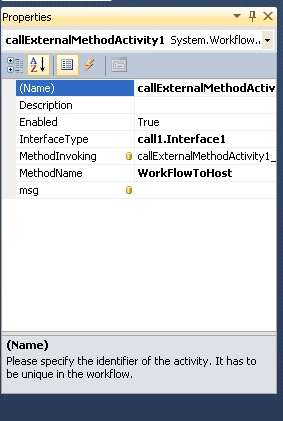
- right-click on CallExternalMetod Activity.
- Go to properties option.
- Define Interface Type, MethodName.
Step 6 : Double-click in CallExternalMethod Activity.
- Write a code.
Code :
using
System;
using
System.ComponentModel;
using
System.ComponentModel.Design;
using
System.Collections;
using
System.Linq;
using
System.Workflow.ComponentModel.Compiler;
using
System.Workflow.ComponentModel.Serialization;
using
System.Workflow.ComponentModel;
using
System.Workflow.ComponentModel.Design;
using
System.Workflow.Runtime;
using
System.Workflow.Activities;
using
System.Workflow.Activities.Rules;
namespace call1
{
public sealed
partial class
Workflow1 :
SequentialWorkflowActivity
{
private string
_message = "Hey, passingthe data from workflow to
host application";
public string
Message
{
get
{
return _message;
}
}
public Workflow1()
{
InitializeComponent();
}
private void
callExternalMethodActivity1_MethodInvoking(object
sender, EventArgs e)
{
}
}
}
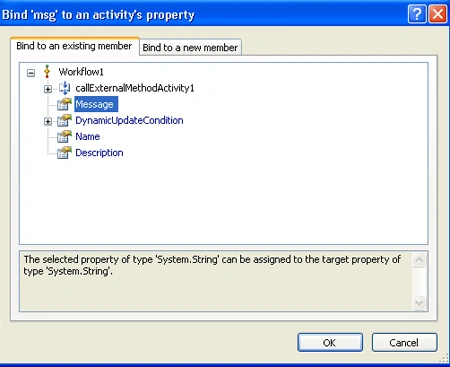
Step 7 : Define the Message
for CallExternalMethod Activity.
- Go to properties option and click in msg option.
- Add Message.
Step 8 : Go to Solution Explorer.
- Select Program.cs option.
- Double-click on option.
- Add the Instance of " ExternalDataExchange" class to the WorkflowRuntime.
Code :
using
System;
using
System.Collections.Generic;
using
System.Linq;
using
System.Text;
using
System.Threading;
using
System.Workflow.Runtime;
using
System.Workflow.Runtime.Hosting;
using
System.Workflow.Activities;
namespace call1
{
class Program
| {
static void
Main(string[] args)
{
using (WorkflowRuntime
workflowRuntime = new
WorkflowRuntime())
{
ExternalDataExchangeService
externalService = new
ExternalDataExchangeService();
workflowRuntime.AddService(externalService);
Class1 comm =
new Class1();
externalService.AddService(comm);
AutoResetEvent waitHandle =
new AutoResetEvent(false);
workflowRuntime.WorkflowCompleted +=
delegate(object sender,
WorkflowCompletedEventArgs e) {
waitHandle.Set(); };
workflowRuntime.WorkflowTerminated +=
delegate(object sender,
WorkflowTerminatedEventArgs e)
{
Console.WriteLine(e.Exception.Message);
waitHandle.Set();|
};
WorkflowInstance instance =
workflowRuntime.CreateWorkflow(typeof(call1.Workflow1));
instance.Start();
comm.RaiseEventFromHost += delegate(object
sender, SenddataEventArg e)
{
string val = e.Response;
Console.WriteLine(val);|
};
Console.ReadLine();
waitHandle.WaitOne();
}
}
}
}
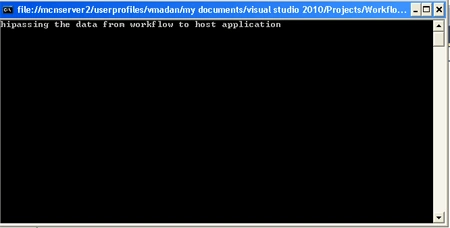
Step 9 : Press F5 and run the
application.
Join the conversation! Your thoughts help the community grow.