

Here I am showing how to make a cascading drop down in share point using JQuery
have created two lists Stationary and Items. In Items list Stationary be a look
up column from Stationary. I want to achieve while selecting the Category say
Stationary items from Items list which belongs to Stationary will be populated
in the second drop down
Stationary List

Items List
Stationary field in this list be a lookup column from the Stationary List

1. Down load the jquery-1.3.2.min.js by Jquery.com, from the below link
http://code.google.com/p/jqueryjs/downloads/detail?name=jquery-1.3.2.min.js
2. And jquery.SPServices-0.5.6.min.js from the below link
http://spservices.codeplex.com/
3. After downloading upload these two files in a document library
4. Now you have to create third list where you want to implement the
cascading drop down in my case Purchase
Where Category be a lookup column from Stationary List and Items be a lookup
field from Items List
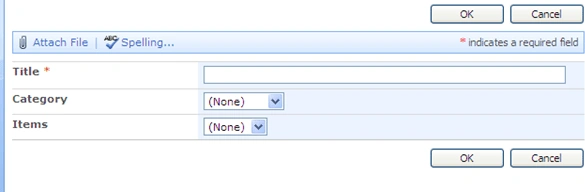
5. Open your web application in Share point Designer. Go to the Purchase
list and open NewForm.aspx in Share point designer after checking out
6. Paste the below code just below the Placeholder Main
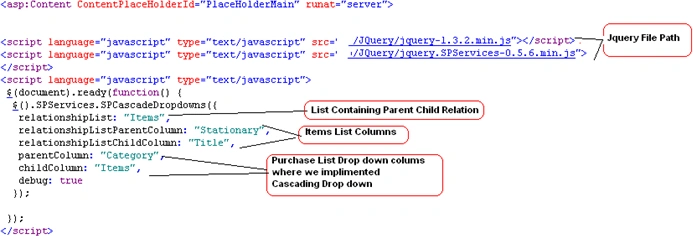
7. Save Your Changes and Check in
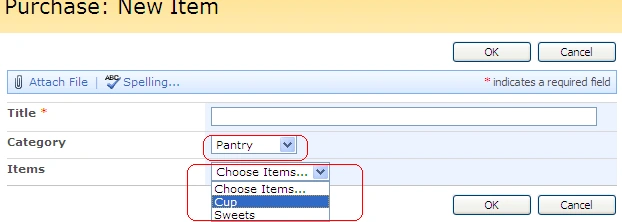
8. Now you can see in Purchase, when adding a new items second drop down
is filtered based on the category selection
vidhu gautamPosted Dec 28, 2012, 4:27 AM
Not working, I m doin same steps as above. Cn u pls tell abt list check in and check out. PLs help tks, Vidhu
arun ramanPosted Sep 3, 2012, 7:21 AM
Thx nicelly workling
Zia AhmedPosted Apr 28, 2011, 7:16 AM
Thanks Man. You solved my one problem. Zia.
Ravindra KumarPosted Apr 25, 2011, 7:10 AM
Hi, My Name is Ravindra. Thank U. This is a nice article and more benficial. Thanks
SP bbPosted Sep 2, 2010, 4:13 PM
Thanks alot man for sharing this code! KEEP UP THE GOOD WORK! YOUR ARE THE MAN! SPbb