
I am also using entity framework code first model to get the list of countries and its states.
- Open Visual Studio 2010.
- Create a new ASP.NET MVC 3 or 4 web application and named it as Cascading DropDown for this application.
- Choose Razor as the View engine and click OK.
- Add a Controller in your project and give name as HomeController.
- Create a model class in the Model folder as shown below:
Country:
State:- public class Country
- {
- public int CountryID { get; set; }
- public string Name { get; set; }
- public virtual ICollection<State> States { get; set; }
- }
ModelDbContext:- public class State
- {
- public int StateID { get; set; }
- public string Name { get; set; }
- public int CountryID { get; set; }
- public virtual Country Country { get; set; }
- }
- public class ModelDbContext : DbContext
- {
- public DbSet<Country> Countries { get; set; }
- public DbSet<State> States { get; set; }
- }
Model
In this model class I have created a property CountryID (hold selected value of country), State (hold selected value of state), Countries and States (hold list of available country and its states).
- public class Model
- {
- public int ? CountryID
- {
- get;
- set;
- }
- public int ? StateID
- {
- get;
- set;
- }
- public IEnumerable < Country > Countries
- {
- get;
- set;
- }
- public IEnumerable < State > States
- {
- get;
- set;
- }
- }
- public class ModelInitializer: DropCreateDatabaseIfModelChanges < ModelDbContext >
- {
- protected override void Seed(ModelDbContext context)
- {
- var countries = new List < Country >
- {
- new Country
- {
- Name = "India"
- },
- new Country
- {
- Name = "USA"
- },
- new Country
- {
- Name = "South Africa"
- },
- new Country
- {
- Name = "Australlia"
- },
- };
- var states = new List < State >
- {
- new State
- {
- Name = "Delhi", Country = countries.Single(m => m.Name == "India")
- },
- new State
- {
- Name = "Mumbai", Country = countries.Single(m => m.Name == "India")
- },
- new State
- {
- Name = "California", Country = countries.Single(m => m.Name == "USA")
- },
- new State
- {
- Name = "Newyork", Country = countries.Single(m => m.Name == "USA")
- },
- new State
- {
- Name = "Capetown", Country = countries.Single(m => m.Name == "South Africa")
- },
- new State
- {
- Name = "Bolavia", Country = countries.Single(m => m.Name == "South Africa")
- },
- new State
- {
- Name = "Sydney", Country = countries.Single(m => m.Name == "Australlia")
- },
- new State
- {
- Name = "Melbourne", Country = countries.Single(m => m.Name == "Australlia")
- },
- };
- countries.ForEach(m => context.Countries.Add(m));
- states.ForEach(m => context.States.Add(m));
- }
- }
- <connectionStrings>
- <add name="ModelDbContext" connectionString="Data Source=.\SQLEXPRESS; Initial Catalog=CountryDb; Integrated Security=true;" providerName="System.Data.SqlClient"/>
- </connectionStrings>
- protected void Application_Start()
- {
- Database.SetInitializer(new CascadingDropDown.Models.ModelInitializer());
- AreaRegistration.RegisterAllAreas();
- WebApiConfig.Register(GlobalConfiguration.Configuration);
- FilterConfig.RegisterGlobalFilters(GlobalFilters.Filters);
- RouteConfig.RegisterRoutes(RouteTable.Routes);
- }
- ModelDbContext db = new ModelDbContext();
- public ActionResult Index()
- {
- Model model = new Model
- {
- Countries = db.Countries.ToList()
- };
- return View(model);
- }
- [HttpPost]
- public virtual ActionResult SelectCountry(int ? countryid)
- {
- var states = countryid.HasValue ? db.Countries.FirstOrDefault(m => m.CountryID == countryid).States : null;
- Model model = new Model
- {
- CountryID = countryid,
- Countries = db.Countries.ToList(),
- States = states
- };
- if (Request.IsAjaxRequest()) return PartialView("_States", model);
- else return View("Index", model);
- }
- @model CascadingDropDown.Models.Model
- @{
- Layout = null;
- }
- <!DOCTYPE html>
- <html>
- <head>
- <meta name="viewport" content="width=device-width" />
- <title>Index</title>
- <script src="@Url.Content("~/Scripts/jquery-1.7.1.min.js")" type="text/javascript"></script>
- <script type="text/javascript">
- $(document).ready(function () {
- $('input[type=submit]').hide();
- $('#CountryID').change(function () {
- $(this).parents('form').submit();
- return false;
- });
- $("form[action$='SelectCountry']").submit(function () {
- $.ajax({
- url: $(this).attr('action'),
- type: 'post',
- data: $(this).serialize(),
- success: function (response) {
- $('#states').html(response);
- }
- });
- return false;
- });
- });
- </script>
- </head>
- <body>
- <div>
- @using (Html.BeginForm("SelectCountry", "Home"))
- {
- <fieldset>
- <legend>Countries</legend>
- @Html.DropDownListFor(m => m.CountryID, new SelectList(Model.Countries,"CountryID", "Name"), "[Please select a Country]")
- <input type="submit" value="Select" />
- </fieldset>
- }
- </div>
- <div id="states">
- @Html.Partial("_States", Model)
- </div>
- </body>
- </html>
- @model CascadingDropDown.Models.Model
- <fieldset>
- @if (Model.States != null && Model.States.Count() > 0)
- {
- <legend>States</legend>
- @Html.HiddenFor(m => m.CountryID);
- @Html.DropDownListFor(m => m.StateID, new SelectList(Model.States, "StateID","Name"), "[Please select a state]")
- }
- else
- {
- <legend>No states available</legend>
- }
- </fieldset>
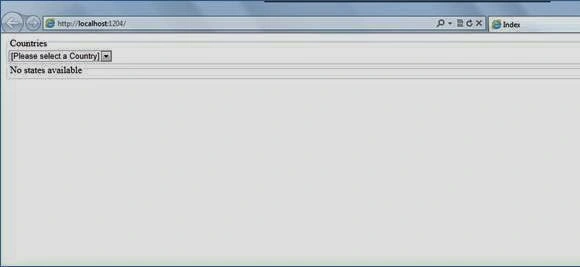
Now run an application. It will something look like below:
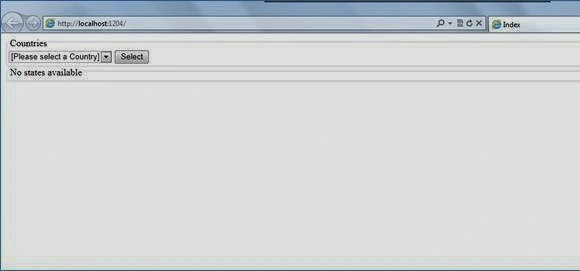
When JavaScript is turned off a select button will also be displayed in the UI in order to populate the states.
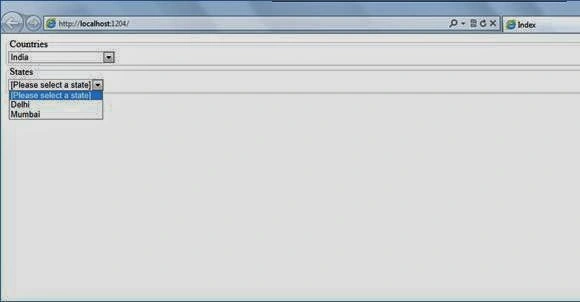
When you select the country, it will populate all states in the state DropDown on the basis of selected country. You can see in the following screenshot.
Thanks for reading this article. You can enter your valuable comments and suggestion to improve this article in the comment box.


Rahul Kumar SaxenaTOP 100Posted Apr 4, 2016, 3:42 AM EDT
Good Show
Manish PandeyPosted Mar 31, 2016, 2:09 AM EDT
good post
Mohammed IbrahimPosted Mar 30, 2016, 11:46 PM EDT
nice
Sibeesh VenuTOP 100Posted Mar 30, 2016, 10:30 PM EDT
Nice Share
Jaipal ReddyPosted Mar 30, 2016, 8:04 PM EDT
Nice . .
Roshan MulePosted Mar 30, 2016, 10:27 AM EDT
very nice !
Debasis SahaTOP 100Posted Mar 30, 2016, 5:04 AM EDT
Good One..
Vignesh ManiTOP 100Posted Mar 30, 2016, 4:42 AM EDT
good one
Manoj KallaPosted Mar 30, 2016, 3:03 AM EDT
Very good and Well written.. keep it up
Karthikeyan KPosted Mar 30, 2016, 2:32 AM EDT
Good one
Karthikeyan KPosted Mar 30, 2016, 2:32 AM EDT
Thanks for sharing
Mohammed IbrahimPosted Mar 30, 2016, 2:25 AM EDT
nice
Saillesh PawarPosted Mar 30, 2016, 2:23 AM EDT
Nice Share