
Steps for changing the SIP address
Step 1: Go to SharePoint admin center.
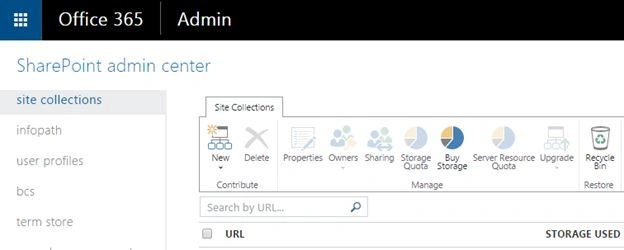
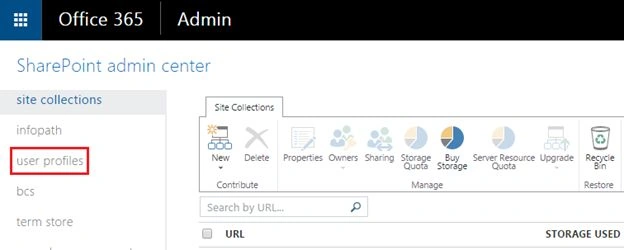
Step 2: Then click on the user profiles from the left menu.
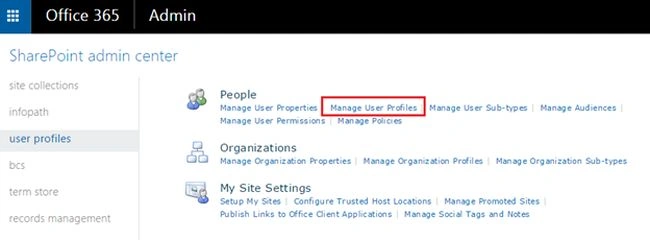
Step 3: Under user profiles settings page, select Manage User Profile as in the following screenshot:
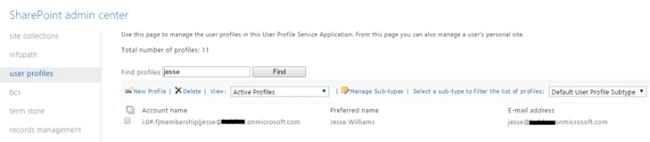
Step 4: On manage the user profiles Page, you can find the user using search box. You can do this for changing the sip address of a particular user,
Enter the User name in the Text box and click on the Find button.
Step 5: Click the drop down from user name and select Edit My profile as in the following screenshot:
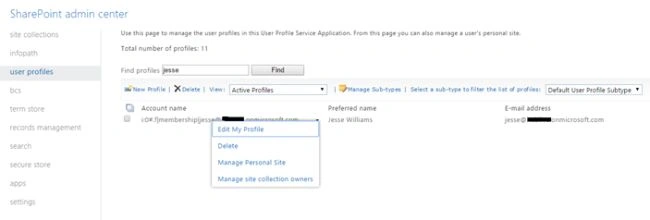
Step 6: On the Edit My Profile page, change the SIP Address and click on the save icon for saving the changes.
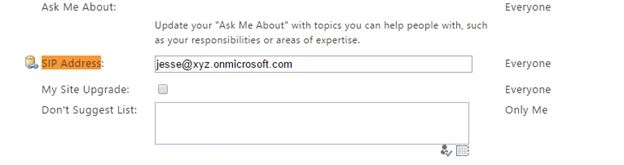
Finally, sip address will be updated successfully.
Summary
In this article we have explored how to change the SIP address in SharePoint online user profile.
Change User SIP Address In SharePoint Online
In this article I will explain the steps to change the sip address of user in SharePoint online user profile.


Karthikeyan KPosted Sep 7, 2015, 3:25 AM EDT
Good one...
Kaviya BalasubramanianPosted Sep 7, 2015, 3:24 AM EDT
Thank u all :)
Santhakumar MunuswamyPosted Sep 5, 2015, 12:10 AM EDT
Thanks for nice share
Sumit JoshiPosted Sep 4, 2015, 8:22 AM EDT
Thanks for sharing..
Rajeesh MenothPosted Sep 3, 2015, 8:40 PM EDT
Nice Share..
Mohammed IbrahimPosted Sep 3, 2015, 7:38 AM EDT
thanks for sharing information...
Kaviya BalasubramanianPosted Sep 3, 2015, 4:03 AM EDT
Thank you all :)
Pankaj Kumar ChoudharyTOP 100Posted Sep 3, 2015, 4:02 AM EDT
Nice Explain ........
Vinodh NarayananPosted Sep 3, 2015, 3:22 AM EDT
Good one
RakeshPosted Sep 3, 2015, 1:09 AM EDT
Good One
Sibeesh VenuTOP 100Posted Sep 3, 2015, 12:54 AM EDT
Nice