
--- .Css Pages---
DayAndNight.css
Body {font-family:Arial, Verdana, sans-serif; font-size: 5px; color: #000000;}
{
/* your styles come here*/
}
Site.CSS
Body {font-family:Arial, Verdana, sans-serif; font-size: 5px; color: #000000;}
{
/* your styles come here*/
}
--- .aspx of master page---
Assigned runat ="server" property to access from server side.
<head>
<link href="~/Styles/Site.css" rel="stylesheet" type="text/css" runat="server" id="lnkStyleSheet"/>
</head>
In dropdown add styles sheet as a list item.
<asp:DropDownList ID="ddlStyles" runat="server" AutoPostBack="True" onselectedindexchanged="ddlStyles_SelectedIndexChanged">
<asp:ListItem Text="Original" Value="Styles/Site.css"></asp:ListItem>
<asp:ListItem Text="Day And Night" Value="Styles/DayAndNight.css"></asp:ListItem>
</asp:DropDownList>
--- .cs of master page ---
protected void Page_Load(object sender, EventArgs e)
{
if (!IsPostBack)
{
if (Session["Theme"] != null)
lnkStyleSheet.Href = Session["Theme"].ToString().Trim();
else
lnkStyleSheet.Href = ddlStyles.SelectedValue.Trim();
if (Session["SelectedIndex"] != null)
{
ddlStyles.SelectedIndex = Convert.ToInt32(Session["SelectedIndex"].ToString());
}
}
}
protected void ddlStyles_SelectedIndexChanged(object sender, EventArgs e)
{
lnkStyleSheet.Href = ddlStyles.SelectedValue.Trim(); // assigning style to link href in aspx page
Session["Theme"] = ddlStyles.SelectedValue.Trim(); // storing selected value in session to maintain across the tabs
Session["SelectedIndex"] = ddlStyles.SelectedIndex; // storing dropdown selected value in session to maintain across the tabs
}
Output
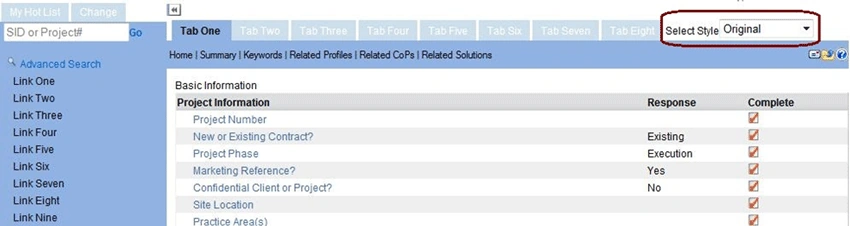
Original Style
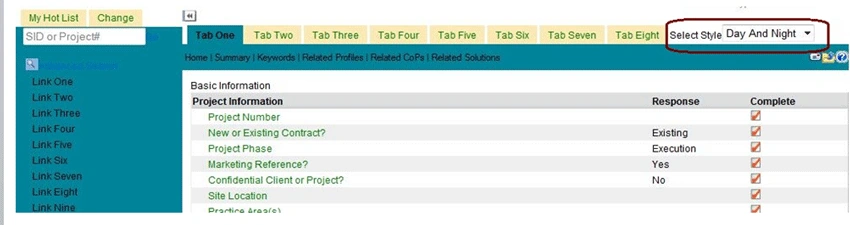
Day and night Style
Please give me your comments and advice on this article.
Thanks,
Srinivas Kotra.
Manav PandyaPosted May 11, 2017, 9:58 AM
Nice share ...............
mohan kumarPosted Feb 29, 2012, 9:12 AM
worth reading this article..nice work..keep it up..
akhilesh RaoPosted Jun 16, 2011, 8:39 AM
It is very good post. thnx :)